Why I Built CapeOS, an Open-Source Network OS for Labs
The Network Doodles labs needed switches and routers anyone could run for free, with a command line beginners recognise. Nothing fit, so I built CapeOS: what it is, what works, and how to run it.
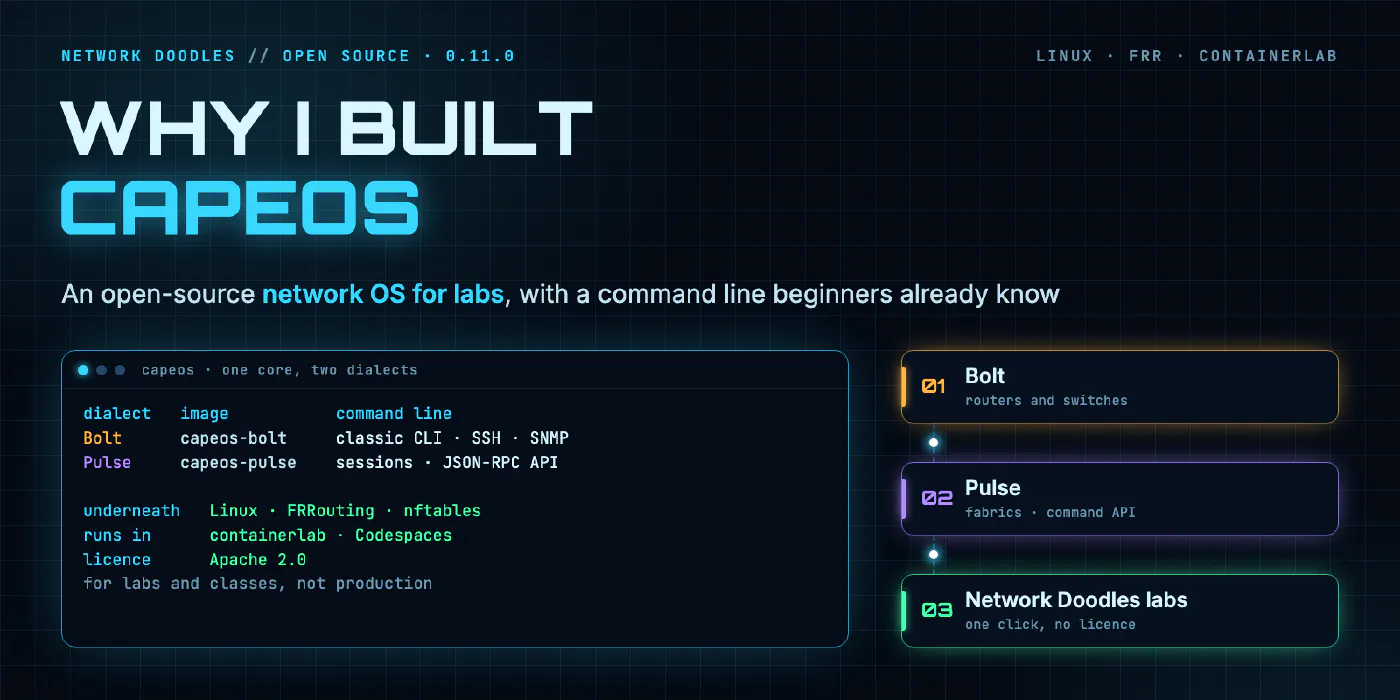
CapeOS is not affiliated with, endorsed by or sponsored by Cisco Systems or Arista Networks. Cisco, IOS, Arista and EOS are trademarks of their respective owners. I use the names only to describe the style of command line, and CapeOS isn’t a copy of either company’s software.
Why did the labs need their own network OS?
Every lab on this site has the same rule: you click a button, a codespace opens in your browser, and you’re looking at a working network a few minutes later. No downloads, no accounts on a vendor site, no licence keys. That rule ruled out most of the network operating systems people actually learn on.
I started where a lot of containerlab users start, with Nokia SR Linux. It’s free to pull, it boots in a
container, and it’s a good NOS. The first build of the Ansible 101 lab ran on it. But most people coming to
these labs learned networking on IOS. They know show running-config, configure terminal and
interface GigabitEthernet1. SR Linux’s model-driven CLI is a different way of thinking about a device, and for
a beginner that’s one more new thing stacked on top of the thing they came to learn. In an Ansible lab, I want
the hard part to be Ansible.
Then there’s EOS. The ANTA course tests switches through EOS’s JSON-RPC API, so it needs something that speaks that API. Arista’s lab image, cEOS-lab, needs an arista.com account to download, and its licence doesn’t let anyone redistribute it. A lab can’t ship it, and a lab that tells you to go download it yourself loses most beginners at step one.
So the choice was: teach on a CLI most beginners don’t know, ask them to fetch an image they can’t get without an account, or build something. I built something.
What is CapeOS?
CapeOS is a network operating system for labs, classes, CI pipelines and laptops. Each node is one container. Underneath it’s Debian Linux with FRRouting, so when CapeOS says it has an OSPF neighbour, FRR really formed that adjacency and the kernel really forwards the packets. On top sits a command line, a device model that owns the running config, and a daemon that applies that config to FRR and the kernel.
A few numbers from the README: a node boots in about 1.5 seconds and uses about 45 MB of memory, and images are built for both linux/amd64 and linux/arm64. That’s what makes a six-switch fabric fit inside a free codespace.
It’s for education, not production. It hasn’t been security hardened or audited, some commands are accepted and stored but do nothing, and there’s no support or stability promise between releases. Don’t put it anywhere that carries real traffic.
It’s also a clean-room build. CapeOS reimplements behaviour from observation and from public client code, never from another product’s code or documentation text.
What are the two dialects?
One core, two command lines. Each dialect is its own image, and both share the same routing, switching and services underneath.
| Bolt | Pulse | |
|---|---|---|
| Image | capeos-bolt | capeos-pulse |
| Command style | IOS-style | EOS-style |
| Data ports | GigabitEthernet1, GigabitEthernet2, … | Ethernet1, Ethernet2, … |
| Management port | GigabitEthernet0 | Management0 |
| A fresh node is | a router (CAPEOS_PLATFORM=switch makes a switch) | a switch: Layer 2 ports, IP routing off |
| Programmatic access | the CLI over SSH, SNMP | the CLI over SSH, SNMP, and a JSON-RPC command API over HTTPS with JSON output for the common show views |
| Config workflow | running and startup config, archive, configure replace with rollback | named configure sessions with diffs, commit, commit timers and abort, configuration replace |
| First released | 0.1.0 | 0.7.0 |
Bolt is the one beginners meet first. Pulse exists because of the API: it’s what lets tools that talk JSON-RPC to a switch, ANTA among them, run in a lab you open with one click.
The names are mine. Bolt and Pulse are CapeOS dialects, not products of anyone else’s.
What works in CapeOS 0.11.0?
“Real” below means a protocol actually runs: FRR, the Linux bridge or nftables does the work, not a canned reply. Most of it is in both dialects; the full list, with a spec for every feature and which dialect has it, is in the repository.
| Area | What’s real today |
|---|---|
| Routing (FRR) | OSPFv2 with multiple processes, OSPFv3, BGP IPv4, static routes, VRFs, IPv6, prefix lists and route maps, BFD, BGP aggregates; EIGRP for IPv4 through a CapeOS speaker of its own (Bolt) |
| Switching (Linux bridge) | VLANs, access and trunk ports, SVIs, port-channels with LACP, per-VLAN spanning tree (classic and rapid) with portfast, BPDU guard, root and loop guard |
| Data centre (Pulse) | VXLAN with BGP EVPN, the anycast gateway, MLAG pairs |
| Access lists (nftables) | standard and extended, with hit counters |
| Services | NAT and a DHCP server and relay (Bolt), router advertisements, SLAAC and DHCPv6, HSRP and VRRP with track objects |
| Management | local users, SSH, AAA with TACACS+, NTP, LLDP, remote syslog, an SNMP v2c/v3 agent with IF-MIB, traps and informs, ping and traceroute |
What’s recorded only: some commands, such as EIGRP for IPv6, MST and IPv6 first hop redundancy groups, are accepted, shown in the running config and round trip through automation, but nothing acts on them. That’s on purpose: a playbook that pushes them shouldn’t fail, but I’d rather say they do nothing than pretend.
0.11.0 itself added ping and traceroute, clear counters, persistent logging and the views ANTA’s checks need to
Pulse, and DHCP host pools, ICMP unreachables for access-list denies and show clock to Bolt.
Which tools have been tested against it?
I’m only going to list what the labs on this site run and check:
- Ansible, with the
cisco.iosandansible.netcommoncollections overnetwork_cli, against Bolt switches. The Ansible 101 course and the observability lab use it to push and read config. - ANTA 1.10.0, against a six-switch Pulse fabric through the command API. All 14 tasks of the ANTA lab pass on its solution branch with Pulse 0.11.0.
- Everyday tools in the Networking 101 and Wireshark 101 labs: SSH, ping, traceroute, DHCP, DNS and packet captures on the links between Bolt routers and switches.
It’s a lab NOS. It isn’t the real thing, and it doesn’t claim to be. Where a lab result depends on how CapeOS behaves rather than on the tool you’re learning, the lab guide says so.
How do I run CapeOS in containerlab?
Pull an image. Both registries carry the same images, and there’s no latest tag, so always pin a version:
docker pull ghcr.io/dkhenderson2/capeos-bolt:0.11.0
# or: registry.gitlab.com/networkdoodles/capeos/capeos-bolt:0.11.0
A CapeOS node is a containerlab kind: linux node. Here’s two Bolt routers and one link:
name: capeos-two
topology:
  defaults:
    kind: linux
    image: ghcr.io/dkhenderson2/capeos-bolt:0.11.0
    env:
      CAPEOS_USER: admin
      CAPEOS_PASSWORD: capeos-lab
  nodes:
    r1: {}
    r2: {}
  links:
    - endpoints: ["r1:eth1", "r2:eth1"]
Deploy it with sudo containerlab deploy -t capeos-two.clab.yml, then ssh admin@clab-capeos-two-r1. The node
is named after its containerlab node, writes a default startup config on first boot, and reports healthy about
two seconds after it starts. Bind a file to /flash/startup-config to give a node its own config, and
write memory saves back to it. In the CLI, eth1 is GigabitEthernet1.
For Pulse, change the image to capeos-pulse:0.11.0. Remember that its Ethernet ports start as switchports and
IP routing starts off, so a routed lab needs ip routing and no switchport in its startup config.
Two gotchas worth knowing up front:
- On macOS, Docker Desktop doesn’t route container addresses to your Mac, so SSH by name won’t work there. Use
docker exec -it clab-capeos-two-r1 capeos-cli, or run containerlab in a Linux VM or a codespace. - VRFs need a host kernel with VRF support (
sudo modprobe vrfonce on Linux). Docker Desktop’s kernel doesn’t have it.
Everything a lab can rely on (interface names, readiness, environment variables, what each image needs from the
host) is written down in the repository’s lab contract, docs/lab-contract.md.
Which Network Doodles labs run on CapeOS?
| Course | Lab devices | CapeOS image |
|---|---|---|
| Networking 101 | a switch and two routers between Linux hosts | Bolt 0.11.0 |
| Wireshark 101 | the same network, with captures on its links | Bolt 0.11.0 |
| Ansible 101 for networking | a three-switch leaf-spine fabric | Bolt |
| Observability for network engineers | three switches sending syslog and SNMPv3 | Bolt 0.6.0 |
| Testing with ANTA | two spines and four leaves with eBGP | Pulse 0.11.0 |
As each course goes live, its lab opens in GitHub Codespaces from its lab page, on your own GitHub account’s free allowance. Networking 101 is first: its hands-on half is Networking 101, part 2.
Where do I get it?
The source is at gitlab.com/networkdoodles/capeos, under the Apache 2.0 licence. The images include FRRouting, which is GPL-2.0-or-later and runs as a separate program. Read the contributing guide and the clean-room rules before you send a change.
I built CapeOS so that anyone can learn network automation on something that looks like the networks they’ll work on, without first needing access to enterprise gear. If you build a lab on it, I’d like to see it.
Related doodles
Build Your Own MCP Server for Network Automation Using FastMCP
A hands-on guide to building an MCP server that exposes NetBox queries, device configs, and AWX job templates directly to Claude using FastMCP and …
From InfraGenie to ODIN: Taking a Hackathon AI Agent to Production
InfraGenie won a hackathon by flipping one idea: agents propose, automation fixes. ODIN takes that framework to production and adds the part before …
Managing TLS Certificates Using Ansible and Let’s Encrypt! PART 2.2:
Deploy Let's Encrypt certificates from your cert-store repo to F5 BIG-IP with Ansible and AWX/AAP: custom credentials, versioned cert and key objects, …