DHCP on the Wire: How a Host Gets an Address (Wireshark 101, Lesson 4)
DHCP in packets: four messages sent before the host has an address, the options that matter, leases and renewal, and how a relay with ip helper-address carries a broadcast to a server two hops away.
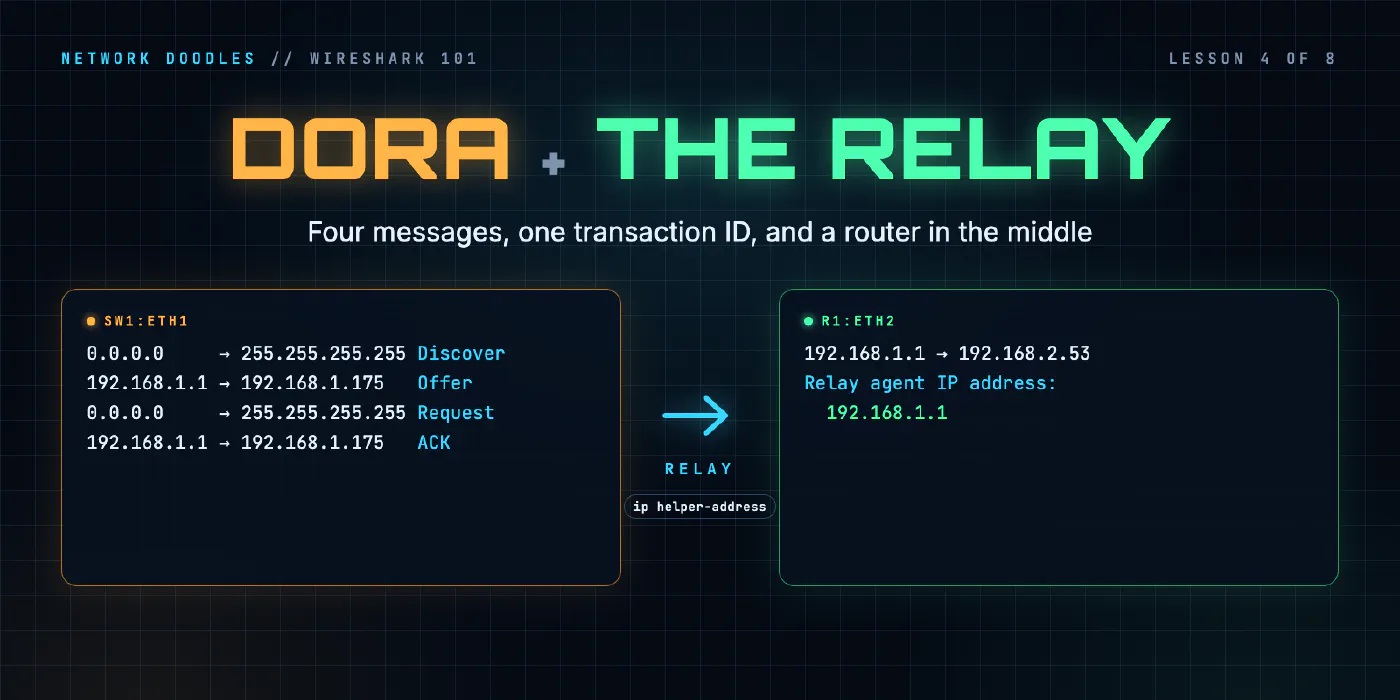
lesson 4 of 8 · course Wireshark 101
- 1What a capture shows
- 2Capture vs display filters
- 3ARP: finding the neighbor
- 4DHCP: getting an address
- 5DNS: names to addresses
- 6TCP: handshake, data, teardown
- 7TLS without decrypting it
- 8Troubleshooting a broken path
DHCP, the Dynamic Host Configuration Protocol, gives a host its address and everything else it needs to use
the network, in four messages: Discover, Offer, Request, ACK. The first is sent before the
host has any address, from 0.0.0.0 to 255.255.255.255. The address is only ever leased, so the host
renews it, directly with the server, before the lease runs out. And because routers don’t pass broadcasts on,
a router acting as a DHCP relay carries those messages to a server on another network, writing its own
address into them so the server knows which network the client is on.
Networking 101’s DHCP lesson walked through DORA as an animation. This lesson is the same story in real packets from the lab, where the DHCP server is two hops away from the laptop and r1 relays every message.
How does a host send anything without an address?
It cheats, politely. A host that has no IP address still has a MAC address, and it can still send an IP packet: it just has to make up the addresses. The Discover goes:
- from
0.0.0.0, which means this host, no address yet; - to
255.255.255.255, the limited broadcast: everyone on this network; - in an Ethernet frame to
ff:ff:ff:ff:ff:ff, the broadcast MAC address; - over UDP, from port 68 (the client’s port) to port 67 (the server’s).
Here are the DHCP frames of the lab’s capture, taken on the laptop’s cable:
    6 0.613249583 192.168.1.175 → 192.168.2.53 DHCP 342 DHCP Release  - Transaction ID 0x54c3a747
    7 2.240006876      0.0.0.0 → 255.255.255.255 DHCP 342 DHCP Discover - Transaction ID 0xd9e69210
    8 2.246596042  192.168.1.1 → 192.168.1.175 DHCP 342 DHCP Offer    - Transaction ID 0xd9e69210
    9 2.273590042      0.0.0.0 → 255.255.255.255 DHCP 342 DHCP Request  - Transaction ID 0xd9e69210
   10 2.281617209  192.168.1.1 → 192.168.1.175 DHCP 347 DHCP ACK      - Transaction ID 0xd9e69210
The lab makes the laptop give its address back first (the Release in frame 6, more on that below), then ask for a new one. Frames 7 to 10 are DORA. From Discover to ACK took 41.6 milliseconds.
The four messages share one transaction ID, 0xd9e69210: a random number the client picks for each
exchange. Every answer carries it back. On a network where twenty laptops boot at once, it’s how each one
picks its own answers out of the broadcast noise, and in Wireshark it’s how you pick one client’s exchange out
of a busy capture: filter dhcp.id == 0xd9e69210.
| Message | IP from → to | What it says | |
|---|---|---|---|
| D | Discover | 0.0.0.0 → 255.255.255.255 | I need an address. Any servers out there? |
| O | Offer | server (here, the relay) → offered address | You can have 192.168.1.175, with these settings |
| R | Request | 0.0.0.0 → 255.255.255.255 | I’ll take 192.168.1.175, from server 192.168.2.53 |
| A | ACK | server (the relay) → the address | It’s yours, for 600 seconds |
Why is the Request still a broadcast, when the laptop already knows the server? Because more than one server may have made an offer. The Request names the one the laptop chose (option 54, the server identifier) and the address it’s taking (option 50), and broadcasting it tells every server at once: the chosen one confirms, and the others can put their offered addresses back.
The Offer and ACK go to the offered address directly, not to everyone. The laptop’s Discover had its broadcast flag set to 0, which tells the server the client can receive a unicast before its address is configured. A client that can’t would set it to 1, and the answers would be broadcast.
Which DHCP options matter?
The address itself is in a fixed field near the top of the message, Your (client) IP address. Everything else is an option: a numbered setting with a length and a value. The numbers come from RFC 2132, and they’re worth learning, because Wireshark shows them by number. Here’s the lab’s Offer:
Dynamic Host Configuration Protocol (Offer)
    Message type: Boot Reply (2)
    Hops: 1
    Transaction ID: 0xd9e69210
    Your (client) IP address: 192.168.1.175
    Relay agent IP address: 192.168.1.1
    Client MAC address: aa:aa:aa:11:11:11 (aa:aa:aa:11:11:11)
    Option: (53) DHCP Message Type (Offer)
    Option: (54) DHCP Server Identifier (192.168.2.53)
    Option: (51) IP Address Lease Time
        IP Address Lease Time: 10 minutes (600)
    Option: (58) Renewal Time Value
        Renewal Time Value: 5 minutes (300)
    Option: (59) Rebinding Time Value
        Rebinding Time Value: 8 minutes, 45 seconds (525)
    Option: (1) Subnet Mask (255.255.255.0)
    Option: (15) Domain Name
        Domain Name: lab
    Option: (6) Domain Name Server
        Domain Name Server: 192.168.2.53
    Option: (3) Router
        Router: 192.168.1.1
(Some lines left out.) The ones to know:
| Option | Name | Lab value | Why it matters |
|---|---|---|---|
| 53 | DHCP Message Type | Offer | which of the messages this is: Wireshark’s summary comes from it |
| 54 | Server Identifier | 192.168.2.53 | the real server, whoever delivered the message |
| 51 | Lease Time | 600 s | how long the address is lent for |
| 58 | Renewal Time (T1) | 300 s | when to start renewing |
| 59 | Rebinding Time (T2) | 525 s | when to ask any server, if the first won’t answer |
| 1 | Subnet Mask | 255.255.255.0 | which addresses are neighbors (ARP) and which go to the gateway |
| 3 | Router | 192.168.1.1 | the default gateway |
| 6 | DNS Server | 192.168.2.53 | where to send name lookups |
| 15 | Domain Name | lab | added to short names, so web becomes web.lab |
The client has its own say, too. Its Discover carries option 55, the Parameter Request List: the options it wants. The lab’s laptop asks for 1, 3, 6, 12, 15, 28 and 42. A server only has to send what it has, and a missing option is a common reason a host “has an address but can’t reach anything”: no option 3, no gateway.
Every setting the laptop has, apart from its MAC address, came from those few hundred bytes. When a host’s network settings look wrong, the Offer and the ACK are the first place to look, because they’re the only record of what it was told.
How do leases and renewal work?
An address is lent, not given. RFC 2131, the DHCP standard, gives the client two timers, and the lab’s numbers show its defaults exactly:
| Time | Lab value | Share of the lease | What the client does |
|---|---|---|---|
| T1, renewal | 300 s | 50% | sends a Request unicast to the server that gave the lease |
| T2, rebinding | 525 s | 87.5% | no answer yet: broadcasts a Request to any server |
| lease end | 600 s | 100% | still no answer: stops using the address |
The renewal is the interesting one on the wire. By T1 the client has an address and knows the server’s (option 54), so it sends an ordinary unicast packet, from its own address to the server’s, routed like any other traffic. No broadcast, no relay. If you capture a renewal, it looks nothing like DORA: one Request and one ACK, with real addresses on both.
Ten minutes is a short lease. It suits a lab where you want to watch a renewal, and networks where devices come and go quickly. Longer leases mean fewer renewals and a pool that empties more slowly when devices leave without saying goodbye.
Release
A client that’s leaving can hand the address back with a Release, and the lab’s capture starts with one.
Frame 6 goes from the laptop’s address, 192.168.1.175, to the server’s, 192.168.2.53: unicast, like a
renewal. Just before it, the laptop sent an ARP request for 192.168.1.1. The server is on another network,
so the Release went to the gateway’s MAC address like any other routed packet (that’s
lesson 3’s rule at work). A Release is optional (RFC 2131 says a client may
send one), and a device that’s simply unplugged can’t send one at all. That’s why the lease time, not the
Release, is what really frees addresses.
Why do DHCP broadcasts need a relay?
Because the Discover is a broadcast, and routers don’t forward broadcasts. That’s the point of a router, and it’s what keeps a broadcast domain to one network (Networking 101’s lesson on domains). Without help, every network would need its own DHCP server.
Real networks don’t work like that. A company with dozens of offices runs a handful of DHCP servers in its data centers. What connects them is the DHCP relay: the router on the client’s network listens for DHCP broadcasts and passes each one on to a server, as a unicast packet that can be routed anywhere.
On Cisco-style routers, CapeOS included, one line on the client-facing interface turns it on. Here’s r1’s:
interface GigabitEthernet1
 description home network (sw1)
 ip address 192.168.1.1 255.255.255.0
 ip helper-address 192.168.2.53
ip helper-address 192.168.2.53 means: DHCP broadcasts that arrive here, send to 192.168.2.53.
What does a relayed Discover look like?
The lab captures both sides of r1 at once: its home side (sw1’s port towards r1) and its side towards r2. Here are the first DHCP frames, as frame, interface, IP source and destination, UDP ports, hops, the relay address and the summary:
7	sw1:eth1	0.0.0.0	255.255.255.255	68	67	0	0.0.0.0	DHCP Discover - Transaction ID 0x5fc77b2d
8	r1:eth2	192.168.1.1	192.168.2.53	67	67	1	192.168.1.1	DHCP Discover - Transaction ID 0x5fc77b2d
9	r1:eth2	192.168.2.53	192.168.1.1	67	67	1	192.168.1.1	DHCP Offer    - Transaction ID 0x5fc77b2d
10	sw1:eth1	192.168.1.1	192.168.1.175	67	68	1	192.168.1.1	DHCP Offer    - Transaction ID 0x5fc77b2d
It’s a different exchange from the one above, so a different transaction ID, but one ID throughout: one conversation, carried in two hops. Follow the Discover through r1:
On the home network (sw1:eth1) | After r1 (r1:eth2) | |
|---|---|---|
| IP source | 0.0.0.0 | 192.168.1.1, r1 |
| IP destination | 255.255.255.255 | 192.168.2.53, the server |
| UDP ports | 68 → 67 | 67 → 67 |
| Hops | 0 | 1 |
| Relay agent IP address (giaddr) | 0.0.0.0 | 192.168.1.1 |
r1 didn’t forward the broadcast. It received it, and sent a new packet with the same DHCP message inside, changed in two places. It added one to hops, a counter that stops messages being relayed in circles. And it wrote its own address on the receiving interface into the Relay agent IP address field, which RFC 2131 calls giaddr (gateway IP address).
How giaddr picks the pool
giaddr is the most important field in a relayed message. The server can’t tell where the client is from the packet’s source: the client has no address, and the packet arrived from r1 anyway. giaddr tells it: this client is on the network where 192.168.1.1 lives. The server finds the range that contains that address and offers from it.
The lab’s DHCP server, dnsmasq on the dns host, isn’t on 192.168.1.0/24 at all. It has one range, for that
network, 192.168.1.100 to 192.168.1.199, and it picks that range because giaddr is 192.168.1.1. The
laptop got 192.168.1.175.
Why the Offer comes from the relay
The server sends its answer back to giaddr, to UDP port 67 on the relay (frame 9). r1 then delivers it on the
home network, from its own address, 192.168.1.1, to the client (frame 10). So the laptop only ever talks to
r1: its Offer and ACK arrive from 192.168.1.1, while option 54 inside them names the real server,
192.168.2.53.
That’s not a contradiction, and it’s useful. The IP source tells you who delivered the message. Option 54 tells you who made the decision. When something’s wrong with what a client was given, option 54 is the server whose logs you need.
What I see go wrong
DHCP works on one network and not another. Nearly always a relay problem. Capture both sides of the
router. No relayed copy on the server side means the router isn’t relaying: a missing ip helper-address, or
one on the wrong interface. A relayed copy with no answer means the server has no range for that giaddr, or
something between the relay and the server blocks UDP port 67.
Two servers answering. A second DHCP server on the network, often a home router or a test box plugged into
the wrong port, sends Offers too. In a capture that’s two Offers with the same transaction ID and different
option 54 values. Clients take whichever they like, and some of them end up with the wrong gateway or DNS server.
Filter dhcp.option.dhcp == 2 and look at the server identifiers.
A client with an address and no connectivity. Read the ACK. A missing or wrong option 3 (no gateway) or 6 (no DNS server) explains it before you touch anything else.
Discovers with no Offer at all. The pool may be full, especially with long leases and a lot of
short-lived devices. The client keeps sending Discovers, each with a new transaction ID. Many operating
systems then give themselves a link-local address from 169.254.0.0/16
(RFC 3927), which is a reliable sign that DHCP failed.
Expecting to see renewals in a broadcast capture. Renewals are unicast to the server. A capture on another host’s switch port won’t show them. A capture on the client’s cable, or near the server, will.
Try it
Chapter 4 of the lab has you capture the laptop releasing its address and asking for a new one, read the lease, the gateway and the DNS server out of the Offer, and then capture both sides of r1 at once to watch the Discover change as it’s relayed.
What’s next
With an address, a gateway and a DNS server, the laptop is ready to look up a name. Lesson 5 is about DNS: the question and answer behind every name you type, and the extra lookups the domain name from option 15 adds.
Related doodles
ARP on the Wire: Who Has This Address? (Wireshark 101, Lesson 3)
ARP turns an IP address into a MAC address with one broadcast question and one unicast answer. The fields, the neighbor cache, ARP for the gateway, …
Capture Filters vs Display Filters (Wireshark 101, Lesson 2)
Capture filters decide what's saved and can't be undone. Display filters decide what you see. BPF vs Wireshark fields, contains and matches, and why …
DNS on the Wire: Queries, Answers and the Lookups You Didn't Type (Wireshark 101, Lesson 5)
A DNS lookup is two UDP packets matched by a transaction ID. How to read the flags, the reply codes, A, AAAA and CNAME records and TTLs in Wireshark, …