Troubleshooting a Broken Path with Wireshark: Loss, Silent Drops and MTU (Wireshark 101, Lesson 8)
Capture at two points at once and follow one packet: the fault is between the last place you see it and the first you don’t. How loss, a silent ACL drop, a missing return route and an MTU black hole look.
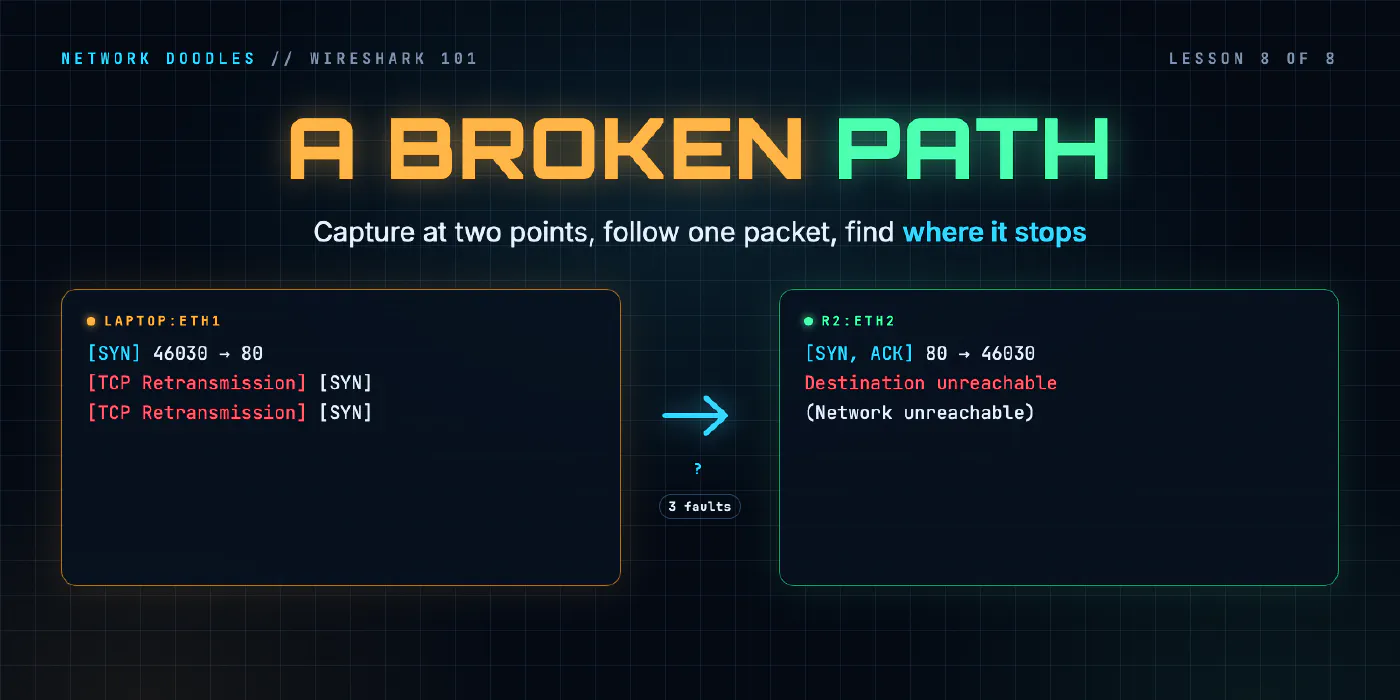
lesson 8 of 8 · course Wireshark 101
- 1What a capture shows
- 2Capture vs display filters
- 3ARP: finding the neighbor
- 4DHCP: getting an address
- 5DNS: names to addresses
- 6TCP: handshake, data, teardown
- 7TLS without decrypting it
- 8Troubleshooting a broken path
When a connection fails, the capture on the client tells you that something went wrong, rarely where. The method that finds where is simple: capture at two or more points on the path at the same time, and follow one packet from point to point. The fault is between the last place you see it and the first place you don’t. Then the shape of what you see tells you what kind of fault it is: a burst of duplicate ACKs is loss, a SYN that vanishes is a filter, a SYN-ACK that never comes back is a route, and a connection that opens and then stalls is very often the MTU.
This lesson pulls the whole course together on four faults from the Wireshark 101 lab. Each one looks different on the wire, and two of them look the same from the laptop.
Silence versus refusal
Lesson 6 drew the line that matters most here. A SYN answered by a RST is a refusal: the network works and the far end said no. A SYN answered by nothing is silence: something on the way dropped it, or dropped the answer, and nobody said a word.
A refusal is easy to troubleshoot, because the answer came from somewhere. Silence is hard, because the client sees exactly the same thing whatever the cause: the same SYN, sent again and again. In the lab’s mystery fault, the laptop’s capture is seven copies of one SYN over seven seconds, then nothing. Three different faults produce that capture. You can’t tell them apart from the laptop, however long you stare.
So you stop staring and add capture points.
Capture at two points and follow one packet
The lab’s path from the laptop to the web server crosses a switch and two routers:
laptop ──[laptop:eth1]── sw1 ── r1 ──[r1:eth2]── r2 ──[r2:eth2]── web
Capture all three marked points into one file, at the same time, and filter on one connection. A SYN that
appears at laptop:eth1 and r1:eth2, but never at r2:eth2, got through r1 and died at r2. That’s the
whole method: divide the path, and look for the boundary between seen and not seen. Wireshark’s
frame.interface_name field records which point saw each frame.
Two rules make it work:
- Capture at the same time. Faults come and go. Two captures taken ten minutes apart don’t describe the same packet.
- Take away what you’re not testing. The lab’s mystery traffic opens the web server by its IP address, not its name, so a DNS problem can’t hide the fault you’re looking for.
The multi-interface trap
Put one packet in a file three times and Wireshark’s TCP analysis gets confused. It doesn’t know the copies are the same packet seen in three places. It thinks the second and third copies were sent again:
1  0.000000000  laptop:eth1  51606 → 80 [SYN] Seq=0 Win=64240 Len=0 MSS=1460 ...
2  0.000217167  r1:eth2      [TCP Retransmission] 51606 → 80 [SYN] Seq=0 Win=64240 Len=0 MSS=1460 ...
Frame 2 isn’t a retransmission. It’s frame 1, 0.2 ms later and one router further on. Every tcp.analysis
flag in a multi-point capture is suspect until you deal with this.
The obvious fix, a display filter like frame.interface_name == "laptop:eth1", isn’t enough. A display filter
hides frames; it doesn’t redo the analysis. In the lab’s MTU capture, the SYN-ACK reached the switch’s capture
point first, so the laptop’s own copy is still flagged TCP Retransmission with everything else filtered out.
Two fixes that do work, both checked against the lab’s captures with Wireshark 4.6:
- Export one interface to its own file (File › Export Specified Packets, with the interface filter applied) and open that. The analysis starts over, and the false flags are gone.
- Tell Wireshark the copies are different conversations. The preference
protocols.conversation_deinterlacing_key(find it under Edit › Preferences › Advanced) set to.MIkeeps frames from different interfaces and MACs in separate TCP streams. Each capture point becomes its own stream, and only real retransmissions are flagged.
Packet loss: duplicate ACKs and fast retransmission
A link that loses a few percent of its packets doesn’t look broken. Pages load, downloads finish, ping mostly answers. Everything is just slower. A capture shows it plainly, because TCP has to do something about every lost packet, and it does it on the wire.
In the lab, r2 drops 3% of what it sends towards r1, and the laptop downloads a 2 MB file. Here’s one lost segment and its repair:
35 0.578603209 192.168.2.10 → 192.168.1.175 [TCP Previous segment not captured] 80 → 56336 [ACK] Seq=17623 ... Len=1448
36 0.578605084 192.168.1.175 → 192.168.2.10 [TCP Dup ACK 34#1] 56336 → 80 [ACK] Seq=79 Ack=16175 ... SLE=17623 SRE=19071
38 0.578606375 192.168.1.175 → 192.168.2.10 [TCP Dup ACK 34#2] 56336 → 80 [ACK] Seq=79 Ack=16175 ... SLE=17623 SRE=20519
40 0.578607334 192.168.1.175 → 192.168.2.10 [TCP Dup ACK 34#3] 56336 → 80 [ACK] Seq=79 Ack=16175 ... SLE=17623 SRE=21967
...
58 0.578705625 192.168.2.10 → 192.168.1.175 [TCP Fast Retransmission] 80 → 56336 [ACK] Seq=16175 ... Len=1448
Read it with the sequence numbers from lesson 6:
- The gap. Frame 35 starts at byte 17,623, but the laptop was expecting 16,175. One 1,448-byte segment is missing. Wireshark marks it Previous segment not captured.
- Duplicate ACKs. The laptop can only acknowledge bytes up to the gap, so every segment that arrives after it
triggers the same ACK again:
Ack=16175, “I still need byte 16,175”. - SACK blocks. Each duplicate ACK also carries a SACK block (RFC 2018):
SLEandSRE(the left and right edges) list the bytes the laptop did get past the gap. The right edge grows with every segment. The sender learns exactly what’s missing and resends only that. - Fast retransmission. The sender doesn’t wait for a timeout. Duplicate ACKs are a strong hint that one segment was lost and the ones after it arrived, so it resends the missing one straight away. RFC 5681 sets the trigger at three duplicate ACKs.
In the lab’s reference capture, 3% loss on one direction of one link produced 26 retransmissions (25 of them fast) and 142 duplicate ACKs, plus 39 gaps and 18 segments marked out of order. The receiver is noisy about loss; the sender is quiet and efficient.
Wireshark’s labels are heuristics
Those tcp.analysis labels are Wireshark’s best guess from the sequence numbers, not something TCP wrote in
the packet. Wireshark’s TCP analysis documentation
gives the rules, and they don’t always match the RFCs. It calls a segment a fast retransmission after two
duplicate ACKs, not three. And it calls a filled gap out-of-order instead of a retransmission when it arrives
very soon after the previous segment, within the initial RTT or 3 ms. The lab’s link loses packets but never reorders them, so
those 18 “out-of-order” segments are really repairs too.
| Flag | Wireshark’s meaning |
|---|---|
tcp.analysis.lost_segment | a gap: the sequence number jumped past what was expected |
tcp.analysis.duplicate_ack | an ACK that repeats the previous one, with no data and the same window |
tcp.analysis.retransmission | data the sender had already sent (fast retransmissions included) |
tcp.analysis.fast_retransmission | a retransmission that followed duplicate ACKs |
tcp.analysis.out_of_order | a filled gap that arrived quickly after the segment before it |
tcp.analysis.flags matches them all, and Analyze › Expert Information counts them by type. That’s the
fastest summary of a capture’s health. Just remember the multi-interface trap above before trusting the counts.
To find where the loss happens, use the method: a segment on r2:eth2 that never appears on r1:eth2 was lost
between them.
ACL drops: silent, or ICMP administratively prohibited
An access list (ACL) is a router’s list of permit and deny rules. When it denies a packet, the router has two choices: drop it silently, or tell the sender with an ICMP Destination Unreachable message, type 3, code 13, communication administratively prohibited (RFC 1812).
The two make very different captures:
| Router behavior | What the client sees | What you can learn |
|---|---|---|
| sends ICMP type 3 code 13 | the SYN, then an ICMP message from the router that denied it | which router, straight away: it’s the source of the ICMP |
| drops silently | the SYN, again and again, then a timeout | nothing, until you capture further along |
The routers in the lab run CapeOS 0.11.2, which answers an inbound ACL deny with ICMP administratively
prohibited unless the interface has no ip unreachables. The mystery fault sets it, so the drop is silent: the
harder case, and the one you’ll meet most often, because many networks turn these messages off.
In the lab’s reference capture the fault was on r2. The SYN shows up at laptop:eth1 and at r1:eth2, seven
times each, and never once at r2:eth2. It crossed r1, arrived at r2, and went no further. No ICMP anywhere.
A missing return route
The third mystery fault looks the same from the laptop, and it’s completely different underneath. r2 loses its route back to the home network, 192.168.1.0/24.
Follow the SYN and it gets all the way to web. web answers with a SYN-ACK. The SYN-ACK reaches r2, which has no route for 192.168.1.175, and dies there. The captures show it:
- the SYN at all three points;
- a SYN-ACK at
r2:eth2only, never atr1:eth2or the laptop; - an ICMP Network unreachable (type 3, code 0) from r2’s address on that link, 192.168.2.1, to web.
That last one catches people out. A router that can’t forward a packet tells the packet’s source, and the packet it couldn’t forward was web’s SYN-ACK. So the ICMP message goes to web, not to the laptop. The laptop never hears a thing. You only see that message if you capture on web’s side of r2.
The general lesson: a path has two directions, and a fault in the return direction looks like a fault in the forward direction from the client. If the SYN arrives and the answer doesn’t come back, look at routes back.
MTU: when small packets work and big ones don’t
The MTU (maximum transmission unit) is the biggest IP packet a link carries in one frame. On ordinary Ethernet it’s 1,500 bytes, a 1,514-byte frame with the Ethernet header. Some networks use jumbo frames, often 9,000 bytes, to move data in fewer, bigger packets.
At the start of a connection, each side announces its MSS (maximum segment size), worked out from its own MTU: 1,460 for 1,500, 8,960 for 9,000. The other side then sends segments up to that size. Neither side knows anything about the links in between.
In the lab, someone turned on jumbo frames on the laptop and on web, but not on the switch between the laptop
and r1. Both hosts announced MSS=8960. The handshake is small, so it crossed fine. Then:
11  laptop:eth1    74  57982 → 443 [SYN] Seq=0 Win=62720 Len=0 MSS=8960 ...
13  sw1:eth1       74  443 → 57982 [SYN, ACK] Seq=0 Ack=1 ... MSS=8960 ...
15  laptop:eth1    66  57982 → 443 [ACK] Seq=1 Ack=1 ...
17  laptop:eth1  1624  Client Hello (SNI=web.lab)
18  laptop:eth1  1624  [TCP Retransmission] 57982 → 443 [PSH, ACK] Seq=1 Ack=1 ... Len=1558
19  laptop:eth1  1624  [TCP Retransmission] 57982 → 443 [PSH, ACK] Seq=1 Ack=1 ... Len=1558
...
The third column is the frame length. The TLS 1.3 Client Hello from lesson 7,
1,558 bytes, now went as one 1,624-byte frame, because the laptop believed it had 8,960 bytes to play with.
It left the laptop 16 times (the original and 15 retransmissions), about every half second, and never once appeared on sw1:eth1, the switch’s port
towards r1. Filter frame.len > 1514 and the picture is complete in two lines: big frames on one side of the
switch, none on the other.
Why a switch makes a black hole
A router that receives a packet too big for the next link, with the IP header’s DF (don’t fragment) bit set, drops it and sends back ICMP type 3, code 4, fragmentation needed, with the next link’s MTU in the message. That’s Path MTU Discovery (RFC 1191): the sender learns the smaller size and sends smaller segments. TCP on Linux sets DF on its packets for exactly this reason. The lab’s 1,624-byte frame had it set.
A switch can’t do that. It works at layer 2, forwarding frames by MAC address, and has no IP address on the path to send ICMP from. A frame bigger than its port’s MTU is simply dropped. Nobody is told, so the sender never learns, and it keeps retransmitting into the hole until the application gives up. That’s a black hole: packets go in and nothing comes out.
Routers can make black holes too. If the fragmentation needed message is filtered on the way back, often by a firewall that blocks “all ICMP”, PMTUD breaks in the same silent way. RFC 2923 describes the problem.
Why TLS 1.3 breaks first
An MTU problem only hurts packets bigger than the smallest link. Ping is 98 bytes. A DNS lookup is under 100. A TCP handshake is 74. A plain HTTP request is often under 200. On the lab’s broken path, all of those work. The first big packet in most HTTPS connections is now the client’s TLS 1.3 Client Hello, and with a post-quantum key share it’s over 1,500 bytes on its own. So the classic symptom is: ping works, HTTP works, HTTPS hangs right after the handshake. It used to take a large download to trip over an MTU mismatch. Now a single Client Hello does it.
What I see go wrong
Trusting the analysis in a multi-point capture. Half the Retransmission and Dup ACK labels in a three-point capture are the same packet seen three times. Export one interface, or set the deinterlacing preference, before you count anything.
Capturing at one point and guessing. The client’s capture says “no answer”. It can’t say where. Two capture points, at the same time, usually settle it in minutes.
Forgetting the return path. A SYN that arrives and an answer that doesn’t come back is a return-route or return-filter problem. The ICMP message that would explain it goes to the server, not to you.
“Ping works, so the network’s fine.” Ping is small. Test with the size that fails. When the application
hangs after the handshake, filter frame.len > 1514 and look for large frames sent over and over and never
acknowledged.
Mixed MTUs. Jumbo frames on the hosts and not on the switches, or the other way around, is a black hole waiting for its first big packet. Make every device on a layer 2 network agree on the MTU.
Try it
Chapter 8 of the lab breaks the path three ways: packet loss you measure, a fault the lab picks at random that you find with three capture points, and the jumbo-frame black hole.
Where to go next
That’s the end of Wireshark 101. Captures are for one conversation, on demand. For watching a whole network all the time, logs and metrics do the job, and the observability course builds them. When those say something is wrong and can’t say why, come back to the packets. Or start again at the DNS lesson with a capture from your own network.
Related doodles
TCP in Wireshark: Handshake, Sequence Numbers, FIN and RST (Wireshark 101, Lesson 6)
One web page is twelve TCP frames. How to read the handshake, sequence and acknowledgement numbers, the window and SYN options in Wireshark, how a …
The Network from the Command Line: ip route get, ss, curl -v, dig and tcpdump (Linux CLI 101, Lesson 8)
When a service answers on the server but not from anywhere else, five commands find out why: which way the packet goes, what's listening on which …
ARP on the Wire: Who Has This Address? (Wireshark 101, Lesson 3)
ARP turns an IP address into a MAC address with one broadcast question and one unicast answer. The fields, the neighbor cache, ARP for the gateway, …