ARP on the Wire: Who Has This Address? (Wireshark 101, Lesson 3)
ARP turns an IP address into a MAC address with one broadcast question and one unicast answer. The fields, the neighbor cache, ARP for the gateway, gratuitous ARP, and what a duplicate IP looks like.
lesson 3 of 8 · course Wireshark 101
- 1What a capture shows
- 2Capture vs display filters
- 3ARP: finding the neighbor
- 4DHCP: getting an address
- 5DNS: names to addresses
- 6TCP: handshake, data, teardown
- 7TLS without decrypting it
- 8Troubleshooting a broken path
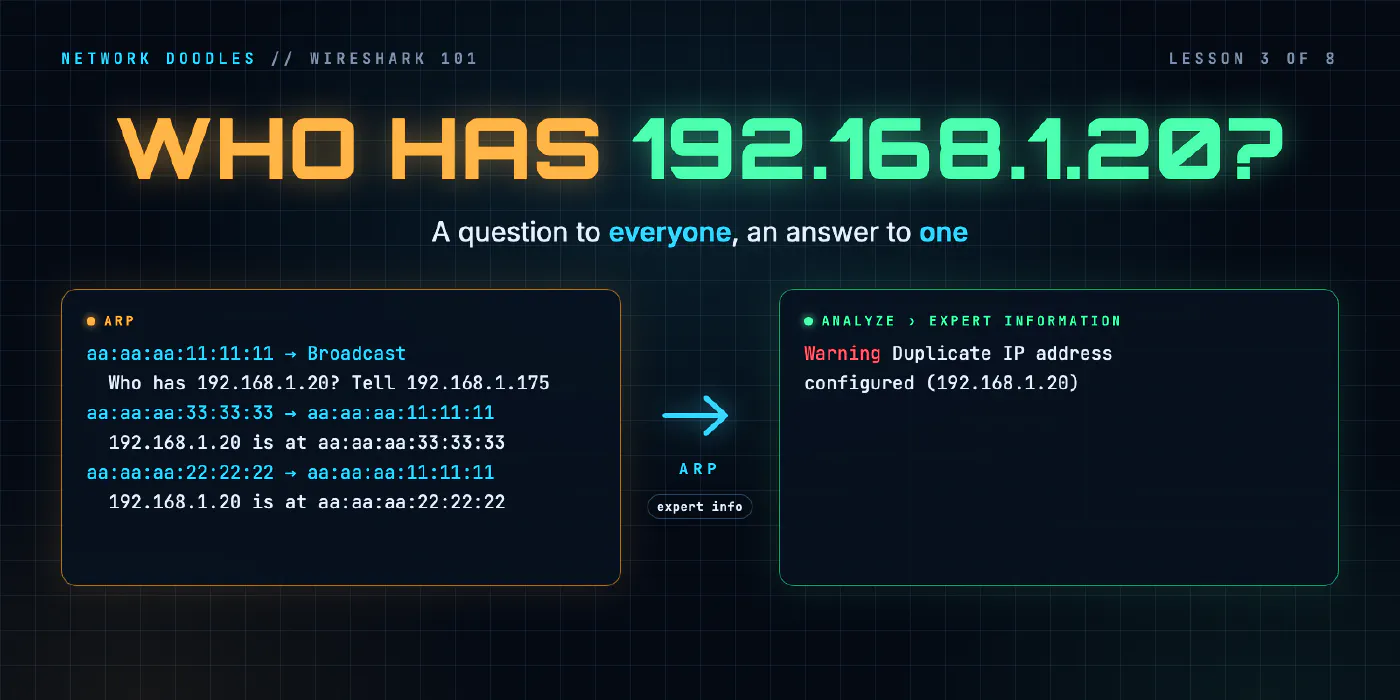
ARP, the Address Resolution Protocol, is how a host finds the MAC address that goes with an IP address on its own network. It’s one question, sent to everyone (who has 192.168.1.20?), and one answer, sent only to the host that asked (192.168.1.20 is at aa:aa:aa:22:22:22). Hosts remember the answer for a while in a neighbor cache, and only ask for addresses on their own network: for anything further away, they ask for their gateway.
It’s the first thing you’ll see in almost every capture you take, and it’s where a lot of “the network is flaky” problems turn out to live. This lesson reads ARP field by field from the lab’s captures, then covers the cache, the gateway, gratuitous ARP, and what two hosts with one address look like on the wire.
Why does IP need ARP?
An IP packet never travels on its own. On an Ethernet network it’s carried inside a frame, and the frame
needs a destination MAC address: the address of the network card that should pick it up. The laptop knows
the printer’s IP address, 192.168.1.20, because someone typed it or DNS gave it. It doesn’t know the
printer’s MAC address. Nothing in IP tells it.
ARP fills that gap. It’s defined in RFC 826, from 1982, and it hasn’t needed to change much since. You met it in lesson 1: before the laptop could send its first ping, it sent an ARP request. Every first conversation with a neighbor starts like that.
What’s in an ARP request and reply?
Here’s the start of the lab’s ARP capture, taken on the laptop’s cable while it pings the printer:
    2 1.071035042 aa:aa:aa:11:11:11 → Broadcast    ARP 42 Who has 192.168.1.20? Tell 192.168.1.175
    3 1.071288709 aa:aa:aa:22:22:22 → aa:aa:aa:11:11:11 ARP 42 192.168.1.20 is at aa:aa:aa:22:22:22
    4 1.071292167 192.168.1.175 → 192.168.1.20 ICMP 98 Echo (ping) request  id=0x092b, seq=1/256, ttl=64
The question, the answer 254 microseconds later, and the ping straight after: 3.5 microseconds after the answer arrived. The laptop was holding the ping until it knew where to send it.
Open the request in Wireshark’s details pane and the ARP layer has nine fields. Four of them are the ones that matter: two pairs of addresses.
| Field | In the request | In the reply |
|---|---|---|
| Opcode | request (1) | reply (2) |
| Sender MAC address | the laptop’s, aa:aa:aa:11:11:11 | the printer’s: the answer |
| Sender IP address | the laptop’s, 192.168.1.175 | the printer’s, 192.168.1.20 |
| Target MAC address | 00:00:00:00:00:00: unknown, that’s the question | the laptop’s |
| Target IP address | 192.168.1.20: the address being asked about | the laptop’s |
The other five (hardware type Ethernet, protocol type IPv4, sizes 6 and 4) say what kind of addresses are being mapped. ARP was designed to work for more than Ethernet and IPv4, and those fields are where that shows. On an Ethernet network carrying IPv4 they never change.
Notice that the MAC addresses are in the frame twice: once in the Ethernet header, which the switch reads to deliver the frame, and once in the ARP body, which the hosts read to learn the mapping. They usually agree. When you’re investigating something odd, check that they do.
An ARP message is small: 42 bytes on the wire, header included. That’s 14 bytes of Ethernet header and 28 bytes of ARP.
Why is the request a broadcast and the reply unicast?
The request goes to ff:ff:ff:ff:ff:ff, the broadcast MAC address, which Wireshark shows as
Broadcast. It has to: the laptop doesn’t know who has the address, so it asks everyone. Every host on the
network receives it, and every host except the owner ignores it.
The reply goes unicast, straight to the laptop’s MAC address. The printer knows exactly who asked, because the request told it (the Sender fields). There’s no reason to bother anyone else.
That difference decides what a capture sees. In lesson 1’s capture of two switch ports, the printer’s cable carried the laptop’s ARP request for r1, because it was a broadcast, but not r1’s reply, which the switch sent only to the laptop. If you’re capturing on a third host’s port and see an ARP request with no reply, that’s normal. It’s only a problem if you’re on the asker’s cable.
The broadcast is also why ARP stops at the router. A router doesn’t forward broadcasts: the edge of a broadcast domain, from Networking 101’s lesson on domains, is the edge of where ARP can ask.
Why does a host ARP for its gateway and not the far host?
Because the far host can’t hear the question. A host only ARPs for addresses on its own network, which it works out from its own address and subnet mask. For anything else, it sends the packet to its default gateway, the router on its network, so the MAC address it needs is the gateway’s.
The lab’s capture shows the laptop doing both. After pinging the printer, it pings web, 192.168.2.10, on
another network:
    8 1.423931125 aa:aa:aa:11:11:11 → Broadcast    ARP 42 Who has 192.168.1.1? Tell 192.168.1.175
    9 1.424048667 aa:c1:ab:d8:b6:be → aa:aa:aa:11:11:11 ARP 42 192.168.1.1 is at aa:c1:ab:d8:b6:be
   10 1.424050834 192.168.1.175 → 192.168.2.10 ICMP 98 Echo (ping) request  id=0x092c, seq=1/256, ttl=64
It never asks who has 192.168.2.10?. It asks for 192.168.1.1, r1. And the ping in frame 10 carries two
destinations that look like they disagree:
| Layer | Destination | Means |
|---|---|---|
| Ethernet | aa:c1:ab:d8:b6:be (r1) | the next stop |
| IP | 192.168.2.10 (web) | the final stop |
That one frame is the whole of routing. The IP destination stays the same for the whole journey. The Ethernet destination is rewritten at every hop, and ARP is how each sender finds the next one. (r1’s MAC address is generated when the lab starts, so yours will be different.)
This is also how a wrong subnet mask shows up in a capture. Give the laptop a mask that’s too wide and it thinks web is a neighbor, so it broadcasts who has 192.168.2.10?, and nobody on its network answers (unless the router is set up to answer on the far host’s behalf, which is called proxy ARP). The capture shows the same question, over and over, with no reply, and no ping ever leaves.
What is the neighbor cache, and why do entries go stale?
Asking before every packet would be wasteful, so every host keeps the answers in a table: the ARP cache,
or neighbor cache. On Linux, ip neigh shows it. On Cisco-style routers, show ip arp. When the
laptop wants to send to an address that’s in the table, it uses the stored MAC address and sends no ARP at
all.
That’s why the lab empties the laptop’s cache before each ARP task. Without that, a capture of the laptop pinging the printer would show the ping and no ARP, because the laptop already knew. It’s worth remembering when you’re troubleshooting: no ARP in a capture doesn’t mean ARP is broken. Usually it means the answer was already cached.
Entries don’t last forever, because the answer can change: a host gets a new network card, a virtual
machine moves to another server, a device is replaced and its address reused. A cached entry that’s wrong
sends traffic to a MAC address that isn’t there any more. So hosts let entries age, and check them again
before trusting them. How long an entry lives varies by operating system and is configurable. Linux’s
ip neigh shows each entry’s state, such as REACHABLE (recently confirmed) or STALE (needs checking
before it’s trusted again).
You can see a recheck on the wire. The lab’s DHCP capture starts with this:
    1 0.000000000 aa:aa:aa:33:33:33 → aa:aa:aa:11:11:11 ARP 42 Who has 192.168.1.175? Tell 192.168.1.30
    2 0.000042375 aa:aa:aa:11:11:11 → aa:aa:aa:33:33:33 ARP 42 192.168.1.175 is at aa:aa:aa:33:33:33
Look at the destination of frame 1: not Broadcast, but the laptop’s own MAC address. broken-pc already had
an entry for the laptop and was checking it with a unicast request, straight to the MAC address it
expected. The laptop confirmed it. Nobody else on the network had to hear the question.
What is gratuitous ARP?
A gratuitous ARP is an ARP message nobody asked for: a host announcing its own mapping to everyone. In the lab it looks like this:
1 0.000000000 aa:aa:aa:33:33:33 → Broadcast ARP 42 Gratuitous ARP for 192.168.1.20 (Request)
Address Resolution Protocol (request/gratuitous ARP)
    Opcode: request (1)
    [Is gratuitous: True]
    Sender MAC address: aa:aa:aa:33:33:33 (aa:aa:aa:33:33:33)
    Sender IP address: 192.168.1.20
    Target MAC address: Broadcast (ff:ff:ff:ff:ff:ff)
    Target IP address: 192.168.1.20
The giveaway is that the sender IP and the target IP are the same address. It isn’t a question; it’s an
announcement: 192.168.1.20 is me, at this MAC address. [Is gratuitous: True] is in square brackets
because Wireshark worked it out; it isn’t a field in the packet. You can filter on it with
arp.isgratuitous == 1.
Hosts send them for good reasons:
- Bringing an address up. A host announces its new address so that anyone with an old entry for it updates straight away.
- Failover. When a standby device takes over an address from a failed one (a redundant router pair, a server cluster), it sends a gratuitous ARP so every neighbor starts sending to the new MAC address immediately, instead of waiting for their caches to age.
- Conflict detection. RFC 5227 describes how a host can check that nobody else is using an address before claiming it, and announce it afterwards.
What does a duplicate IP address look like on the wire?
Two hosts with the same IP address is a common mistake: a static address typed onto a device that DHCP had already given out, a cloned virtual machine, a replacement device configured from the old one’s notes. The network doesn’t stop it. Both hosts carry on, and both answer ARP for the address.
In the lab, broken-pc briefly takes the printer’s address and announces it (the gratuitous ARP above). Then the laptop looks for the printer:
    3 0.584692875 aa:aa:aa:11:11:11 → Broadcast    ARP 42 Who has 192.168.1.20? Tell 192.168.1.175
    4 0.584883875 aa:aa:aa:33:33:33 → aa:aa:aa:11:11:11 ARP 42 192.168.1.20 is at aa:aa:aa:33:33:33
    5 0.584884584 aa:aa:aa:22:22:22 → aa:aa:aa:11:11:11 ARP 42 192.168.1.20 is at aa:aa:aa:22:22:22
One question, two different answers, less than a microsecond apart. Wireshark notices, and marks frame 5 with expert info, its name for problems it spots across packets rather than inside one:
[Duplicate IP address detected for 192.168.1.20 (aa:aa:aa:22:22:22) - also in use by aa:aa:aa:33:33:33 (frame 4)]
    [Expert Info (Warning/Sequence): Duplicate IP address configured (192.168.1.20)]
It’s a Warning in the Sequence group, so it shows up in Analyze › Expert Information and with the
filter _ws.expert. It’s worth opening that window on any capture you’re handed: it’s the quickest way to
find what’s odd.
Which answer does the laptop believe? That depends on the operating system. In the lab’s reference capture, the laptop’s pings went to the first reply. Here are the pings that followed, as frame number, Ethernet source and destination, IP source and destination, and ICMP type (8 is a request, 0 a reply):
6	aa:aa:aa:11:11:11	aa:aa:aa:33:33:33	192.168.1.175	192.168.1.20	8
7	aa:aa:aa:33:33:33	aa:aa:aa:11:11:11	192.168.1.20	192.168.1.175	0
broken-pc answered the pings meant for the printer, with the printer’s IP address. From the laptop’s point of view, everything worked. That’s what makes duplicate addresses so miserable to troubleshoot: depending on who answered last time and whose cache entry has aged, traffic goes to one host, then the other. Users report “it works, then it doesn’t”. The ping succeeds, and still the print job vanishes. The capture is the only place you can see two MAC addresses claiming one IP.
Why does ARP’s trust matter?
ARP has no authentication. A host believes any reply, and often any announcement, without checking who sent it. The duplicate address above was an accident, but nothing stops a host doing the same thing on purpose: claiming the gateway’s address so that its neighbors send it their traffic. That’s ARP spoofing, and it’s the reason enterprise switches offer features such as dynamic ARP inspection, which check ARP messages against the addresses DHCP actually handed out. For troubleshooting, the lesson is simpler: an ARP reply is a claim, not a proof. When two MAC addresses claim one IP, find out which one should.
What I see go wrong
“There’s no ARP in the capture, so ARP is the problem.” Usually the answer was cached. Look for the traffic that follows instead, and at the cache itself.
A request with no reply, read on the wrong cable. Replies are unicast. On a third host’s port you’ll never see one. On the asker’s own cable, a request with no reply means nobody has that address, or the host that has it is down, or the asker has the wrong subnet mask and is asking for a host that isn’t on its network.
Replaced hardware, old entries. A device is swapped, keeps its IP address, and gets a new MAC address. Neighbors keep sending to the old one until their entries age out, unless the new device sends a gratuitous ARP. A capture shows frames to a MAC address that never answers.
Duplicate addresses that come and go. The symptom moves between hosts and times of day. Capture on the asker’s cable and look for two different is at answers, or open Expert Information.
Ignoring the Ethernet header. The ARP body says one thing, and the Ethernet source says another? Then something is answering on another host’s behalf. Find out what, and why.
Try it
Chapter 3 of the lab has you capture the laptop finding the printer and then the web server, read which address it asked for each time, and then catch broken-pc claiming the printer’s address, with Wireshark’s expert info pointing at the frame.
What’s next
ARP needs the host to have an IP address already. Lesson 4 is about how it gets one: the four DHCP messages, sent before the laptop has any address at all, and the router that carries them to a server two hops away.
Related doodles
Capture Filters vs Display Filters (Wireshark 101, Lesson 2)
Capture filters decide what's saved and can't be undone. Display filters decide what you see. BPF vs Wireshark fields, contains and matches, and why …
DHCP on the Wire: How a Host Gets an Address (Wireshark 101, Lesson 4)
DHCP in packets: four messages sent before the host has an address, the options that matter, leases and renewal, and how a relay with ip …
DNS on the Wire: Queries, Answers and the Lookups You Didn't Type (Wireshark 101, Lesson 5)
A DNS lookup is two UDP packets matched by a transaction ID. How to read the flags, the reply codes, A, AAAA and CNAME records and TTLs in Wireshark, …