lesson 5.1 · chapter 5 of 7: coverage and ap placement · 40 min
Coverage and AP placement: height, power and overlap
objective
Design for −67 dBm and 25 dB SNR, explain what mounting height and antenna shape do to the floor under an access point, say why turning every access point up to full power backfires, and place access points to cover an office.
What makes a good Wi-Fi design?
Coverage is only half of it
Lighting a room is easy: put up enough bulbs and it’s bright. Wi-Fi is harder, because it’s a conversation. Every access point has to hear every device as well as the device hears it, and every access point on a channel shares that channel’s airtime with every other one it can hear. So a good design is about three things at once:
- Coverage: enough signal everywhere people work.
- Capacity: enough airtime for everyone, which means not too many devices per access point, and not too many access points on the same channel within earshot of each other.
- Roaming: as people walk, there’s always a good next access point (lesson 6).
in one sentence Good Wi-Fi is coverage, capacity and roaming, not just a strong signal.
Design targets
The common targets:
| Use | Signal (RSSI) | SNR |
|---|---|---|
| Voice and video calls | −67 dBm or better | 25 dB or more |
| Web, email, general data | about −70 dBm | about 20 dB |
| Barely working | −80 dBm | 10 to 15 dB |
Designers aim for the target everywhere people use Wi-Fi, not just on average, and they leave a margin: a body between you and the access point costs several dB, and fading (lesson 4) swings the signal by several more.
in one sentence Design for −67 dBm and 25 dB SNR where people work, with a margin to spare.
Mounting height and the antenna
Most office access points hang from the ceiling, 8 to 12 ft up; warehouses and halls can be 20 ft or more. Two things change with height:
- Distance. Higher means farther from everyone, everywhere: a little less signal across the board.
- The antenna’s shape. From lesson 3, a plain upright dipole has a hole straight down. Hang one 20 ft up and the spot directly underneath gets the hole. That’s why ceiling access points use antennas shaped to send down, strongest about 45° below the horizon, with only a shallow dip straight down.
In high ceilings, designers often use access points with directional antennas aimed at the floor, or mount them lower on walls and columns.
in one sentence Higher is farther from everyone, and the antenna must be shaped to send down.
Transmit power: the conversation has two sides
It’s tempting to turn every access point up to the maximum. It backfires twice:
- The device can’t shout back. An access point might send 20 dBm; a phone often sends 12 to 15 dBm with a worse antenna. If the access point is loud enough to reach a phone far away, the phone’s answer may not make it back. The link is lopsided: full bars, poor performance.
- Bigger cells overlap more. A Wi-Fi radio waits its turn whenever it can hear another one on its channel, down to very faint signals (about −82 dBm for a 20 MHz channel). Turn every access point up and each one hears more of the others, so they share airtime with more of them. That’s co-channel interference from lesson 2, made worse.
So designers usually run more access points at moderate power (often 11 to 17 dBm on 5 GHz) rather than a few at full blast.
in one sentence Loud access points make lopsided links and share airtime with more neighbors. More, quieter APs win.
Spacing and overlap
Neighboring access points’ −67 dBm areas should overlap a little, so a device walking between them always has a good one to move to. A common starting point in offices on 5 GHz is roughly one access point per 2,500 to 4,000 sq ft, closer where walls are heavy or many people gather. Rules of thumb only start a design: the floor plan, the walls and the people decide it.
in one sentence Overlap neighbors a little at −67 dBm so the walk between them never hits a gap.
Directional antennas for odd shapes
Long, narrow spaces, such as hallways, warehouse aisles and stadium seating, suit directional antennas from lesson 3. A beam aimed down an aisle puts the signal where the people are, and the racks or walls either side keep it out of the neighbors’ space.
in one sentence Long, narrow spaces get beams aimed down them.
How designers work
A wireless design usually goes in four steps:
- Requirements: what people do where (calls, video, scanners, cameras), how many devices, which bands.
- Predictive design: a model like this course’s lab, with the real floor plan and wall types, to place access points and pick power and channels before anything is installed.
- Install, then survey: walk the building with a laptop measuring the real signal (a site survey), because real walls, furniture and people never match the model exactly.
- Adjust and recheck: move or add access points, change power and channels, and survey again.
The lab below is step 2. It shows the share of the floor at −67 dBm or better as you work, and it can export your design as a file (in its panel, under Design), the same shape the hands-on part of the course reads.
in one sentence Requirements, predict, survey, adjust: models start a design, surveys finish it.
Height, antennas and covering the office
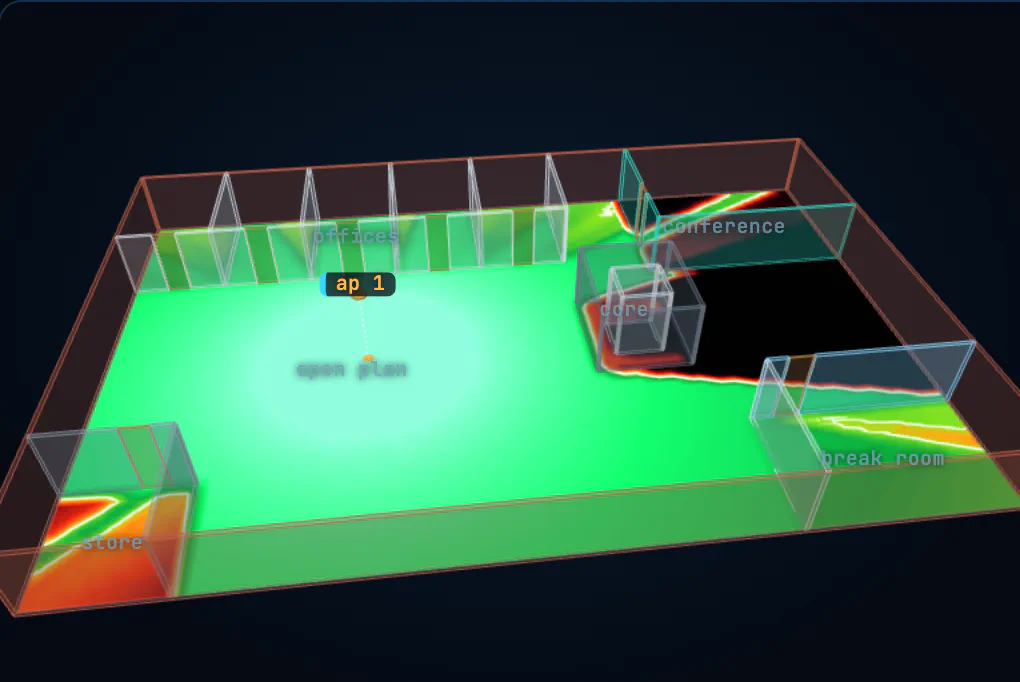
Two tasks, each checked by the lab:
- Fill in the hole. A dipole hangs 20 ft up. Get −67 dBm straight under it without moving it sideways. Try the height and the antenna.
- Cover the office. Get 95% of the floor to −67 dBm on 5 GHz with three access points or fewer. Watch the coverage figure as you drag them, and remember the coated glass.
Things to try once they’re done: turn one access point up to 23 dBm and watch how far its cell spreads; switch the whole floor to 2.4 GHz and see the cells grow; switch to 6 GHz and see them shrink.
in one sentence The antenna fixes the hole; spreading three access points out covers the floor.
The warehouse
A warehouse is 200 ft long. Six aisles run the full length, separated by metal racks floor to ceiling. The ceiling is 30 ft. Staff use handheld scanners in the aisles.
- Why is one powerful omni on the ceiling in the middle a poor idea?
- Sketch a better design.
- What would you check after it’s installed?
hint
Think about what the metal racks do to a signal crossing them (lesson 4), and what a dipole does straight below it from 30 ft up (lesson 3).
show the solution
- Three problems at once: metal racks full of stock cost a lot each (often 20 dB or more), so the signal crossing several of them dies; from 30 ft up an omni’s weakest direction points at the floor; and a scanner’s small radio can’t shout back across 100 ft and several racks.
- Put the access points in the aisles, on the end walls or columns, with directional antennas aimed down each aisle, one or two per aisle depending on length, or ceiling access points with down-facing antennas lower over each aisle. Moderate power, and channels alternated so neighboring aisles differ.
- A site survey walking each aisle with a scanner-like device: signal and SNR along the whole length, roaming between access points as you walk (lesson 6), and a check that full racks of stock haven’t changed the picture since the empty-building survey.
Back to lesson 4 for what walls cost, or on to lesson 6, where a laptop walks between the access points you placed. Channels for all these access points come from lesson 2.
5 check: test yourself
Pick an answer for each question. You'll see straight away whether it's right, and why. Questions marked what happens next? are about the animations.
what happens next?Why don’t designers turn every access point up to full power?
Wi-Fi is a conversation. An access point heard at −60 dBm by a laptop that it can only hear at −80 dBm makes a lopsided link, and big cells overlap more on the same channel.
A ceiling access point with a plain upright dipole hangs 20 ft up. Where on the floor is it weakest nearby?
The dipole’s hole points straight down at the floor. Ceiling access points use antennas shaped to send down for exactly this reason.
What’s the usual design target for voice and video calls?
−67 dBm leaves room for walls, bodies and fading. Data-only areas can get away with about −70 dBm.
You need Wi-Fi along a 200 ft warehouse aisle with metal racks on both sides. What works best?
The racks block the sides anyway. A beam puts the signal down the aisle where the people are, and keeps it out of the next aisle.
Why do neighboring access points’ coverage areas usually overlap a little at −67 dBm?
Without overlap there’s a weak gap between cells, and calls drop as people walk through it. Lesson 6 is about that walk.