lesson 4.1 · chapter 4 of 7: how signal travels · 35 min
How signal travels: distance, walls and bounces
objective
Work out what distance does to a signal (about 6 dB every time you double it), say roughly what drywall, glass, coated glass, concrete and metal each cost on 2.4 and 5 GHz, and explain reflection, scatter and multipath, and why your signal bars jump when you move a few inches.
What happens to a signal on its way?
Spreading out: free-space loss
Back to the pond from lesson 1. A ripple gets weaker as it spreads, because the same energy is shared over a bigger ring. Radio spreads over a bigger sphere, so the loss grows with the square of the distance. Engineers call it free-space path loss (FSPL):
FSPL (dB) = 20 × log10(distance in m) + 20 × log10(frequency in MHz) − 27.55
You don’t need the formula; you need what it means:
- Twice the distance costs about 6 dB, a quarter of the power. Ten times the distance costs 20 dB.
- At 1 m (3 ft), the air already costs 40 dB on 2.4 GHz and 47 dB on 5 GHz.
in one sentence In open space, every doubling of distance costs about 6 dB.
Why does 5 GHz reach less far?
You’ll often hear that higher frequencies “fade faster”. In empty space they don’t. The wave spreads exactly the same way. What changes is the receiving antenna: an antenna of the same type is smaller at a higher frequency (about half a wavelength, from lesson 1), so it catches less of the passing wave. That’s the 20 × log10(frequency) part of the formula, and it works out to about 6.5 dB between 2.4 and 5 GHz, and 8 dB to 6 GHz.
Then the walls make it worse: most building materials absorb more at higher frequencies, as the table below shows. Indoors, that’s usually the bigger difference.
in one sentence 5 GHz loses about 6.5 dB more in the air because the antennas catch less, and more in most walls.
Absorption: walls
Every wall takes a share of the signal. These are the numbers this course’s lab uses, straight through a wall at right angles:
| Material | 2.4 GHz | 5 GHz | 6 GHz | Where the number comes from |
|---|---|---|---|---|
| Clear glass | 2.5 dB | 3.0 dB | 3.2 dB | 3GPP TR 38.901 |
| Drywall (two sheets on studs) | 3 dB | 4 dB | 4 dB | WLAN design rule of thumb |
| Wooden door | 5.1 dB | 5.5 dB | 5.6 dB | 3GPP TR 38.901 |
| Brick | 6 dB | 10 dB | 11 dB | rule of thumb (NIST IR 6055) |
| Concrete block | 10 dB | 15 dB | 16 dB | rule of thumb (NIST IR 6055) |
| Poured concrete (a structural wall) | 14.7 dB | 25.7 dB | 29.5 dB | 3GPP TR 38.901 |
| Coated (low-E) glass | 23.7 dB | 24.6 dB | 24.8 dB | 3GPP TR 38.901 |
| Metal (elevator doors, fire doors) | 30 dB | 35 dB | 35 dB | nearly opaque |
Three things to notice:
- Concrete gets much worse with frequency: 15 dB on 2.4 GHz, 26 on 5, 30 on 6.
- Coated glass is the surprise. Modern office windows and glass walls often have a thin metal coating to keep heat in or out. You can’t see it, but radio can: it costs as much as a concrete wall.
- A wall crossed at a slant costs more, because the signal goes through more of it.
Real walls vary a lot: wet concrete, metal studs, foil-backed insulation and steel mesh all change the numbers. Treat the table as a starting point, not a measurement.
in one sentence Drywall and clear glass cost a few dB; concrete, coated glass and metal cost a lot, more so at 5 and 6 GHz.
Reflection, scatter and diffraction
Walls don’t only absorb. Some of the signal does other things:
- Reflection: it bounces off, like light off a mirror. Metal and coated glass reflect most of what hits them.
- Scatter: it hits something rough or cluttered, shelves, pipes, people, and sprays off in lots of directions.
- Diffraction: it bends a little around corners and through doorways, the way you can hear someone talking round a corner.
Because of these, the area “behind” a solid wall is never completely dark: some signal bounces and bends into it.
in one sentence Signal also bounces, scatters and bends, so shadows behind walls are never completely dark.
Multipath and fading
Indoors, the signal reaches a laptop by many routes at once: straight through the walls, off the ceiling, off a filing cabinet. The copies arrive a few billionths of a second apart and add up or cancel, depending on exactly where the laptop is. That’s multipath. Because the waves are only a few inches long, moving the laptop an inch or two can swing the signal by several dB. That swing is called fading.
Modern Wi-Fi turns multipath to its advantage (MIMO from lesson 3 needs it), and radios average their measurements to smooth out fading. But it’s why one reading from one spot never tells the whole story.
in one sentence Copies of the signal arrive by different routes and add or cancel: the signal wobbles over inches.
What the lab gets right, and what it leaves out
The office below is a teaching model, not a survey tool. For every point on the floor it adds up exactly the link budget from lesson 1: transmit power, the antenna’s gain toward that point (lesson 3), free-space loss over the straight-line distance, and the loss of every wall the straight line crosses.
What it leaves out, on purpose:
- Reflections and diffraction. Shadows behind walls are darker than real ones, so the lab caps the walls on any one path at 40 dB, a stand-in for signal finding its way around.
- Multipath and fading. The colors are smooth; a real floor is speckled.
- Real antennas. The patterns are ideal shapes, not a particular product’s datasheet.
- People, furniture and clutter, which absorb a few dB each.
- Interference from neighbors and other devices.
A real office loses more than free space suggests. In practice the signal often falls off closer to 9 dB per doubling of distance than 6 (the ITU’s indoor model for offices). That’s why professionals walk the building with a laptop before and after a design: it’s called a site survey.
in one sentence The lab adds up the straight path and its walls. Real buildings are messier, and surveys check them.
Walls, bands and the conference room
The office has drywall offices along the top with wooden doors, a concrete core with a metal elevator shaft, a concrete-block storage room, a break room with a glass front, and a conference room behind coated glass. One ceiling access point hangs in the middle at 10 ft.
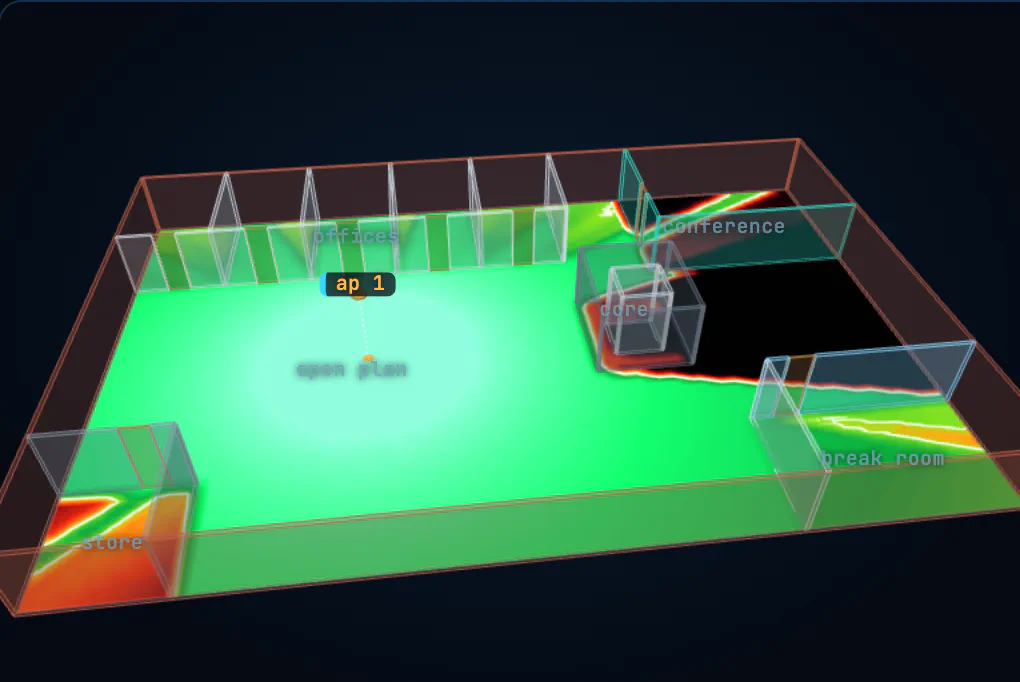
Three tasks, each checked by the lab:
- Which walls cost the most? Click walls to read their loss, on both bands. The order isn’t the same.
- Good on 2.4, not on 5. Find a spot one access point covers on 2.4 GHz but not on 5 GHz.
- Light up the conference room. Get −67 dBm in the middle of it without adding an access point.
Click the floor to put the laptop down: the panel shows the whole link budget for that spot, wall by wall.
Try it on your own computer (optional)
Your own laptop will tell you its signal in dBm:
- Mac: hold Option and click the Wi-Fi icon in the menu bar. Look for RSSI and Noise; the difference is your SNR.
- Windows: in Command Prompt, type
netsh wlan show interfaces. It shows Signal as a percentage; recent versions also show Rssi in dBm. - Linux:
iw devlists your Wi-Fi interface; theniw dev wlan0 link(with your interface’s name) shows signal in dBm.
Walk around with it. Put a wall between you and the access point, then a door, then two walls. You’ll see the numbers from the table, give or take a lot: that’s real buildings.
in one sentence The lab adds up walls exactly; your laptop shows what real ones do.
Behind the concrete
A laptop is 30 ft from an access point, in open space, and gets −52 dBm on 5 GHz.
- You move it to 60 ft, still in open space. Roughly what does it get?
- Back at 30 ft, a poured concrete wall goes up between them. What now, on 5 GHz?
- The same wall on 2.4 GHz instead, if the access point is just as loud on both bands?
- Which of those three spots is good enough for a video call?
hint
Twice the distance costs about 6 dB. Use the table for the wall. And remember 2.4 GHz also costs about 6.5 dB less in the air.
show the solution
- About −58 dBm (twice the distance, 6 dB less).
- About −78 dBm (−52 − 25.7). Too weak for a call.
- About −60 dBm: the air costs 6.5 dB less (−45.5 dBm without the wall) and the concrete about 14.7 dB: −45.5 − 14.7 ≈ −60.
- The first and the third. On 5 GHz, behind the concrete, you’d want another access point on the other side of the wall, which is lesson 5.
Back to lesson 3 for antenna patterns, or on to lesson 5, where you put this to work and place access points.
5 check: test yourself
Pick an answer for each question. You'll see straight away whether it's right, and why. Questions marked what happens next? are about the animations.
You move a laptop from 20 ft to 40 ft from an access point, in open space. Roughly what happens to the signal?
Free-space loss grows by 20 × log of the distance: twice as far is 6 dB less, a quarter of the power.
what happens next?Why does 5 GHz reach less far than 2.4 GHz from the same access point?
In empty space the wave doesn’t fade faster. A smaller antenna catches less of it (about 6.5 dB less), and walls take a bigger bite at higher frequencies.
Which looks like nothing but blocks like concrete?
The thin metal coating that keeps heat out reflects radio too: about 24 dB, the same as a thick concrete wall on 5 GHz.
Your phone shows the signal jumping by several dB when you move it a few inches. Why?
At 5 GHz the wave is under 2½ inches long, so moving half of that can turn a peak into a dip. Radios average over time to cope.
On 5 GHz, concrete costs about 26 dB. How much of the signal gets through?
26 dB is 10 + 10 + 6: a tenth of a tenth of a quarter, about 1/400th. Some gets through, which is why one wall rarely kills Wi-Fi completely.