Strings, Lists and Dicts: From a Line of show Output to Data (Python 101, Lesson 2)
Everything a device prints reaches Python as a string. How split, strip, slicing and f-strings take a line of show output apart and put it back, what lists and dicts are, and why a list of dicts is the shape of every YAML and JSON file.
lesson 2 of 8 · course Python 101 for network engineers
- 1Running Python
- 2Strings, lists and dicts
- 3Loops, conditionals and functions
- 4Files, modules and errors
- 5Regex and TextFSM
- 6Talking to devices with Netmiko
- 7YAML, JSON and a first REST call
- 8Capstone: an inventory to CSV
Everything a device prints reaches Python as one thing: a string, a piece of text. Python’s string methods
(split, strip, partition and slicing) cut it into pieces, a dict gives each piece a name, and an
f-string puts the pieces back into a line. A list of those dicts is exactly the shape a YAML or JSON
file holds, so the same few types carry you from show output to inventories and APIs.
This lesson works on two real lines from the lab’s router r1: the first line of
show version, and a row of show ip interface brief. By the end, each one is a dict you can ask questions
of, and a dict you can turn back into a line. Every REPL session below is Python 3.11 in the lab’s codespace.
What kinds of values does Python have?
A value is a piece of data: a word, a number, a yes or no. Every value has a type, which decides what you can do with it. Five types cover almost everything in this course:
| Type | What it holds | Network example |
|---|---|---|
str (string) | text, in quotes | "GigabitEthernet1", "administratively down" |
int (integer) | a whole number | 24 (a prefix length), 4094 (the highest VLAN) |
float | a number with a decimal point | 1.5 (a delay in milliseconds) |
bool (Boolean) | True or False | is the interface up? |
None | nothing: no value at all | the address of an unassigned interface |
type() tells you which one you have:
>>> type("up"), type(24), type(1.5), type(True), type(None)
(<class 'str'>, <class 'int'>, <class 'float'>, <class 'bool'>, <class 'NoneType'>)
The type matters because Python won’t guess. "24" in quotes is text that happens to contain digits, and
adding a number to text is an error:
>>> "24" + 1
Traceback (most recent call last):
  File "<stdin>", line 1, in <module>
TypeError: can only concatenate str (not "int") to str
>>> int("24") + 1
25
int() turns text into a whole number, and refuses anything that isn’t one. A software version looks like a
number, but it isn’t:
>>> int("0.11")
Traceback (most recent call last):
  File "<stdin>", line 1, in <module>
ValueError: invalid literal for int() with base 10: '0.11'
That’s why versions, interface names and addresses stay strings in this course. Python’s built-in types page lists everything each type can do.
What is a variable?
A variable is a name for a value. = attaches the name on the left to the value on the right:
>>> name = "GigabitEthernet1"
>>> name.startswith("Gig")
True
Think of it as a label tied to the value, not a box the value is copied into. Two names can be tied to the same list, and a change made through one shows through the other:
>>> a = [10, 11]
>>> b = a
>>> b.append(12)
>>> a
[10, 11, 12]
Numbers and strings can’t be changed at all, so this never surprises you with them. y = y + 1 makes a new
number and moves the label y to it; x still names the old one:
>>> x = 5
>>> y = x
>>> y = y + 1
>>> x
5
The same goes for string methods. name.upper() gives you a new string and leaves name as it was:
>>> name.upper()
'GIGABITETHERNET1'
>>> name
'GigabitEthernet1'
If you want to keep the result, give it a name: upper_name = name.upper().
How do you cut a line of show output into pieces?
With split(). Called with nothing in the parentheses, it splits on any run of spaces and throws the spaces
away, which is exactly what a column-aligned show table needs. Called with a character, it splits on that
character and keeps everything else, spaces included. Here’s the first line of r1’s show version:
>>> line = "CapeOS Software (CO-BOLT), Version 0.11.2, LAB USE ONLY"
>>> parts = line.split(",")
>>> parts
['CapeOS Software (CO-BOLT)', ' Version 0.11.2', ' LAB USE ONLY']
>>> len(parts)
3
Three pieces, and the second and third start with the space that followed each comma. strip() removes
spaces from both ends, and removeprefix() removes a fixed bit of text from the front (it arrived in Python
3.9, with PEP 616):
>>> parts[1].strip()
'Version 0.11.2'
>>> parts[1].strip().removeprefix("Version")
' 0.11.2'
>>> parts[1].strip().removeprefix("Version").strip()
'0.11.2'
Each method returns a new string, so you can chain them, left to right. The first piece holds two things, the
software’s name and the image in parentheses. partition() splits a string once, at the first match, and gives
back three parts: before, the separator, and after:
>>> first = parts[0]
>>> first.partition("(")
('CapeOS Software ', '(', 'CO-BOLT)')
The string methods you’ll use most on CLI output:
| Method | What it does | Example | Result |
|---|---|---|---|
split() | split on runs of spaces | "Gi1 up up".split() | ['Gi1', 'up', 'up'] |
split(",") | split on one character | "10.0.12.1/30".split("/") | ['10.0.12.1', '30'] |
strip() | remove spaces from both ends | " r1# ".strip() | 'r1#' |
strip("()") | remove those characters from both ends | "(CO-BOLT)".strip("()") | 'CO-BOLT' |
partition("(") | split once, keep the separator | as above | three strings |
startswith("show") | does it start with this? | "show ip int brief".startswith("show") | True |
removeprefix("Version") | drop this text from the front, if it’s there | as above | a new string |
lower(), upper() | change the case | name.lower() | 'gigabitethernet1' |
The full list is in the docs under string methods.
How do you pick out part of a string or a list?
By position, with square brackets. Positions are counted from 0, so [0] is the first item. Negative
positions count from the end, so [-1] is the last:
>>> name[0:2]
'Gi'
>>> name[-1]
'1'
>>> name[:15]
'GigabitEthernet'
>>> name[15:]
'1'
[start:stop] is a slice: everything from start up to, but not including, stop. Leave out start and
it begins at the beginning; leave out stop and it runs to the end. Slices work the same way on lists. Asking
for a single position that isn’t there is an error; a slice past the end gives you whatever there is:
>>> name[10:100]
'ernet1'
>>> name[100]
Traceback (most recent call last):
  File "<stdin>", line 1, in <module>
IndexError: string index out of range
Why does split() break on administratively down?
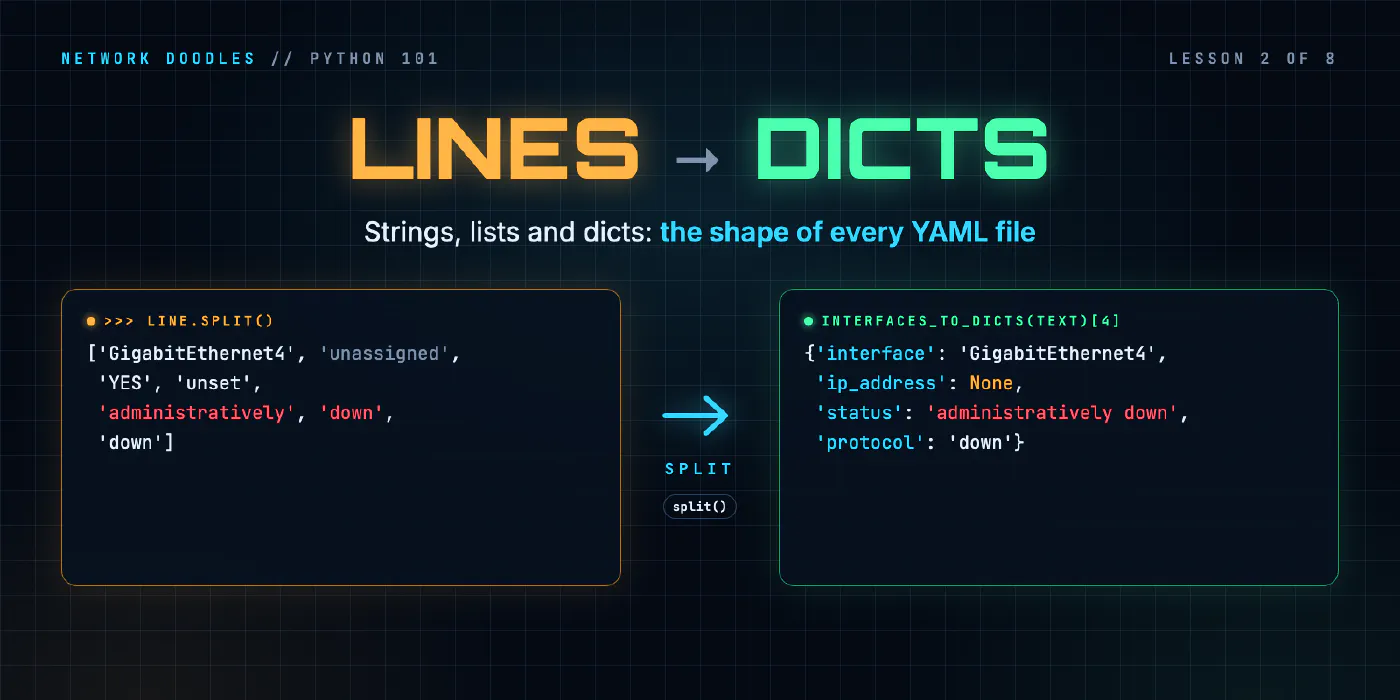
Because split() doesn’t know what a column is. It sees spaces. This is the whole of r1’s
show ip interface brief, as the lab keeps it in netlab/parse.py under the name SAMPLE:
>>> from netlab.parse import SAMPLE
>>> print(SAMPLE)
Interface              IP-Address      OK? Method Status                Protocol
GigabitEthernet0       172.80.111.11   YES DHCP   up                    up
GigabitEthernet1       192.168.10.1    YES manual up                    up
GigabitEthernet2       10.0.12.1       YES manual up                    up
GigabitEthernet3       10.0.13.1       YES manual up                    up
GigabitEthernet4       unassigned      YES unset  administratively down down
Loopback0              10.255.0.1      YES manual up                    up
Status is the state of the interface itself and Protocol is the state of the line protocol on top of
it, the two layers Networking 101 separates. administratively down means someone
configured shutdown on it. A working interface splits into six words:
>>> SAMPLE.splitlines()[2].split()
['GigabitEthernet1', '192.168.10.1', 'YES', 'manual', 'up', 'up']
GigabitEthernet4 splits into seven, because its status is two words:
>>> words = SAMPLE.splitlines()[5].split()
>>> words
['GigabitEthernet4', 'unassigned', 'YES', 'unset', 'administratively', 'down', 'down']
(splitlines() cuts text into a list of lines, so [5] is the sixth line, counting the header.) Code that
assumes the status is always words[4] reads GigabitEthernet4 as status administratively and protocol
down, and gets it wrong without an error. The fix is to count from both ends. The first four columns are
always one word each, and so is the last one, so the status is whatever is left in the middle:
>>> words[:4]
['GigabitEthernet4', 'unassigned', 'YES', 'unset']
>>> words[4:-1]
['administratively', 'down']
>>> " ".join(words[4:-1])
'administratively down'
>>> words[-1]
'down'
" ".join(list) is split() in reverse: it glues a list of strings together with a space between each. On a
working interface, words[4:-1] is the one word ['up'], and joining one word gives 'up', so the same code
works for both.
How do you put the pieces back into a line?
With an f-string: a string with an f in front of its opening quote, where anything in {curly braces}
is worked out and dropped into the text. They arrived in Python 3.6 with
PEP 498:
>>> intf = "Gi1"
>>> vlan = 10
>>> f"interface {intf} is in VLAN {vlan}"
'interface Gi1 is in VLAN 10'
>>> f"{intf:<10}|"
'Gi1       |'
The second one pads intf to 10 characters, left-aligned, which is how a show command lines up its columns.
An f-string turns a number into text for you, as {vlan} did. Gluing with + doesn’t: that’s the
TypeError from the first section, and str(vlan) would be the fix.
join() is the other way to build a line, when you have a list. It also wants strings, and says so:
>>> ",".join(["10", "11", "12"])
'10,11,12'
>>> ",".join([10, 11, 12])
Traceback (most recent call last):
  File "<stdin>", line 1, in <module>
TypeError: sequence item 0: expected str instance, int found
What is a list?
A list is an ordered collection of values, in square brackets. split() returns one. The VLANs on the
lab’s switch, sw1, are a list of numbers:
>>> vlans = [10, 11, 12, 20]
>>> vlans[0]
10
>>> vlans[-1]
20
>>> vlans[1:3]
[11, 12]
>>> vlans.append(30)
>>> vlans
[10, 11, 12, 20, 30]
>>> len(vlans)
5
>>> 20 in vlans
True
Lists keep their order, can hold anything (strings, numbers, other lists, dicts), and can change: append()
adds an item to the end. in asks whether a value is in the list. A position past the end is an
IndexError, as with strings.
What is a dict?
A dict (dictionary) maps keys to values: you look a value up by its name instead of its position. Keys are usually strings. A device in an inventory is a dict:
>>> r1 = {"name": "r1", "host": "172.80.111.11", "device_type": "cisco_ios"}
>>> r1["host"]
'172.80.111.11'
Asking for a key that isn’t there is an error, a KeyError, and its message is the missing key:
>>> r1["model"]
Traceback (most recent call last):
  File "<stdin>", line 1, in <module>
KeyError: 'model'
get() asks more politely. It returns None when the key is missing (the REPL prints nothing for None), or
a default you choose:
>>> r1.get("model")
>>> r1.get("model", "unknown")
'unknown'
Assigning to a key adds it, or replaces the value if the key is already there. in asks about keys, not
values:
>>> r1["model"] = "CapeOS-Bolt"
>>> r1.keys()
dict_keys(['name', 'host', 'device_type', 'model'])
>>> "host" in r1
True
>>> "172.80.111.11" in r1
False
Each key appears once. A dict keeps its keys in the order you added them, which Python has guaranteed since 3.7 (the dict documentation says so).
| list | dict | |
|---|---|---|
| Brackets | [10, 11, 12] | {"name": "r1"} |
| Look up by | position: vlans[0] | key: r1["name"] |
| Missing | IndexError | KeyError, or get() for None |
| Good for | many of the same thing: VLANs, interfaces, devices | one thing’s named fields: a device, an interface |
How does a line of show output become a dict, and a dict a line?
Put the last few sections together. Split a row, and give each piece a key:
>>> words = SAMPLE.splitlines()[2].split()
>>> row = {"interface": words[0], "ip_address": words[1], "status": words[4], "protocol": words[5]}
>>> row
{'interface': 'GigabitEthernet1', 'ip_address': '192.168.10.1', 'status': 'up', 'protocol': 'up'}
>>> row["status"]
'up'
Now the rest of your code asks for row["status"] and never needs to know which column it came from. If the
next release of the OS adds a column, one function changes, not every line that uses the data.
Some values need translating as you go. An interface with no address says unassigned, which is a word, not
an address. The honest Python value for no address is None, and a one-line if does it:
>>> words = SAMPLE.splitlines()[5].split()
>>> words[1]
'unassigned'
>>> address = words[1]
>>> None if address == "unassigned" else address
That’s GigabitEthernet4 again, and the last line prints nothing, because the answer is None. Test for None with is:
ip is None is True when there’s no address. None isn’t an empty string ("" == None is False), and
most things you’d do with a string fail on it: len(None) is a TypeError.
Going back is one f-string. The keys go in single quotes inside it, because the f-string itself uses double quotes:
>>> f"{row['interface']} ({row['ip_address']}) is {row['status']}/{row['protocol']}"
'GigabitEthernet1 (192.168.10.1) is up/up'
Why is a list of dicts the shape of YAML and JSON?
Because YAML and JSON are built from the same two containers: a sequence of things (a list) and a set of named fields (a dict). A list of dicts is a table: one dict per row, the same keys in each. A list of devices:
>>> devices = [{"name": "r1", "role": "router"}, {"name": "sw1", "role": "switch"}]
>>> devices[1]["name"]
'sw1'
devices[1] is the second dict, and ["name"] looks up a key in it. Hand that list to the json module from
the standard library, and to PyYAML, and each writes it in its own spelling:
>>> import json, yaml
>>> print(json.dumps(devices, indent=2))
[
  {
    "name": "r1",
    "role": "router"
  },
  {
    "name": "sw1",
    "role": "switch"
  }
]
>>> print(yaml.safe_dump({"devices": devices}, sort_keys=False))
devices:
- name: r1
  role: router
- name: sw1
  role: switch
JSON (RFC 8259) uses brackets and braces much like Python’s. YAML
uses indentation and a - for each item in a list. The data underneath is identical. That’s why an Ansible
inventory, a NetBox API response and the output of a TextFSM parser all feel familiar once you can read a
list of dicts: they’re the same shape. Understanding YAML walks through YAML’s
syntax, and lesson 7 loads both from files and from an API.
What goes wrong
TypeError: can only concatenate str (not "int") to str. You used + between text and a number. Use an
f-string, or str() on the number.
ValueError: too many values to unpack. A line like a, b, c = line.split() expects an exact number of
pieces, and this line had more. On show ip interface brief, that’s administratively down. Slice from both
ends instead.
ValueError: not enough values to unpack (expected 6, got 0). The same unpacking hit a blank line, which
splits into an empty list. Skip lines with no words in them.
A value that’s wrong, with no error at all. words[4] on an administratively down interface gives
'administratively'. Python can’t tell you that’s not what you meant. Look at the data in the REPL before you
trust a column number.
KeyError: 'model'. The dict doesn’t have that key. Check the spelling (keys are case-sensitive:
"Host" isn’t "host"), or use get() when the key may be missing.
'unassigned' where you wanted no address. The word from the CLI went straight into the data. Translate
it to None once, where you parse, so the rest of the code has one way to say nothing.
Calling a method and losing the result. name.strip() on its own line changes nothing: strings can’t be
changed. Write name = name.strip().
A list changed behind your back. b = a doesn’t copy a list; both names point at the same one. Use
b = list(a) for a copy.
Try it
Chapter 2 of the lab has you write two functions in netlab/parse.py: the
first line of show version into a dict and back, then all of show ip interface brief into a list of dicts,
two-word statuses and unassigned addresses included. The checks run them on lines and outputs they’ve never
seen, and task 2.1 shows you how to read pytest’s output when one fails.
What’s next
You can turn one interface into a dict. Lesson 3 works through a
whole list of them: loops, if, and functions small enough to test, ending with a function that says which
interfaces are down.
Related doodles
Capstone: an Inventory to CSV (Python 101, Lesson 8)
Shape a small network tool: an inventory in, one function per step, a CSV out. Two device types into one row, csv.DictWriter, carrying on when a …
Files, Modules and Errors: Saved Configs In, a Report Out (Python 101, Lesson 4)
Read a folder of saved configs with pathlib and with, write a CSV report, split the code into a module and a script, read a traceback from the bottom …
Loops, Conditionals and Functions: Which Interfaces Are Down? (Python 101, Lesson 3)
A for loop runs the same lines for every interface, if decides which ones matter, and a function wraps it up so it can be reused and tested. for over …