Talking to Devices with Netmiko: SSH from Python (Python 101, Lesson 6)
Log in to a router from Python with Netmiko, run show commands and get them back parsed, push a config change, keep the password in .env instead of the code, and turn a failed login into one clear line.
lesson 6 of 8 · course Python 101 for network engineers
- 1Running Python
- 2Strings, lists and dicts
- 3Loops, conditionals and functions
- 4Files, modules and errors
- 5Regex and TextFSM
- 6Talking to devices with Netmiko
- 7YAML, JSON and a first REST call
- 8Capstone: an inventory to CSV
Netmiko is a Python library that logs in to network devices over SSH and runs CLI commands for you. One
call, ConnectHandler(), opens the session and gets it ready; send_command() runs a show command and
returns its output, already parsed into a list of dicts if you add use_textfsm=True; send_config_set()
pushes configuration lines. The username and password come from environment variables, never from the code,
and a failed login or a device that doesn’t answer arrives as an exception you can catch.
Until now the course has parsed show output saved in files. This lesson gets it from live devices, and takes a first look at objects and classes, because the connection Netmiko gives you is one. Every output below comes from the lab: Netmiko 4.8.0 against r1 (CapeOS Bolt) and r3 (CapeOS Pulse).
What does Netmiko do that plain SSH doesn’t?
SSH itself only carries bytes: you type, the device sends characters back. The Python library that speaks SSH is paramiko, and Netmiko is built on top of it. With paramiko alone you’d have to solve the problems a person at a terminal solves without thinking:
| Problem | What a person does | What Netmiko does |
|---|---|---|
| The prompt. When has the output finished? | waits until r1# comes back | learns the prompt at login, and reads until it sees it again |
Paging. Long output stops at --More-- | presses space | turns paging off at login (terminal length 0) |
| Line wrapping. Wide lines break | widens the window | sets the terminal width (terminal width 511) |
Privilege. Some commands need enable | types enable and the secret | conn.enable(), with secret= given at login |
Config mode. Changes need configure terminal | types it, then end | send_config_set() enters and leaves for you |
You can watch it happen. Netmiko writes everything it sends and receives to a file if you give it
session_log="session.log". This is the log of a login to r1, one show clock, and the logout:
r1#
r1#terminal width 511
r1#terminal length 0
r1#
r1#
r1#show clock
05:51:53.965 UTC Wed Nov 11 2026
r1#
r1#
r1#exit
The first four lines are Netmiko’s session preparation, the setup it runs before your first command. The
lab’s login lands straight at the privileged r1# prompt, so there’s no enable here: conn.check_enable_mode()
returns True. On a device that logs you in at r1>, you’d pass secret= to ConnectHandler() and call
conn.enable().
Scrapli does the same job with a different design, including a way to run many sessions at once. This course uses Netmiko, the one most network automation examples are written with.
Why does a CapeOS router say cisco_ios?
Netmiko needs to know what kind of CLI it’s talking to, because the commands that turn paging off and the
shape of the prompt differ from one network OS to another. You tell it with device_type, a name from
Netmiko’s list of platforms, such as
cisco_ios, arista_eos or juniper_junos.
CapeOS, the lab’s network OS, has two CLI dialects. Bolt (r1, r2 and sw1)
behaves like the CLI that Netmiko and ntc-templates call cisco_ios; Pulse (r3) behaves like the one they
call arista_eos. They behave closely enough that both libraries work against it unchanged. So in this lab
the device_type is what picks the dialect:
| Device | CapeOS dialect | device_type | Netmiko’s class |
|---|---|---|---|
| r1, r2, sw1 | Bolt | cisco_ios | CiscoIosSSH |
| r3 | Pulse | arista_eos | AristaSSH |
That doesn’t make CapeOS either of those products: it’s an open-source OS of its own, and device_type names
the CLI each dialect behaves like. The same name also picks the ntc-templates template (lesson 5) for parsed
output, so a wrong device_type can log in fine and still prepare the session and parse for the wrong CLI.
How do you log in and run a command?
ConnectHandler() takes the device’s details as keyword arguments, name=value pairs, so the order
doesn’t matter and each value says what it is. It opens the SSH session, runs the session preparation, and
gives you back the connection:
>>> import os
>>> from netmiko import ConnectHandler
>>> from netlab.env import load_env
>>> load_env()
>>> conn = ConnectHandler(device_type="cisco_ios", host="r1", username=os.environ["LAB_USER"], password=os.environ["LAB_PASSWORD"])
>>> conn.find_prompt()
'r1#'
host can be a name or an address: in the lab, r1 resolves to 172.80.111.11 on the management network.
find_prompt() asks the device for its prompt, the quickest way to prove the login worked.
send_command() runs one command and returns everything the device printed, as a single string:
>>> print(conn.send_command("show ip interface brief"))
Interface              IP-Address      OK? Method Status                Protocol
GigabitEthernet0       172.80.111.11   YES DHCP   up                    up
GigabitEthernet1       192.168.10.1    YES manual up                    up
GigabitEthernet2       10.0.12.1       YES manual up                    up
GigabitEthernet3       10.0.13.1       YES manual up                    up
GigabitEthernet4       unassigned      YES unset  administratively down down
Loopback0              10.255.0.1      YES manual up                    up
That’s the text lessons 2 to 5 parsed by hand, with split(), a regex and TextFSM. Now it comes from the
router instead of a file. send_command() waits for the prompt to come back before it returns, for up to 10
seconds by default (read_timeout=); a slow command such as a large show running-config may need more.
conn.disconnect() logs out. A device allows only so many SSH sessions at once (its VTY lines), and a script
that forgets to disconnect holds them until they time out.
What does use_textfsm=True give you?
Add use_textfsm=True and Netmiko hands the output to ntc-templates before returning it. You get the same
list of dicts as lesson 5’s parse_output(), with no parsing code
of your own:
>>> rows = conn.send_command("show ip interface brief", use_textfsm=True)
>>> type(rows), len(rows)
(<class 'list'>, 6)
>>> rows[1]
{'interface': 'GigabitEthernet1', 'ip_address': '192.168.10.1', 'status': 'up', 'proto': 'up'}
Six interfaces, six dicts. Ask r3, the Pulse router, the same question with device_type="arista_eos":
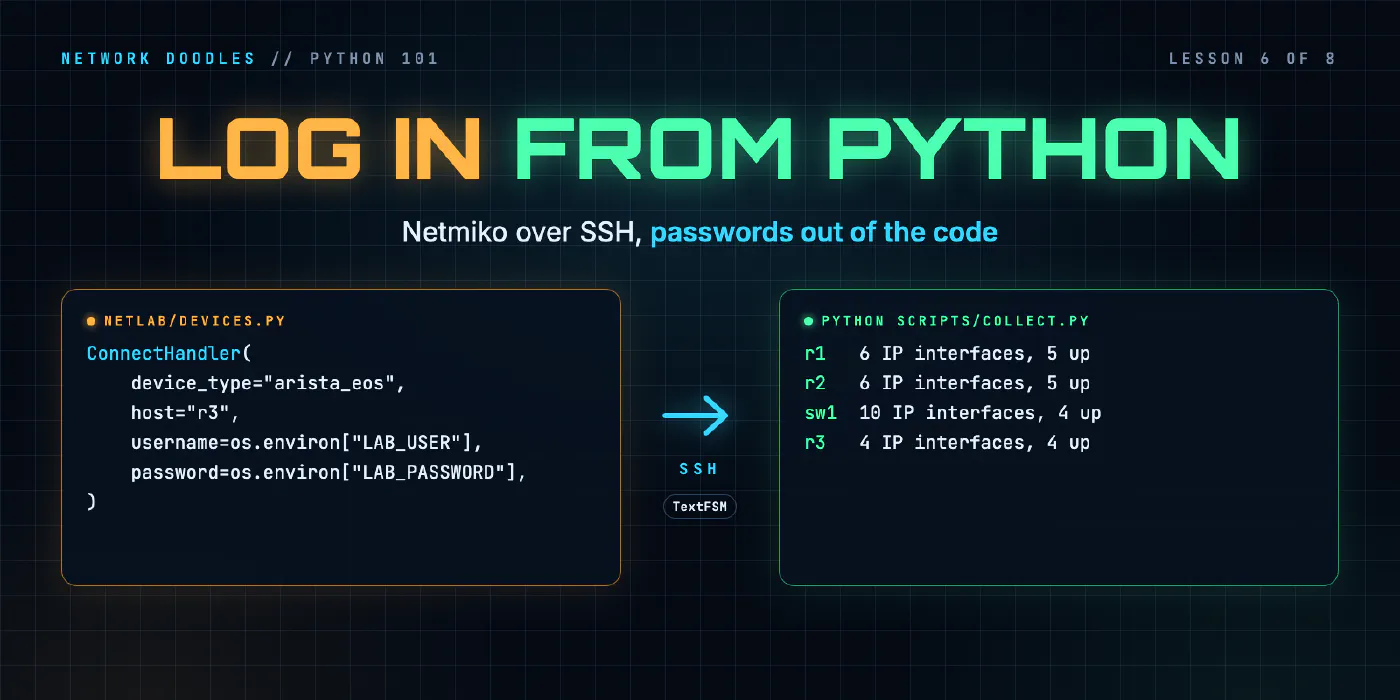
>>> r3 = ConnectHandler(device_type="arista_eos", host="r3", username=os.environ["LAB_USER"], password=os.environ["LAB_PASSWORD"])
>>> r3.send_command("show ip interface brief", use_textfsm=True)[0]
{'interface': 'Ethernet1', 'ip_address': '10.0.13.2/30', 'status': 'up', 'protocol': 'up', 'mtu': '1500'}
Same command, different template, and the keys differ: protocol instead of proto, an mtu column, and the
address with its prefix length, because that’s how Pulse prints it. Each template’s keys come from the
template’s author, not from a standard. Code that runs against two device types should use the keys they share
(interface, status) or translate one shape into the other.
If there’s no template for a platform and command, use_textfsm=True gives you back the plain string, as if
you hadn’t asked. Lesson 5 found that ntc-templates has none for show ntp associations on cisco_ios:
>>> out = conn.send_command("show ntp associations", use_textfsm=True)
>>> type(out)
<class 'str'>
No error, no warning. A for loop over that string walks it one character at a time, which is a confusing
way to find out.
How do you change the configuration?
send_config_set() takes a list of configuration lines. It enters configuration mode, sends each line,
leaves again, and returns the whole conversation. Back on r1’s connection:
>>> print(conn.send_config_set(["interface GigabitEthernet4", "description spare, configured from Python"]))
configure terminal
Configuration mode: one command per line. Finish with 'end' or Ctrl-Z.
r1(config)#interface GigabitEthernet4
r1(config-if)#description spare, configured from Python
r1(config-if)#end
r1#
show interfaces description afterwards lists Gi4 with its new description.
Read that output, because by default Netmiko doesn’t judge it. r1 has no GigabitEthernet9, and this is
what comes back for it, with no exception:
>>> print(conn.send_config_set(["interface GigabitEthernet9"]))
configure terminal
Configuration mode: one command per line. Finish with 'end' or Ctrl-Z.
r1(config)#interface GigabitEthernet9
                     ^
% Invalid input detected at '^' marker.

r1(config)#end
r1#
The refusal is in the returned string, and your code has to look for it. A change that works is in the running configuration only, as if you’d typed it; saving it is a separate command. Pushing configuration from a loop is fast in both directions, which is why tools such as Ansible wrap it in checks, dry runs and diffs.
Where should the password live?
Not in the code. A script gets copied, pasted into chat, committed to Git and shared, and a password written in it goes everywhere the script goes. Git keeps it in the history even after you delete the line. Don’t hardcode passwords covers the same idea for Ansible.
The usual answer is an environment variable: a named value the shell hands to every program it starts
(Linux CLI 101 covers export and env). Python reads them from os.environ, a dict-like object:
>>> os.environ["LAB_USER"]
'admin'
To save typing export in every terminal, the values go in a file called .env, one KEY=value per line,
in the project folder. The lab’s has the login and the API’s token in it. make setup copies it from
.env.example, and .gitignore lists .env, so Git never picks it up. The lab’s netlab/env.py has a small
load_env() that reads .env into os.environ, the same thing the
python-dotenv package does; a variable already set in your shell
wins over the file.
So the code names the variable, and the value lives somewhere else:
password=os.environ["LAB_PASSWORD"]
The lab’s check for task 6.1 tests this both ways. It fails if the lab’s password appears anywhere in your
code, and it logs in with a deliberately wrong LAB_PASSWORD in the environment, expecting the login to fail.
If your code still gets in, the password didn’t come from the environment.
What happens when the login fails?
Netmiko raises an exception, the same mechanism as the FileNotFoundError in
lesson 4. A wrong password gives this, trimmed to its last part:
>>> ConnectHandler(device_type="cisco_ios", host="r1", username="admin", password="wrong")
Traceback (most recent call last):
  ...
paramiko.ssh_exception.AuthenticationException: Authentication failed.

During handling of the above exception, another exception occurred:

Traceback (most recent call last):
  ...
netmiko.exceptions.NetmikoAuthenticationException: Authentication to device failed.

Common causes of this problem are:
1. Invalid username and password
2. Incorrect SSH-key file
3. Connecting to the wrong device

Device settings: cisco_ios r1:22
Two tracebacks, read from the bottom up: paramiko failed to authenticate, and Netmiko caught that and raised
its own, clearer exception. A device that doesn’t answer at all, here an address with nothing on it, gives a
different one after conn_timeout seconds (10 by default; the lab uses 5), with paramiko’s
Unable to connect to port 22 on 172.80.111.19 underneath:
netmiko.exceptions.NetmikoTimeoutException: TCP connection to device failed.
| Exception | Means | Usual cause |
|---|---|---|
NetmikoAuthenticationException | SSH connected, the login was refused | wrong username or password, wrong .env |
NetmikoTimeoutException | nothing answered on port 22 | the device is down, wrong address, a firewall |
Both live in netmiko.exceptions, so you can catch each one with try/except and say what happened in
one line that names the device:
from netmiko.exceptions import NetmikoAuthenticationException

try:
    conn = ConnectHandler(device_type="cisco_ios", host="r1", username=user, password=password)
except NetmikoAuthenticationException:
    print("r1: login failed")
The person running the script reads one line instead of two screens of traceback, and it tells them what to fix.
What is an object, and what is a class?
Look at what ConnectHandler() returned:
>>> conn
<netmiko.cisco.cisco_ios.CiscoIosSSH object at 0xffff9c629cd0>
>>> conn.base_prompt
'r1'
conn is an object: a value that holds data and also has functions of its own. The data are its
attributes, read with a dot: conn.base_prompt is the prompt without the #. The functions are its
methods, called with a dot and parentheses: conn.send_command(...), conn.disconnect(). You’ve used
methods since lesson 2, because a string is an object too: line.split() is the split method of one
string.
A class is the kind of object, the blueprint every object of that kind is made from. conn is a
CiscoIosSSH; r3 above is an AristaSSH. They’re different classes with the same method names, so
send_command() works on both, and each does the right thing for its CLI. That’s why the code doesn’t
change between Bolt and Pulse: only device_type does, and ConnectHandler() picks the class from it.
You can make classes of your own. This course needs only one, and it’s the simplest kind: a dataclass, a class that only holds a few named values. The lab’s inventory of devices uses one:
from dataclasses import dataclass

@dataclass
class Device:
    name: str
    host: str
    device_type: str = "cisco_ios"
The lines inside list the fields, each with a type (str, a string) that Python records but doesn’t
enforce. = "cisco_ios" is a default, like a function’s default argument. The @dataclass line above the
class (a decorator) writes the rest for you: a way to create one, a readable printout, and == that
compares the fields:
>>> d = Device("r3", "172.80.111.13", "arista_eos")
>>> d
Device(name='r3', host='172.80.111.13', device_type='arista_eos')
>>> Device("r1", "172.80.111.11")
Device(name='r1', host='172.80.111.11', device_type='cisco_ios')
Why not a dict? d.host is shorter than d["host"], making one with a field missing fails at once (a
TypeError) where a dict would quietly lack the key, and the printout says what the thing is. The
dataclasses documentation has the rest. Classes that
build on other classes (inheritance) wait for ANTA, where every test you
write yourself is a class built on ANTA’s AntaTest.
How does one script talk to every device?
With a list of Devices and a loop: connect, run the command, disconnect, keep the result in a dict under the
device’s name. That’s collect(), the function task 6.2 asks for, and the lab’s scripts/collect.py prints a
line per device from what it returns:
$ python scripts/collect.py
r1   6 IP interfaces, 5 up
r2   6 IP interfaces, 5 up
sw1  10 IP interfaces, 4 up
r3   4 IP interfaces, 4 up
Three Bolt devices and a Pulse router, through one function, because each Device carries its own
device_type. The disconnect() goes in a finally: block, so the session is closed even when the command
fails. With r2’s password changed (the lab’s make break T=6.2), the same script stops at r2 with one line,
and exits 1 so a shell script or a CI job can tell it failed:
$ python scripts/collect.py
error: r2: login failed (check LAB_USER and LAB_PASSWORD)
The devices are done one at a time, and the first failure stops the run. Lesson 8 carries on past failures; Nornir, in a later course, runs the same work on many devices at once.
What goes wrong
KeyError: 'LAB_PASSWORD'. The variable isn’t set: .env is missing (make setup makes it), or
load_env() wasn’t called before os.environ was read.
The password is in the code “for now”. It ends up in Git and in every copy of the script. Read it from the environment from the first line.
NetmikoAuthenticationException, though ssh by hand works. Compare .env with what you typed, username
included.
NetmikoTimeoutException. Nothing answered on port 22. Check the address and that the device is up before
suspecting the code.
The wrong device_type. The login may work, but the session preparation and the template are for another
CLI. Use the name your inventory gives that device.
use_textfsm=True returns a string. No template for that platform and command. Check type() before
looping.
Sessions left open, and unread config output. Put disconnect() in a finally: block, and look for
% Invalid in what send_config_set() returns.
Try it
Chapter 6 of the lab has you write connect() and interface_table() with the
login read from .env, and run a script that prints r1’s interfaces. Then you write the Device dataclass
and collect(), log in to r1, r2, sw1 and r3 (two device types through one function), and turn a refused
login into one clear line instead of a traceback.
What’s next
So far the list of devices is written in the script. Lesson 7 moves it out, into a YAML inventory file and then a REST API, and shows that both end up as the same list of dicts.
Related doodles
Capstone: an Inventory to CSV (Python 101, Lesson 8)
Shape a small network tool: an inventory in, one function per step, a CSV out. Two device types into one row, csv.DictWriter, carrying on when a …
Parsing Show Output: Regular Expressions and TextFSM (Python 101, Lesson 5)
Turn show ip interface brief into a list of dicts twice, with a regular expression and with an ntc-templates TextFSM template, see how a template gets …
Files, Modules and Errors: Saved Configs In, a Report Out (Python 101, Lesson 4)
Read a folder of saved configs with pathlib and with, write a CSV report, split the code into a module and a script, read a traceback from the bottom …