Capstone: an Inventory to CSV (Python 101, Lesson 8)
Shape a small network tool: an inventory in, one function per step, a CSV out. Two device types into one row, csv.DictWriter, carrying on when a device is down, exit codes and argparse.
lesson 8 of 8 · course Python 101 for network engineers
- 1Running Python
- 2Strings, lists and dicts
- 3Loops, conditionals and functions
- 4Files, modules and errors
- 5Regex and TextFSM
- 6Talking to devices with Netmiko
- 7YAML, JSON and a first REST call
- 8Capstone: an inventory to CSV
A useful network script has the same shape whatever it does: it reads an inventory, does one job per device, and writes the results where a person or another tool can use them. Give each step its own function, catch failures per device so one dead router doesn’t stop the rest, and finish with an exit code that says whether everything worked. The capstone puts that shape around lessons 2 to 7, and ends with a CSV of every device’s version and serial number.
The tool is scripts/inventory.py in the lab. This lesson walks through the decisions in
it: three small functions instead of one long script, two device types’ show version in one row,
csv.DictWriter, what happens when r2 is switched off, and two options with argparse. Every output below is
from the lab: Python 3.11, Netmiko 4.8 and ntc-templates 9.3, against CapeOS.
What shape should a small network tool have?
Inventory in, one function per step, results out. This is the script’s main():
def main(argv=None):
    args = parse_args(argv)
    devices = load_devices(args.source)
    rows, failures = run(devices)
    write_csv(rows, args.out)
    print(f"wrote {args.out}: {len(rows)} of {len(devices)} devices")
    for name, reason in failures.items():
        print(f"  couldn't inventory {reason}", file=sys.stderr)
    return 2 if failures else 0
It reads as a list of steps, and each step is a function in netlab/report.py or the script itself:
| Function | Takes | Gives back | Network job |
|---|---|---|---|
parse_args() | the command line | which source, which file | none: the tool’s settings |
load_devices(source) | "yaml" or "api" | a list of device dicts | read the inventory (lesson 7) |
facts(device) | one device dict | one row, as a dict | log in, show version, show ip interface brief |
run(devices) | the device list | the rows, and the failures | facts() for every device |
write_csv(rows, path) | the rows, a file name | nothing: it writes the file | the report |
Why not one long script? Because a function with one job can be tried on its own. You can call facts() on
r3 in the REPL and look at the dict before any CSV exists, and the lab’s checker does the same: it calls
run() with a device list it made up, including a device that doesn’t exist. A script with no functions can
only be tested by running all of it against the network.
Each piece is also replaceable. When the inventory moves from a YAML file to an API, only load_devices()
changes. It’s the same idea that makes NetBox as your Ansible inventory work: the
tool asks for devices, not for a particular file.
Why doesn’t show version give the same keys on every device?
Because ntc-templates has one template per platform and command, each written for one CLI, and each names its
fields after what that CLI prints. Here are r1 (CapeOS Bolt, which Netmiko knows as cisco_ios) and r3
(CapeOS Pulse, arista_eos), parsed with parse_output() from lesson 5:
>>> parse_output(platform="cisco_ios", command="show version", data=open("checks/data/version-r1.txt").read())
[{'software_image': 'CO-BOLT', 'version': '0.11.2', 'release': '', 'rommon': '', 'hostname': 'r1', 'uptime': '0 minutes', 'uptime_years': '', 'uptime_weeks': '', 'uptime_days': '', 'uptime_hours': '', 'uptime_minutes': '0', 'reload_reason': '', 'running_image': 'capeos-bolt.bin', 'hardware': [], 'serial': ['CAPEHFI5RPW'], 'config_register': '0x2102', 'mac_address': [], 'restarted': ''}]
>>> parse_output(platform="arista_eos", command="show version", data=open("checks/data/version-r3-pulse.txt").read())
[{'model': '', 'hw_version': '', 'serial_number': 'CAPE4S5VG44', 'sys_mac': 'cae2.b268.c68e', 'image': '4.99.0C', 'total_memory': '8025148', 'free_memory': '6362980', 'uptime': '0 minutes'}]
Line up what the CSV wants, and only one key is the same on both:
| CSV column | cisco_ios (r1, r2, sw1) | arista_eos (r3) |
|---|---|---|
| version | version: '0.11.2' | image: '4.99.0C' |
| serial | serial: a list, ['CAPEHFI5RPW'] | serial_number: a string |
| uptime | uptime | uptime |
| hostname | hostname | not there |
| model | hardware: an empty list | model: an empty string |
The cisco_ios serial is a list because a stack of switches reports one serial per member, so the template
always gives a list, even of one. And neither template finds a model on these devices: the field is there, and
empty. That’s common. Not every device prints every fact where a template looks for it, so a tool has to
decide where each column comes from, and sometimes the answer is “not from the device”.
How do you turn two device types into one row?
Pick one name for each column, and map each device type’s keys onto it in one place. This is the heart of
facts():
    if device["device_type"] == "arista_eos":
        release, serial = version["image"], version["serial_number"]
    else:
        release, serial = version["version"], version["serial"][0]
    return {
        "hostname": hostname,
        "model": device["model"],
        "version": release,
        "serial": serial,
        "uptime": version["uptime"],
        "ip_interfaces": sum(1 for i in brief if i["ip_address"] != "unassigned"),
    }
This is normalizing: turning data that means the same thing, spelled differently, into one shape. The if is
on device_type, the inventory field that told Netmiko which CLI to expect in
lesson 6. The other columns come from wherever they’re reliable:
- hostname is
conn.base_prompt, which Netmiko works out from the prompt when it logs in:r1#gives'r1'. Every device has a prompt; only one template has ahostnamekey. - model is
device["model"], from the inventory, becauseshow versiondoesn’t report one here. The inventory is where you’d record it anyway: it’s what you bought. - ip_interfaces counts the rows of
show ip interface briefwhose address isn’tunassigned. Both templates call that fieldip_address, though Pulse’s includes the prefix (10.0.13.2/30).
The result, for one device of each type:
>>> facts(devices[0])
{'hostname': 'r1', 'model': 'CapeOS-Bolt', 'version': '0.11.2', 'serial': 'CAPEHFI5RPW', 'uptime': '10 minutes', 'ip_interfaces': 5}
>>> facts(devices[2])
{'hostname': 'r3', 'model': 'CapeOS-Pulse', 'version': '4.99.0C', 'serial': 'CAPE4S5VG44', 'uptime': '10 minutes', 'ip_interfaces': 4}
Same keys, same order, two CLIs. Everything after facts() can treat every device alike.
How does csv.DictWriter write the rows?
CSV, comma-separated values, is a text file with one record per line and commas between the fields; any
spreadsheet opens it. Lesson 4 used the csv module’s plain writer,
which takes each row as a list. csv.DictWriter takes each row as a dict, which is what facts() returns,
and puts each value in its column by key:
>>> w = csv.DictWriter(buf, fieldnames=COLUMNS)
>>> w.writeheader()
52
>>> w.writerow(facts(devices[2]))
50
>>> w.writerow({"hostname": "r9"})
9
>>> print(buf.getvalue())
hostname,model,version,serial,uptime,ip_interfaces
r3,CapeOS-Pulse,4.99.0C,CAPE4S5VG44,10 minutes,4
r9,,,,,
(buf is an io.StringIO, a file that lives in memory, so the REPL can print what would have gone to disk.
The numbers are how many characters each call wrote.)
fieldnames fixes the columns and their order, and writeheader() writes them as the first line. A missing
key gives an empty field, as r9 shows. A key that isn’t a column is an error, which catches typos:
w.writerow({"hostname": "r9", "vendor": "x"}) stops with
ValueError: dict contains fields not in fieldnames: 'vendor'.
The lab’s write_csv() opens the file with path.open("w", newline="") and calls writeheader() and
writerows(rows), which writes a whole list in one go. newline="" is the detail to remember: the
csv module’s documentation asks for it on every file you give a
csv writer, because the module writes its own line endings and the file would otherwise translate them again.
What should a script do when one device doesn’t answer?
Carry on, and say so at the end. A network always has a device that’s down, being replaced, or in the
inventory by mistake, and a tool that stops at the first one gets run once. The starter’s run() is a plain
loop, rows.append(facts(d)) for each device. With r2 switched off:
$ python scripts/inventory.py
Traceback (most recent call last):
  File "/workspaces/python-101/scripts/inventory.py", line 37, in <module>
    sys.exit(main())
             ^^^^^^
  File "/workspaces/python-101/scripts/inventory.py", line 28, in main
    rows, failures = run(devices)
                     ^^^^^^^^^^^^
  File "/workspaces/python-101/netlab/report.py", line 102, in run
    rows.append(facts(d))
                ^^^^^^^^
  File "/workspaces/python-101/netlab/report.py", line 55, in facts
    raise DeviceError(f"{device['name']}: no answer from {device['host']}") from None
netlab.devices.DeviceError: r2: no answer from 172.80.111.12
Read it from the bottom, as lesson 4 showed: facts() raised DeviceError for r2, nothing caught it, and it
went up through run() and main() until Python stopped. r1 had answered, but no CSV was written, and r3 and
sw1 were never tried. The fix is a try inside the loop, around one device:
    rows, failures = [], {}
    for d in devices:
        try:
            rows.append(facts(d))
        except DeviceError as e:
            failures[d["name"]] = str(e)
    return rows, failures
Where the try sits decides what a failure costs. Around the whole loop, one dead router ends the run. Around
one device, it costs that device’s row and nothing else. It catches only DeviceError, the “couldn’t log in
or couldn’t reach it” that facts() raises on purpose. A typo in your own code raises something else, and
should still stop the script with a traceback, because you want to see it.
failures maps a device’s name to the reason, so the report can say exactly what happened. With r2 stopped and
r9 in the inventory, a router that was never built:
$ time python scripts/inventory.py
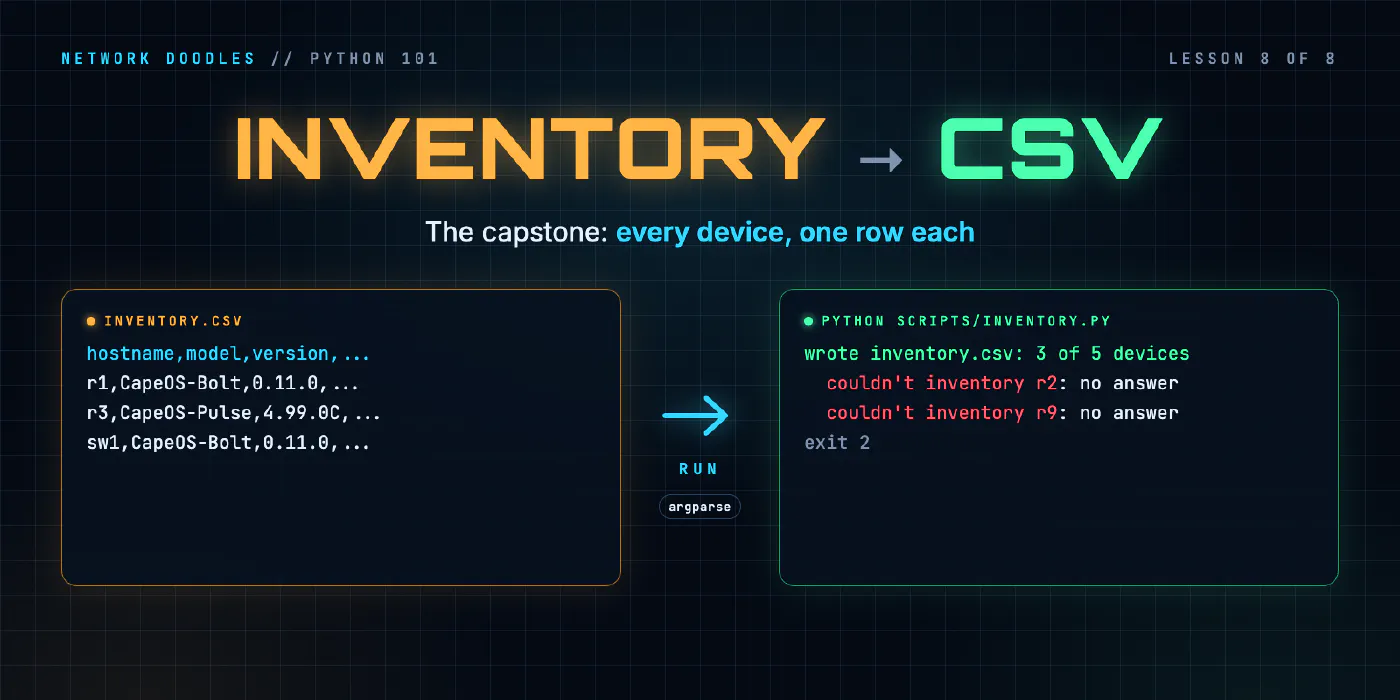
wrote inventory.csv: 3 of 5 devices
  couldn't inventory r2: no answer from 172.80.111.12
  couldn't inventory r9: no answer from 172.80.111.19
python scripts/inventory.py  0.59s user 0.10s system 6% cpu 11.285 total
Three rows in the CSV, and two lines naming what’s missing and why. “No answer” is Netmiko’s
NetmikoTimeoutException, turned into one line in facts() the way collect() did it in lesson 6.
What is an exit code, and why does the script exit 2?
Every program hands the shell a number when it finishes, its exit code (or exit status): 0 means it worked,
anything else means something didn’t. The shell keeps the last one in $?, and &&, a shell script’s if,
cron and every CI pipeline decide what to do next from it. Linux CLI 101 covers it
from the shell’s side. In Python, main() returns the code and the script’s last line hands it over:
sys.exit(main()).
| Situation | Exit code | Who decides it |
|---|---|---|
| every device answered | 0 | main() |
| some devices failed; the rest are in the CSV | 2 | main() |
a bad option, such as --source xml | 2 | argparse, before any device is touched |
| a bug: an exception nobody caught | 1 | Python |
$ python scripts/inventory.py --source xml; echo $?
usage: inventory.py [-h] [--source {yaml,api}] [--out OUT]
inventory.py: error: argument --source: invalid choice: 'xml' (choose from 'yaml', 'api')
2
Why 2 and not 1? Python gives an uncaught exception 1, so 1 means “the tool broke”; 2 here means “the tool
worked, part of the network didn’t”. The catch is that argparse also exits 2 for a bad option, so a caller
can’t tell those apart from the number alone. For this tool that’s acceptable: a bad option never writes a
CSV, and the message says which it was. There’s no universal rule; grep, for example, exits 0 for “found”,
1 for “not found” and 2 for an error.
Notice where the output goes, too. The summary goes to stdout (standard output) and the failures to
stderr (standard error), with file=sys.stderr. A terminal shows both. Redirect the script to a file
with > and only the summary goes there: the failures stay on screen, where a person sees them.
How does argparse turn a command line into options?
argparse, in the standard library, reads the words after the script’s name, checks them, and gives them
back as one object with an attribute per option. This is the lab’s parse_args():
def parse_args(argv=None):
    p = argparse.ArgumentParser(description="Inventory every lab device to a CSV file.")
    p.add_argument("--source", choices=["yaml", "api"], default="yaml",
                   help="where the device list comes from (default: yaml, the file inventory.yml)")
    p.add_argument("--out", default="inventory.csv", help="the CSV file to write (default: inventory.csv)")
    return p.parse_args(argv)
Each add_argument() names an option and its rules: default when it isn’t given, choices for the only
values allowed, help for the help text. parse_args() returns a Namespace, and args.source and
args.out are the values. argv=None means the real command line; a list lets you try it in the REPL
(here inv is scripts/inventory.py, loaded as a module):
>>> inv.parse_args([])
Namespace(source='yaml', out='inventory.csv')
>>> inv.parse_args(["--source", "api", "--out", "reports/x.csv"])
Namespace(source='api', out='reports/x.csv')
What you get for free is the reason to use it rather than reading sys.argv yourself. It refuses bad input
with a usage line and exit code 2 before your code runs, as --source xml showed, and --help prints a
page built from the description and each option’s help, without a line of code from you.
The argparse documentation has the rest: positional
arguments, on/off flags with action="store_true", and types.
What would Nornir add to a tool like this?
The same shape, with the next parts already written. Nornir is a Python automation framework built around this loop: an inventory of hosts, a task that runs on each one, and a result per host.
| This script | Nornir | |
|---|---|---|
| Devices at once | one at a time, in a for loop | many at once, in threads (several connections waiting in parallel) |
| Inventory | a list of dicts from YAML or the API | hosts, groups and defaults, from files or plugins (NetBox has one) |
| Results | rows and a failures dict you build | a result per host, with the failed hosts listed for you |
The first is the one you’d notice. A clean run in the lab takes between 6 and 12 seconds for four devices, most of it waiting for SSH and prompts, and each device that doesn’t answer adds its whole 5-second timeout, because the loop waits for each device in turn. With a few hundred devices that’s too slow, and running connections in parallel safely is a subject of its own.
It’s easier to learn once you’ve written the loop it replaces: facts() is what Nornir calls a task, run()
is what its runner does, and failures is its failed hosts. Nornir’s documentation starts with a tutorial.
What goes wrong
The script stops at the first dead device. The try/except is around the loop, or missing. Put it
inside the loop, around one device.
KeyError: 'version' on r3. The cisco_ios key was used on an arista_eos device. Print each type’s
parsed show version in the REPL before you map keys.
The serial column shows ['CAPEHFI5RPW']. The cisco_ios template gives a list. Take [0].
The model column is empty. It came from show version, where these devices leave it blank. Take it from
the inventory.
ValueError: dict contains fields not in fieldnames. A key in the row isn’t in COLUMNS, often a typo.
The error names the key.
Every failure is caught, your own bugs included. except Exception: in run() turns a typo in facts()
into “couldn’t inventory” for every device, with no traceback to find it by. Catch DeviceError.
The script exits 0 when devices failed. The script calls main() without sys.exit(), or main()
doesn’t return the code. Run echo $? straight after the script to see.
Try it
Chapter 8 of the lab has you write load_devices(), facts() and
write_csv(), and run the script against r1, r2, r3 and sw1. Then make break T=8.2 stops r2 and adds a
router that doesn’t exist, and you make run() carry on and the script exit 2. Last, --source and --out
with argparse, and proof that the YAML and the API give the same CSV.
What’s next
That’s Python 101: from 2 + 2 at the REPL to a tool that logs in to every device in an inventory, reads two
CLIs, and reports what it found and what it couldn’t reach. Where next depends on what you want to automate:
- Ansible 101 runs tasks against an inventory without you writing the loop. Python 101 is recommended first: YAML’s data shapes, Jinja2’s expressions and Ansible’s tracebacks all read like the Python you now know.
- NetBox makes the inventory a source of truth, with a REST API like the lab’s
api. Python 101 is required for it, as it is for network testing and ANTA.
Related doodles
Files, Modules and Errors: Saved Configs In, a Report Out (Python 101, Lesson 4)
Read a folder of saved configs with pathlib and with, write a CSV report, split the code into a module and a script, read a traceback from the bottom …
Loops, Conditionals and Functions: Which Interfaces Are Down? (Python 101, Lesson 3)
A for loop runs the same lines for every interface, if decides which ones matter, and a function wraps it up so it can be reused and tested. for over …
Parsing Show Output: Regular Expressions and TextFSM (Python 101, Lesson 5)
Turn show ip interface brief into a list of dicts twice, with a regular expression and with an ntc-templates TextFSM template, see how a template gets …