Files, Modules and Errors: Saved Configs In, a Report Out (Python 101, Lesson 4)
Read a folder of saved configs with pathlib and with, write a CSV report, split the code into a module and a script, read a traceback from the bottom up, and catch only the errors you can handle.
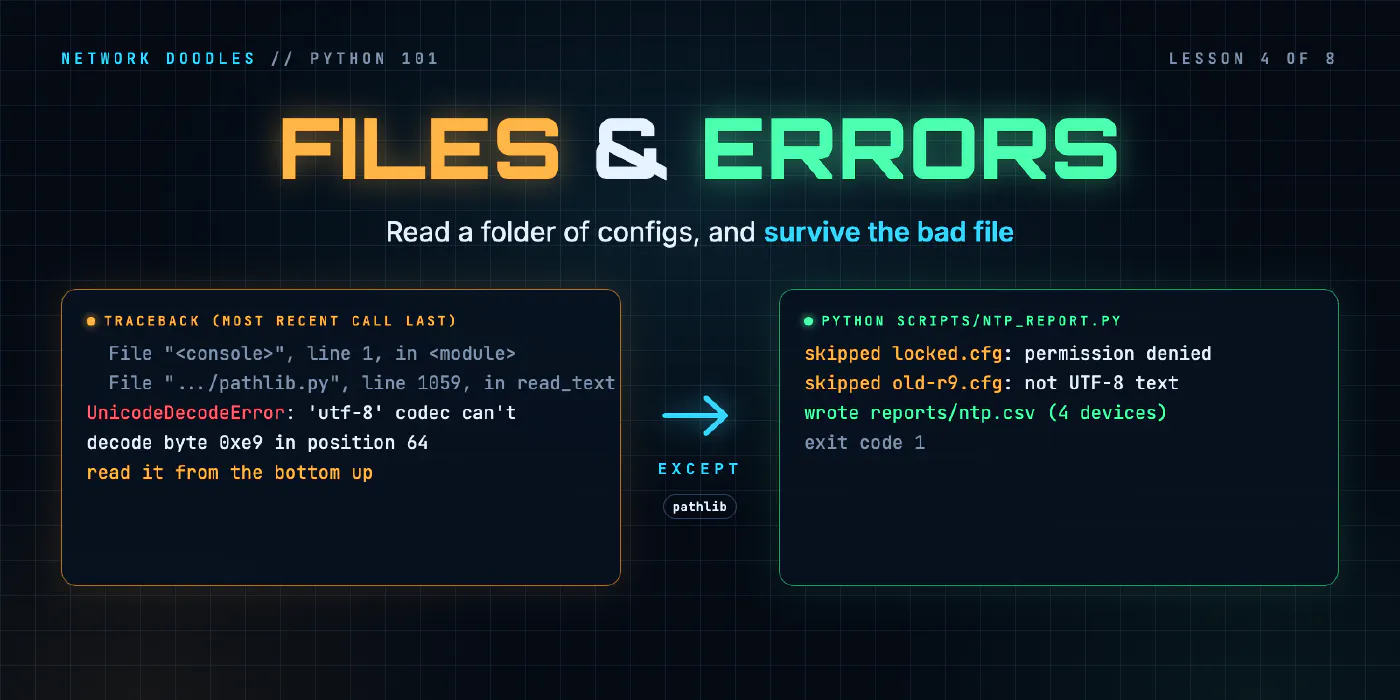
lesson 4 of 8 · course Python 101 for network engineers
- 1Running Python
- 2Strings, lists and dicts
- 3Loops, conditionals and functions
- 4Files, modules and errors
- 5Regex and TextFSM
- 6Talking to devices with Netmiko
- 7YAML, JSON and a first REST call
- 8Capstone: an inventory to CSV
A saved config is a text file, and Python reads one in a line: Path("configs/r1.cfg").read_text(). The
with statement opens a file and closes it again whatever happens in between, and the standard library
already has the modules to write what you found as CSV or JSON. When something goes wrong, Python raises an
exception and prints a traceback: read it from the bottom up. Catch only the exceptions you know what
to do with, and let every other one stop the program.
This lesson builds the tool from the lab’s chapter 4: read every saved config in a folder, say which devices
have an NTP server, write the answer to a CSV file, and keep going when one file can’t be read. On the way it
covers modules and import, why the lab’s scripts add a folder to sys.path, and what
if __name__ == "__main__" is for. Every output below is from the lab’s codespace.
What is a file to Python?
A text file, like a saved config, is bytes that stand for characters in an agreed encoding. Python finds
the file, turns the bytes into a string and hands you the string. From then on it’s the same str as in
lesson 2, and splitlines() and startswith() work as before.
The modern way to name a file is pathlib, from the
standard library. A Path knows it’s a path: you build one with / and ask it questions, instead of gluing
strings together.
>>> from pathlib import Path
>>> p = Path("configs") / "r1.cfg"
>>> p.exists(), p.is_file()
(True, True)
>>> p.stem, p.suffix, p.name
('r1', '.cfg', 'r1.cfg')
>>> text = p.read_text(encoding="utf-8")
>>> text.splitlines()[:3]
['Building configuration...', '', 'Current configuration : 741 bytes']
>>> [line for line in text.splitlines() if line.startswith("ntp server")]
['ntp server 172.80.111.12', 'ntp server 172.80.111.99']
p.stem is the name without the extension, and in the lab that’s the device: configs/r1.cfg is r1. The
first lines are a real CapeOS save: show running-config starts with Building configuration... and a byte
count before the first hostname. Your code looks for the lines it wants and ignores the rest.
A folder is one call more. glob("*.cfg") finds every matching name, the way ls *.cfg does in the shell,
in whatever order the file system keeps them, so sorted() makes the order repeatable:
>>> [p.name for p in sorted(Path("configs").glob("*.cfg"))]
['locked.cfg', 'old-r9.cfg', 'r1.cfg', 'r2.cfg', 'r3.cfg', 'sw1.cfg']
Two of those files are there on purpose, to break things later in this lesson.
What does with do?
read_text() opens, reads and closes in one go. To read a line at a time or write in pieces, you open() the
file yourself, and then something has to close it. That’s the job of with:
>>> with open("configs/r1.cfg") as f:
...     first = f.readline()
...
>>> first
'Building configuration...\n'
open() gives back a file object, f, for as long as the indented block runs, and with closes it when
the block ends, even if the block raises an error. A script that opens a thousand configs and never closes
them runs out of file handles, and a file you were writing may not reach the disk. with is the
context manager statement, and
anything that has to be opened and then closed again can offer it.
The second argument to open() is the mode: "r" reads (the default), "w" empties the file and writes,
and "a" adds to the end. Writing never adds a newline for you.
>>> out = Path("reports/hello.txt")
>>> out.parent.mkdir(parents=True, exist_ok=True)
>>> out.write_text("r1 has NTP\n")
11
>>> with open("reports/hello.txt", "a") as f:
...     f.write("r2 doesn't\n")
...
11
mkdir(parents=True, exist_ok=True) makes the folder if it isn’t there and stays quiet if it is. 11 is the
number of characters written.
Why encoding="utf-8" every time? Because on Python 3.11 the default comes from the operating system’s
locale: UTF-8 in the codespace, perhaps something else on a Windows laptop or in a cron job. Saying it means
the same file reads the same way everywhere.
What’s in the standard library for this?
Most of what a network script does with files is already written, in the standard library that comes with Python:
| Module | What it’s for | In this lab |
|---|---|---|
pathlib | paths, folders, reading and writing whole files | finding and reading configs/*.cfg |
csv | rows and columns, for spreadsheets | reports/ntp.csv, and the capstone’s inventory |
json | lists and dicts as text, for APIs and other programs | lesson 7’s API, and printing a dict readably |
datetime | dates and times | a date in a report’s file name |
csv.writer turns a list into a correctly quoted line, and csv.DictReader reads a file back as one dict per
row, keyed by the header:
>>> import csv
>>> with open("reports/ntp.csv", newline="") as f:
...     rows = list(csv.DictReader(f))
...
>>> rows[0]
{'device': 'r1', 'has_ntp': 'yes'}
>>> [r["device"] for r in rows if r["has_ntp"] == "no"]
['r2']
newline="" is what the csv documentation asks for: the module handles line endings itself. json.dumps()
turns a dict into JSON text, here the files the finished chapter 4 code couldn’t read, and datetime gives
you today in ISO 8601, the date format that sorts properly:
>>> from netlab.configs import load_configs_safe
>>> configs, problems = load_configs_safe("configs")
>>> import json
>>> print(json.dumps(problems, indent=2))
{
  "locked.cfg": "permission denied",
  "old-r9.cfg": "not UTF-8 text (byte 64)"
}
>>> import datetime
>>> datetime.date.today().isoformat()
'2026-11-11'
Before you install a package for something, look in the library index first.
What is a module, and what does import do?
A module is a .py file. import runs it once and gives you its names: its functions and variables.
import csv finds csv.py in the standard library; from netlab.configs import has_ntp finds the lab’s own
netlab/configs.py and takes one function from it. A folder of modules, like netlab/, is a package,
and the dot in netlab.configs is the folder.
>>> import netlab.configs
>>> netlab.configs.__file__
'/workspaces/python-101/netlab/configs.py'
That’s why every chapter of the lab has two kinds of file. The functions live in a module, where the checker
and other scripts can import them and call them on any input. The script, scripts/ntp_report.py, is the thin
part on top: which folder, which output file, call the functions, print. A function you can import is a
function you can test. A script that does everything in one long run of lines can only be run.
Why do the lab’s scripts change sys.path?
Python finds a module by looking through a list of folders, sys.path, and taking the first match. The
first entry is the folder of the
script you ran, or in the REPL the current folder (''), followed by the standard library and the venv’s
site-packages. So in a REPL started at the top of the repository, import netlab works. Run
python scripts/ntp_report.py and the first folder is scripts/, which has no netlab in it. Take two lines
out of the lab’s script and this is what happens:
$ python scripts/ntp_report.py
Traceback (most recent call last):
  File "/workspaces/python-101/scripts/ntp_report.py", line 12, in <module>
    from netlab.configs import load_configs_safe, write_report  # noqa: E402
    ^^^^^^^^^^^^^^^^^^^^^^^^^^^^^^^^^^^^^^^^^^^^^^^^^^^^^^^^^^
ModuleNotFoundError: No module named 'netlab'
These are the two lines, near the top of every script in the lab:
ROOT = pathlib.Path(__file__).resolve().parents[1]
sys.path.insert(0, str(ROOT))
__file__ is the script’s own path, .parents[1] is two levels up from it (the repository), and
sys.path.insert(0, ...) puts that folder first. Now import netlab works from any folder. Bigger projects
install their package into the venv instead (pip install -e .), and then no script needs these lines.
What is if __name__ == "__main__" for?
Every module has a name, __name__. Imported, it’s the dotted name, netlab.configs. Run as a script,
Python calls it "__main__" instead. A file with one line, print("__name__ is", __name__), shows both:
$ python scratch/where.py
__name__ is __main__
$ python -c "import scratch.where"
__name__ is scratch.where
That’s what the last two lines of scripts/ntp_report.py test:
if __name__ == "__main__":
    sys.exit(main(sys.argv))
Run the file and main() runs. Import it, from a check or another script, and you get the main function
without anything happening: no folder read, no file written. The
__main__ documentation calls it the idiom for top-level
code. sys.exit() hands main()’s return value to the shell as the exit code, the $? from
Linux CLI 101: 0 for “all fine”, anything else for “look at me”.
How do you read a traceback?
When Python hits something it can’t do, it raises an exception, an object that says what went wrong. If nothing catches it, the program stops and prints a traceback: the chain of calls that led there. This is the report script, with only the 4.1 functions written, on a folder with a file nobody may read:
$ python scripts/ntp_report.py
Traceback (most recent call last):
  File "/workspaces/python-101/scripts/ntp_report.py", line 29, in <module>
    sys.exit(main(sys.argv))
             ^^^^^^^^^^^^^^
  File "/workspaces/python-101/scripts/ntp_report.py", line 20, in main
    configs, problems = load_configs_safe(folder)
                        ^^^^^^^^^^^^^^^^^^^^^^^^^
  File "/workspaces/python-101/netlab/configs.py", line 60, in load_configs_safe
    return load_configs(folder), {}
           ^^^^^^^^^^^^^^^^^^^^
  File "/workspaces/python-101/netlab/configs.py", line 27, in load_configs
    configs[path.stem] = path.read_text(encoding="utf-8")
                         ^^^^^^^^^^^^^^^^^^^^^^^^^^^^^^^^
  File "/usr/local/lib/python3.11/pathlib.py", line 1058, in read_text
    with self.open(mode='r', encoding=encoding, errors=errors) as f:
         ^^^^^^^^^^^^^^^^^^^^^^^^^^^^^^^^^^^^^^^^^^^^^^^^^^^^^
  File "/usr/local/lib/python3.11/pathlib.py", line 1044, in open
    return io.open(self, mode, buffering, encoding, errors, newline)
           ^^^^^^^^^^^^^^^^^^^^^^^^^^^^^^^^^^^^^^^^^^^^^^^^^^^^^^^^^
PermissionError: [Errno 13] Permission denied: '/workspaces/python-101/configs/locked.cfg'
“Most recent call last” gives the order away: the top is where the program started, the bottom is where it
stopped. So read it from the bottom up. The last line is the answer: the exception’s type,
PermissionError, and a message that names the file. Often that’s all you need. Above it, each
File ... line ... in ... pair is a call that was still in progress, innermost at the bottom, with ^^^^
under the part that was running. The bottom two frames are in pathlib.py, the standard library, and that
code is fine: it was asked to open a file it isn’t allowed to. The lowest frame in your code is
netlab/configs.py, line 27, in load_configs. That’s where to look. The frames above it say how you got
there: main() called load_configs_safe(), which called load_configs().
The same reading works on Netmiko’s tracebacks and Ansible’s: the error at the bottom, your code a few frames up, and library code in between that you can usually skip.
What does try/except do?
Every exception has a type, and the type says what kind of problem it was. These are the ones a script that reads files meets:
| Exception | What happened | In the lab |
|---|---|---|
FileNotFoundError | no file by that name | Path("configs/nope.cfg").read_text() |
PermissionError | the file’s there, and you may not read it | configs/locked.cfg, after chmod 000 |
IsADirectoryError | the name is a folder, not a file | Path("configs").read_text() |
UnicodeDecodeError | the bytes aren’t valid in the encoding you asked for | a config saved in Latin-1 |
ValueError | the right type with a wrong value | int("Gi1") |
The first three are kinds of OSError, the operating system saying no; the
exception hierarchy shows how they
nest. The Latin-1 one is common with configs saved by older tools. In Latin-1 an é is the single byte
0xe9; in UTF-8 it’s two bytes, and 0xe9 followed by a space isn’t valid, so reading as UTF-8 stops there:
>>> Path("configs/old-r9.cfg").read_text()
Traceback (most recent call last):
  File "<stdin>", line 1, in <module>
  File "/usr/local/lib/python3.11/pathlib.py", line 1059, in read_text
    return f.read()
           ^^^^^^^^
  File "<frozen codecs>", line 322, in decode
UnicodeDecodeError: 'utf-8' codec can't decode byte 0xe9 in position 64: invalid continuation byte
>>> Path("configs/old-r9.cfg").read_bytes()[60:80]
b' Caf\xe9 network ^C\nntp'
A banner that says Café network is enough to stop a whole report. try and except let you decide what
happens instead. Python runs the try block, and if it raises an exception of the type an except names,
runs that except block and carries on after it:
>>> try:
...     Path("configs/old-r9.cfg").read_text(encoding="utf-8")
... except UnicodeDecodeError as e:
...     print("skipped:", e.reason, "at byte", e.start)
...
skipped: invalid continuation byte at byte 64
as e keeps the exception, so you can use what it knows. Inside a loop over files, that’s the difference
between “the report crashed” and this, the lab’s finished script on the same folder:
$ python scripts/ntp_report.py configs reports/ntp.csv
wrote reports/ntp.csv (4 devices)
skipped locked.cfg: permission denied
skipped old-r9.cfg: not UTF-8 text (byte 64)
It still exits with 1, not 0, so a cron job or a CI pipeline knows something needs a look.
Why catch only what you can handle?
Because an except is a promise: I know what this problem is, and this is the right thing to do about it. A
file you may not read, or one in the wrong encoding, is a problem with the data, and skipping it with a
message is the right answer. Other exceptions mean something else.
Say a folder inside configs/ happens to be called archive.cfg. Reading it raises IsADirectoryError.
That isn’t a bad config: it’s a mistake in how the folder was put together, or in the code that picks the
files. Catch everything, with except Exception:, and the report says “skipped archive.cfg” and the mistake
hides. The same broad except catches your own bugs too: a mistyped variable name raises NameError, and a
catch-all turns it into one more skipped file on every run. A bare except: is worse still: it even catches
Ctrl+C.
PEP 8, Python’s style guide, says to name
specific exceptions whenever you can, rather than a bare except:. For scripts that run against a network,
that comes down to two rules. Catch the failures you expect from the world (a file you can’t read, a device
that doesn’t answer, a refused login in lesson 6), report each one, and carry on. Don’t catch what you didn’t
plan for: let it stop the program, because the traceback is how you’ll find it.
What goes wrong
FileNotFoundError for a file that’s right there. A relative path like configs/r1.cfg is relative to
the folder you’re in, not to the script. The lab’s scripts build their default paths from ROOT for that
reason.
ModuleNotFoundError: No module named 'netlab' from a script, while the same import works in the REPL.
The script’s folder is first on sys.path, not the repository’s.
UnicodeDecodeError on one file in a hundred. Something saved it in Latin-1 or a Windows code page.
Report it, and fix it once at the source, rather than guessing encodings in every script.
A CSV with a blank line between every row in a spreadsheet: the file was opened without newline="".
open(..., "w") on the file you meant to add to. "w" empties it first. "a" appends.
except Exception: pass. The program never crashes and never tells you anything, so when a problem shows
up later there’s nothing to read.
Reading a traceback from the top. The top is the start of the program, the least interesting part. Start at the last line, then find the lowest frame in your own code.
Try it
Chapter 4 of the lab has you write has_ntp(), load_configs() and
write_report() in netlab/configs.py, and run the given scripts/ntp_report.py over the saved configs of
r1, r2, r3 and sw1 to get reports/ntp.csv. Then make break T=4.2 adds a locked file and a Latin-1 one, and
you make the report finish anyway, catching those two problems and nothing else.
What’s next
The configs were straightforward to search, because the line you wanted starts with the same words every
time. show output isn’t like that: it’s a table, laid out for people.
Lesson 5 turns that table into data, with a regular expression and
then with TextFSM, and compares the two.
Related doodles
Capstone: an Inventory to CSV (Python 101, Lesson 8)
Shape a small network tool: an inventory in, one function per step, a CSV out. Two device types into one row, csv.DictWriter, carrying on when a …
Loops, Conditionals and Functions: Which Interfaces Are Down? (Python 101, Lesson 3)
A for loop runs the same lines for every interface, if decides which ones matter, and a function wraps it up so it can be reused and tested. for over …
Parsing Show Output: Regular Expressions and TextFSM (Python 101, Lesson 5)
Turn show ip interface brief into a list of dicts twice, with a regular expression and with an ntc-templates TextFSM template, see how a template gets …