SSH and Keys: Logging In Without a Password (Linux CLI 101, Lesson 6)
SSH gives you a shell on another machine over an encrypted connection. Host keys, known_hosts, what ‘host key changed’ means, key pairs and authorized_keys, why the lab types -t ed25519, short names in ~/.ssh/config, scp, the agent, and why automation uses keys.
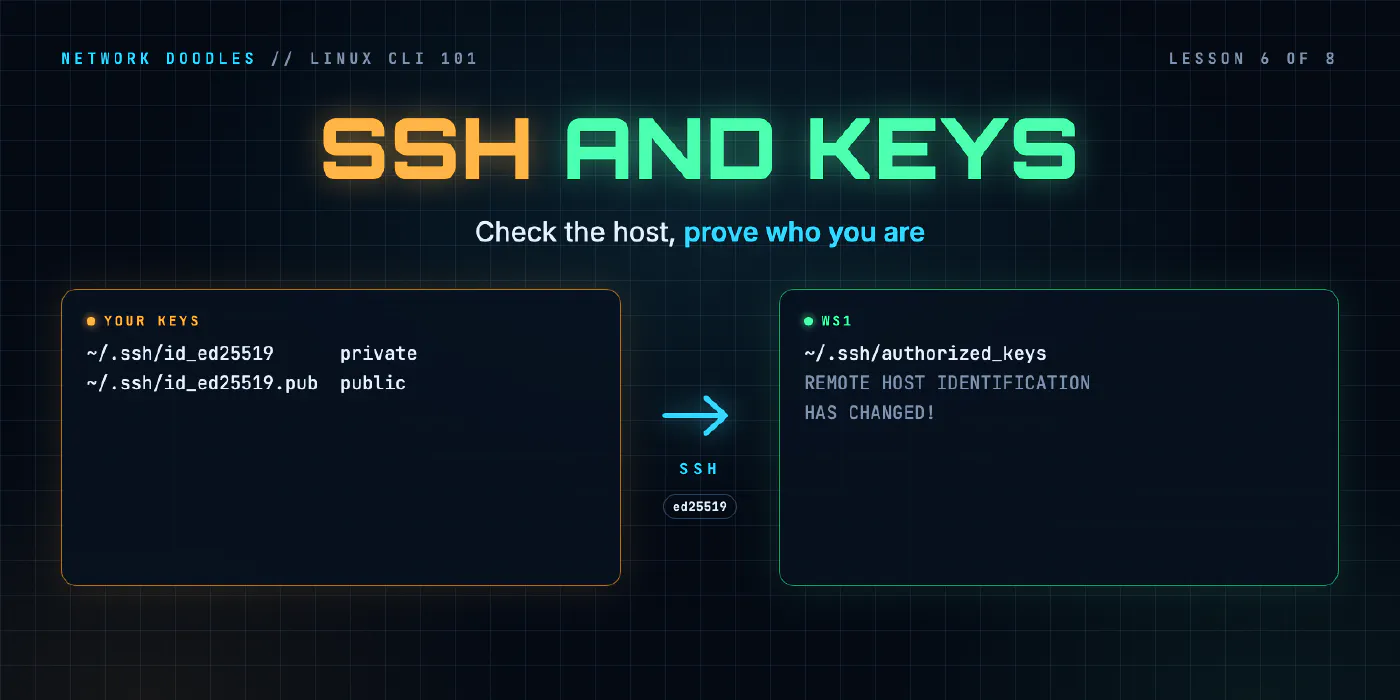
lesson 6 of 8 · course Linux and the command line 101
- 1The shell and the filesystem
- 2Working with files
- 3Pipes, redirection and grep
- 4Users, permissions and sudo
- 5Processes, environment and PATH
- 6SSH and keys
- 7A little Bash scripting
- 8The network from the command line
SSH (Secure Shell) gives you a shell on another machine over an encrypted connection. Two kinds of key
make it safe. The server’s host key proves to you that you’ve reached the right machine, and your
computer remembers it in ~/.ssh/known_hosts. Your own key pair proves to the server who you are: the
private key never leaves your machine, and the public key goes into the server’s
~/.ssh/authorized_keys. With both in place you log in with no password, and a line in ~/.ssh/config
lets you do it by a short name.
You’ve probably used SSH to network devices for years, with a password. Automation needs the key-based version: Ansible logs in to every host over SSH, and Git pushes over it.
What are the client and the server?
The SSH client is the program you run, ssh. The SSH server is a program on the other machine,
sshd (the d is for daemon, a program that runs in the background waiting for work), listening on TCP
port 22. Both come from the same project, OpenSSH, and the versions in this lab
differ, which matters below:
| Machine | Role in the lab | ssh -V says |
|---|---|---|
| the codespace (Debian 12) | client | OpenSSH_9.2p1 Debian-2+deb12u10 |
| ws1 and srv1 (Debian 13) | servers (they have the client too) | OpenSSH_10.0p2 Debian-7+deb13u4 |
| r1 (CapeOS) | a router with an SSH server and a password login |
When you connect, the client and server agree on encryption, the server proves its identity with its host key, and then you prove yours, with a key or a password.
What is a host key, and what’s the first-connection question?
A host key is a key pair that belongs to the server itself, made when SSH was installed. Its job is to stop you typing your password into an impostor. The first time you connect, your client has never seen this server’s key, so it asks you. Here is that question from the codespace, connecting to srv1:
The authenticity of host 'srv1 (172.80.102.12)' can't be established.
ED25519 key fingerprint is SHA256:D5T0vLnK5aqJqyXkl0nNrxpCcACGUqPLTgSGR0KO4Eo.
This key is not known by any other names.
Are you sure you want to continue connecting (yes/no/[fingerprint])?
A fingerprint is a short hash of the key, easy to compare by eye. The honest way to answer is to compare it
with the fingerprint taken on the server itself, through some other channel you already trust (a console, a
colleague, your build records). On srv1, ssh-keygen -lf reads its own public host key:
256 SHA256:D5T0vLnK5aqJqyXkl0nNrxpCcACGUqPLTgSGR0KO4Eo root@srv1 (ED25519)
They match, so it’s srv1. Answer yes and the client saves the key in ~/.ssh/known_hosts. Every later
connection checks the server against that saved key and doesn’t ask again. This is called trust on first
use: the first answer is the one that counts. You can also paste the fingerprint itself as the answer, and
the client checks it for you.
ssh-keyscan srv1 fetches a server’s public host keys without logging in, which is how automation fills
known_hosts for many machines. It saves you typing; it doesn’t prove anything, because it trusts whatever
answers.
Why does known_hosts look like gibberish?
Because Debian’s client settings, in /etc/ssh/ssh_config, include HashKnownHosts yes. The client stores a
hash of each host name instead of the name, so someone who reads your file can’t get a list of every server
you use. A line looks like this:
|1|V5D+TWLxnaBV6Ck3cnAQOfkYWZA=|qeCTHIXQjdcQrnEdhx7ml2NDR5g= ssh-ed25519 AAAAC3NzaC1lZDI1N...
So don’t search the file with grep srv1: it won’t find anything. ssh-keygen -F srv1 hashes the name and
finds the line for you. The ssh-keygen(1) manual page covers it.
What does “REMOTE HOST IDENTIFICATION HAS CHANGED” mean?
It means the server offered a different host key from the one in your known_hosts. To show it here, this
lesson gave the client a throwaway known_hosts file holding the wrong key for srv1:
@@@@@@@@@@@@@@@@@@@@@@@@@@@@@@@@@@@@@@@@@@@@@@@@@@@@@@@@@@@
@    WARNING: REMOTE HOST IDENTIFICATION HAS CHANGED!     @
@@@@@@@@@@@@@@@@@@@@@@@@@@@@@@@@@@@@@@@@@@@@@@@@@@@@@@@@@@@
IT IS POSSIBLE THAT SOMEONE IS DOING SOMETHING NASTY!
Someone could be eavesdropping on you right now (man-in-the-middle attack)!
It is also possible that a host key has just been changed.
The fingerprint for the ED25519 key sent by the remote host is
SHA256:D5T0vLnK5aqJqyXkl0nNrxpCcACGUqPLTgSGR0KO4Eo.
...
Host key verification failed.
The client refuses to connect at all. There are two explanations, and the message names both:
| Cause | How often | What to do |
|---|---|---|
| the server was rebuilt or reinstalled, so it made new host keys | almost always | confirm the new fingerprint with whoever rebuilt it, then replace the old line |
| something between you and the server is pretending to be it (a man-in-the-middle) | rarely, and that’s the case it exists for | don’t connect; find out what’s answering |
The wrong fix is to
delete the whole known_hosts file, or to switch checking off: both throw away the protection for every
server, not just this one. The right fix removes only the one stale entry, and the full message (trimmed
above) tells you which line it is and how. Then connect again and check the new fingerprint, as on first use.
How does a key pair log you in?
A key pair is two files made together. The private key can sign things, and must stay secret. The public key can only check those signatures, so anyone may have it. When you log in, the server sends a challenge, your client signs it with the private key, and the server checks the signature with the public key it already has. Your private key never crosses the network, and there’s no password to steal or guess.
ssh-keygen makes the pair. Here it is in the codespace, writing to a throwaway path (-N '' means no
passphrase, used only for this demo):
$ ssh-keygen -t ed25519 -N '' -f /tmp/lesson6-demo/id_ed25519 -C demo@codespace
Generating public/private ed25519 key pair.
Your identification has been saved in /tmp/lesson6-demo/id_ed25519
Your public key has been saved in /tmp/lesson6-demo/id_ed25519.pub
The key fingerprint is:
SHA256:Jc1YWRs4Z7TUlItc+zW2wdGVlMZ9wO3p3+qm02hmOHE demo@codespace
The two files, and the public key’s one line:
-rw------- 1 vscode vscode  411 Nov 11 05:55 id_ed25519
-rw-r--r-- 1 vscode vscode   96 Nov 11 05:55 id_ed25519.pub

ssh-ed25519 AAAAC3NzaC1lZDI1NTE5AAAAIF9gi15jt5MNl7110z05ei2oPcxC5i0B7QzCMhXRQPQv demo@codespace
The private key is 600, readable only by you, as lesson 4
explained: SSH refuses a private key that others can read. The .pub file is one line: the key type, the key,
and a comment that’s only a label.
To log in with it, the public key’s line goes into ~/.ssh/authorized_keys in your account on the server, one
line per key you trust. ssh-copy-id does that for you over a password login. On srv1 that file and its
folder are locked down as sshd expects:
700 netops /home/netops/.ssh
600 netops /home/netops/.ssh/authorized_keys
| File | Where | Holds | Secret? |
|---|---|---|---|
~/.ssh/id_ed25519 | your machine | your private key | yes: never copy it, share it or commit it |
~/.ssh/id_ed25519.pub | your machine | your public key | no |
~/.ssh/authorized_keys | the server | public keys allowed to log in as this user | no, but only you may write it |
~/.ssh/known_hosts | your machine | servers’ public host keys | no |
/etc/ssh/ssh_host_*_key | the server | the server’s own private host keys | yes |
A passphrase encrypts the private key file, so a stolen copy is useless without it. Use one on your own laptop. The agent, below, means you type it once, not every time.
Why does the lab type -t ed25519?
Ed25519 is a modern key type: small, fast and strong. It’s been ssh-keygen’s default since OpenSSH 9.5,
whose release notes (2023-10-04) say “generate Ed25519 keys by
default”. The codespace runs OpenSSH 9.2, older than that, so there ssh-keygen with no -t still makes RSA:
$ ssh-keygen -N '' -f /tmp/lesson6-demo/default_key -C demo@codespace
Generating public/private rsa key pair.
...
3072 SHA256:PSXemktsnew7YRkQIkYNXcNul6piSYKqv4qJ9/jqx08 demo@codespace (RSA)
A 3072-bit RSA key still works. But -t ed25519 gives you the same key type on every machine, whatever its
OpenSSH version, and it’s the type the lab’s checker looks for.
What does “Permission denied (publickey,password)” mean?
The server turned you away, and the brackets list the login methods it would have accepted. Here the
codespace tries ws1 with the demo key, which ws1 has never been given, in batch mode
(-o BatchMode=yes: never stop to ask a question, fail instead, which is how scripts run ssh):
netops@ws1: Permission denied (publickey,password).
The key was offered and refused, and batch mode wasn’t allowed to fall back to a password prompt. The same
words appear when the key isn’t in authorized_keys, when you’ve given the wrong user name, or when the
server ignores authorized_keys because its permissions are too open. ssh -v shows each key the client
offers and the server’s answer.
How do I log in by a short name? ~/.ssh/config
~/.ssh/config is your client’s settings file. Each Host block gives a name you can type, and the settings
to use for it. The options are in ssh_config(5). Here’s a block in a
throwaway file that makes web mean “srv1, as netops, with this key”:
Host web
    HostName srv1
    User netops
    IdentityFile /tmp/lesson6-demo/id_ed25519
ssh -G web prints the settings the client would actually use, without connecting. It’s the quickest way to
check a block does what you meant:
user netops
hostname srv1
port 22
identityfile /tmp/lesson6-demo/id_ed25519
| Keyword | Means |
|---|---|
Host | the name (or names, or a pattern like *.lab) this block applies to |
HostName | the real name or address to connect to, if different |
User | the user to log in as, so you can drop user@ |
Port | if it’s not 22 |
IdentityFile | which private key to offer |
The client reads the file from the top and, for each setting, keeps the first value it finds. Put
specific hosts first and a catch-all Host * last. Every tool that uses OpenSSH reads this file, so an alias
works for scp, Git and Ansible too.
A fresh install has no ~/.ssh/config at all. If yours already has blocks, they’re left from earlier work.
How do I copy a file over SSH? scp
scp copies files over the same connection, with the same keys, known_hosts and aliases. It reads like
cp, with a host name and a colon in front of a remote path. A path after the colon is relative to your home
folder on the other side, and nothing after the colon means the home folder itself. Forget the colon and scp
makes a local copy with a file name that looks like a host.
What does the SSH agent do?
The agent, ssh-agent, is a small background process (a process like the ones in
lesson 5) that holds your unlocked private keys in memory.
You add a key once with ssh-add, typing its passphrase once, and every ssh after that asks the agent to
sign for it. The client finds the agent through an environment variable, SSH_AUTH_SOCK, so only shells that have
that variable can use it. Here’s the demo key added to an agent and listed:
Identity added: /tmp/lesson6-demo/id_ed25519 (demo@codespace)
256 SHA256:Jc1YWRs4Z7TUlItc+zW2wdGVlMZ9wO3p3+qm02hmOHE demo@codespace (ED25519)
ssh-add -l shows fingerprints, never the keys. The agent is what makes a passphrase bearable, and what lets
Ansible open fifty connections without fifty prompts.
Why do keys beat passwords for automation?
| Password | Key | |
|---|---|---|
| a script can use it without a human | only by storing the password somewhere | yes, through the agent or an unencrypted key kept for that job |
| what crosses the network | the password itself, encrypted | a signature; the private key never leaves |
| guessable | yes, and servers get guessed at all day | no |
| revoke one machine’s access | change the password everywhere it’s used | delete one line from authorized_keys |
| one per person or job | rarely, in practice | easily: one key each, each with its own comment |
Servers defend themselves against guessing too. Since OpenSSH 9.8
(2024-07-01), sshd penalises client addresses that don’t complete a login, through a PerSourcePenalties
setting that’s “on by default”. srv1’s effective settings show it:
persourcepenalties crash:90 authfail:5 noauth:1 grace-exceeded:10 refuseconnection:10 max:600 min:15 ...
A script that keeps retrying a wrong password can get its own address refused for a while. With keys, that doesn’t happen.
That’s why Ansible 101 logs in to Linux hosts with keys, why GitOps pushes with one, and why Python 101’s Netmiko lesson keeps device passwords in environment variables rather than in code. Many network devices, like r1 here, still use passwords, so those tools also keep passwords out of your files.
What I see go wrong
A private key others can read. The client won’t use it, and says so in capitals. chmod 600, from
lesson 4.
A key that’s in authorized_keys and still refused. The server ignores the file if ~/.ssh or
authorized_keys can be written by anyone but you. Or the key went into the wrong user’s home folder.
Wrong user. Without user@ or a User line, ssh uses your local user name (vscode in the codespace),
which doesn’t exist on the server.
Deleting all of known_hosts after one rebuild. It works, and it throws away every other server’s key with it. Remove only the stale entry.
StrictHostKeyChecking no in a config “to make it work”. It turns off the one check that tells you you’ve
reached the right machine. Scan and verify the keys instead.
The private key in Git. Once pushed, assume it’s public: remove its line from every authorized_keys and
make a new pair. Don’t hardcode passwords applies to keys too.
Copying the wrong file. authorized_keys takes the .pub file’s line. If you’re about to paste something
that starts with -----BEGIN OPENSSH PRIVATE KEY-----, stop.
Try it
Chapter 6 of the lab has you log in to ws1 with a password, check and accept its host key, make an ed25519 key pair and log in again without a password. Then you give ws1, srv1 and r1 short names, copy a file to srv1, and meet “host key changed” for real when srv1 is rebuilt.
What’s next
Typing the same SSH command for every host gets old fast. Lesson 7 turns commands you’d type into a script: a loop over a list of hosts, and an exit code that says whether they all answered.
Related doodles
Processes, Environment Variables and PATH: Finding What Runs (Linux CLI 101, Lesson 5)
Every running program is a process with a number. How to run jobs in the background, find a process that's eating a CPU and stop it, what TERM and …
The Shell and the Filesystem: Reading Any Path (Linux CLI 101, Lesson 1)
A shell reads the commands you type and runs them. Linux keeps every file in one tree that starts at /. The prompt, commands and their options, …
Users, Permissions and sudo: Reading ls -l (Linux CLI 101, Lesson 4)
Every Linux file has an owner, a group and nine permission bits. Read them in ls -l, set them with chmod as 644, 755 or 600, see why SSH ignores a key …