A Little Bash Scripting: Variables, Loops and Exit Codes (Linux CLI 101, Lesson 7)
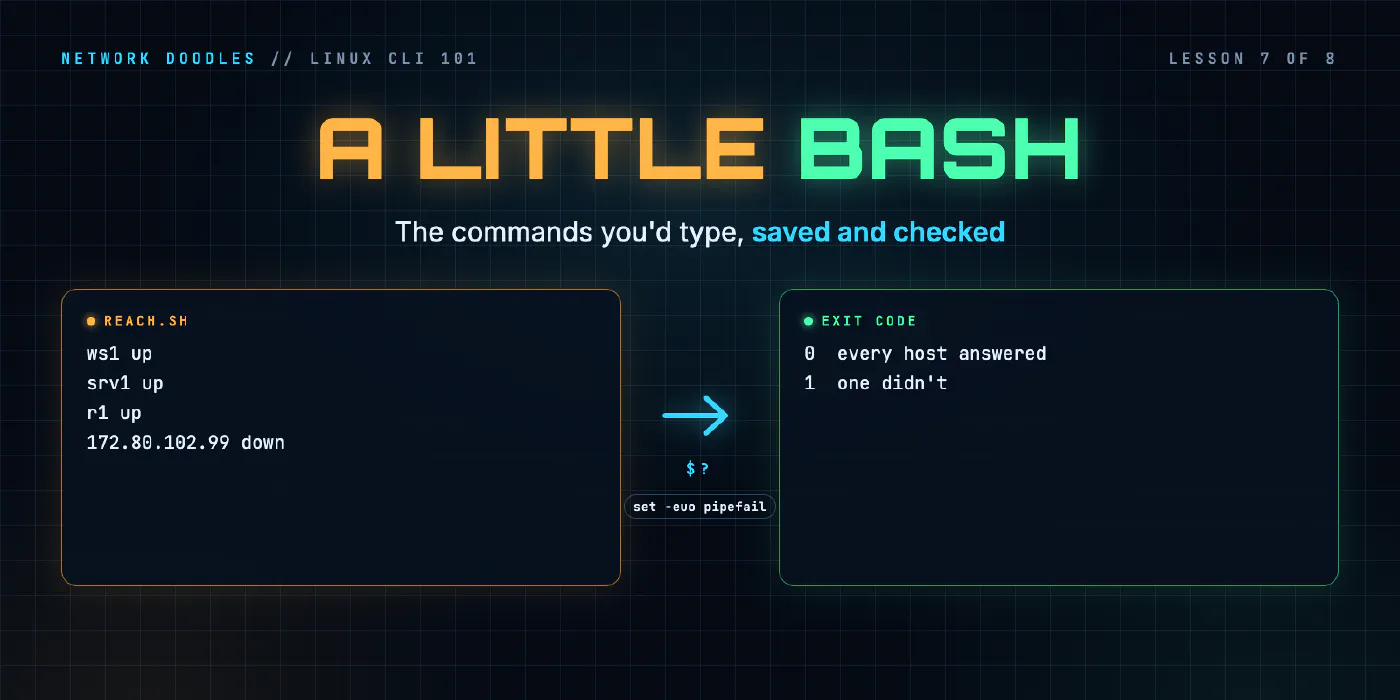
A Bash script is the commands you’d type, saved in a file. The shebang, quoting, arguments, looping over a file of hosts, exit codes, if, && and ||, set -euo pipefail, and the point where Python is the better tool.
lesson 7 of 8 · course Linux and the command line 101
- 1The shell and the filesystem
- 2Working with files
- 3Pipes, redirection and grep
- 4Users, permissions and sudo
- 5Processes, environment and PATH
- 6SSH and keys
- 7A little Bash scripting
- 8The network from the command line
A Bash script is a text file full of the commands you’d otherwise type, run top to bottom by Bash. Three
ideas carry most of it: quote your variables ("$file", not $file), every command returns an exit
code (0 means it worked, anything else means it didn’t), and if, && and || decide what to do next by
reading that code. Put set -euo pipefail near the top so a script stops at the first surprise instead of
carrying on with bad data.
That’s enough to write the script every network engineer writes first: read a list of hosts, check each one, and exit non-zero if any of them failed, so that whatever ran it (you, cron, a CI pipeline) knows. When the script needs real data structures, parsing or error handling, that’s where Bash stops and Python starts.
The examples here ran in the lab’s codespace, Debian 12 with GNU Bash 5.2.15. The reference is the GNU Bash manual.
What is a script, and how does Linux run it?
Here’s a complete one, hello.sh:
#!/usr/bin/env bash
# hello.sh: say who and where we are
echo "Hello from $(hostname), I am $(whoami)"
The first line is the shebang: #! followed by the program that should run the file. /usr/bin/env bash
means find bash on my PATH and use that, the same search the shell does for any command
(lesson 5). Lines starting # after that are comments.
$(hostname) is command substitution: Bash runs the command and pastes its output into the line.
A new file isn’t allowed to run until you give it the execute bit, from lesson 4:
$ ./hello.sh
bash: line 8: ./hello.sh: Permission denied
$ chmod +x hello.sh
$ ls -l hello.sh
-rwxr-xr-x 1 vscode vscode 99 Nov 11 05:55 hello.sh
$ ./hello.sh
Hello from codespace, I am vscode
The ./ matters. The current folder isn’t on PATH, so hello.sh on its own would be “command not found”.
./hello.sh is a path: this file, here. You can also run bash hello.sh, which needs no execute bit and
ignores the shebang, because you’ve named the interpreter yourself.
How do variables and quoting work?
A variable is a name that holds a piece of text. You set it with name=value and read it with $name.
There are no spaces around the =. With spaces, Bash thinks site is a command:
$ site = nyc
bash: line 1: site: command not found
Bash keeps every value as text and, by default, does something surprising when it reads an unquoted variable:
it splits the value on spaces (and expands any * in it as a glob). That bites the moment a file name
has a space in it, which network backups often do. Here’s a two-line script, count.sh, that counts the lines
in a file:
file=$1
wc -l $file
$ ./count.sh "cfgs/nyc leaf1.cfg"
wc: cfgs/nyc: No such file or directory
wc: leaf1.cfg: No such file or directory
0 total
One argument went in. Two came out, because $file without quotes became two words. Add the quotes and it’s
one file again:
file="$1"
wc -l "$file"
$ ./count.sh "cfgs/nyc leaf1.cfg"
2 cfgs/nyc leaf1.cfg
The two kinds of quotes differ in one way:
| Quotes | $ inside them | Example | Prints |
|---|---|---|---|
double, "..." | expanded | echo "site is $site" | site is nyc |
single, '...' | left alone | echo 'site is $site' | site is $site |
Use double quotes around every variable unless you have a reason not to. Use ${name} when the next character
could be part of the name: "${site}_leaf1", because $site_leaf1 asks for a variable called site_leaf1.
The manual’s section on quoting has the
full rules.
How does a script read its arguments?
Whatever you type after the script’s name arrives as positional parameters:
| Name | Holds |
|---|---|
$0 | the script’s own name, as you called it |
$1, $2 … | the first, second … argument |
$# | how many arguments there are |
"$@" | all of them, each one kept whole |
A short args.sh that prints them, called with an argument that has a space in it:
$ ./args.sh r1 "nyc leaf1" srv1
script: ./args.sh
first:  r1
count:  3
arg:    r1
arg:    nyc leaf1
arg:    srv1
The loop in it was for a in "$@". With the quotes, nyc leaf1 stays one argument. Without them it would be
two, for the same reason as $file above.
Often an argument is optional. ${1:-hosts.txt} means the first argument, or hosts.txt if there isn’t
one. The lab’s reach.sh starts with exactly that line.
How do you loop over a file of hosts?
The tempting way is for h in $(cat hosts.txt). It reads the file and splits it into words, so it breaks on
anything that isn’t one word per line. Here it is on a small file with a comment and a blank line:
# lab machines
ws1
srv1

r1
$ for h in $(cat hosts-demo.txt); do echo "[$h]"; done
[#]
[lab]
[machines]
[ws1]
[srv1]
[r1]
The comment became three “hosts”. The way that reads lines is while read -r, with the file fed in at the
end of the loop:
while read -r h; do
  echo "[$h]"
done < hosts-demo.txt
[# lab machines]
[ws1]
[srv1]
[]
[r1]
One line per pass, kept whole, including the blank one. Now the comment and the empty line are easy to
recognize and skip (the lab’s starter script does that for you with a case line). -r tells read to
leave backslashes alone. A for loop is still the right tool over a glob, such as for f in "$dir"/*.cfg,
because the shell hands it one file name per pass, spaces and all.
What is an exit code?
Every command finishes with a number, its exit code (or exit status): 0 for success, anything from
1 to 255 for some kind of failure. The shell doesn’t print it. It keeps it in $? until the next command
replaces it:
$ ls /etc/hostname; echo $?
/etc/hostname
0
$ ls /nope; echo $?
ls: cannot access '/nope': No such file or directory
2
$ grep -q root /etc/passwd; echo $?
0
$ grep -q nobodyhere /etc/passwd; echo $?
1
Each program documents its own codes in its man page. A few you’ll meet constantly:
| Code | From | Means |
|---|---|---|
0 | anything | it worked |
1 | grep | no line matched (not an error, just no) |
2 | grep, ls | real trouble, such as a file that isn’t there |
1 | ping | no reply came back |
2 | ping | something else went wrong, such as a name that doesn’t resolve |
126 | Bash | found the file but couldn’t run it (no execute bit) |
127 | Bash | command not found |
The ping codes, from the codespace:
$ ping -c 1 -W 1 ws1 >/dev/null; echo "ws1: $?"
ws1: 0
$ ping -c 1 -W 1 172.80.102.99 >/dev/null; echo "dead: $?"
dead: 1
$ ping -c 1 -W 1 nosuchhost >/dev/null; echo "noname: $?"
ping: nosuchhost: Name or service not known
noname: 2
>/dev/null throws the normal output away. The exit code still arrives, and that’s all a script needs.
Your own script sets its exit code with exit N. Without one, it exits with the code of the last command it
ran. That’s how a script reports back: a monitoring job, a CI pipeline, an Ansible task or another script
reads the number, not the text. The manual’s exit status
page lists Bash’s own codes.
How do if, && and || use exit codes?
if doesn’t test a true-or-false value. It runs a command and looks at its exit code: 0 takes the
then branch, anything else takes else. [ ... ] is itself a command (also called test) whose whole job is
to return 0 or 1: [ -f "$file" ] asks is this a regular file?, [ -z "$x" ] asks is this empty?.
#!/usr/bin/env bash
set -euo pipefail
file="${1:-hosts-demo.txt}"
if [ ! -f "$file" ]; then
  echo "no such file: $file" >&2
  exit 2
fi
if grep -q "^r1$" "$file"; then
  echo "$file lists r1"
else
  echo "$file has no r1"
fi
echo "done"
$ ./ifdemo.sh; echo "exit $?"
hosts-demo.txt lists r1
done
exit 0
$ ./ifdemo.sh args.sh; echo "exit $?"
args.sh has no r1
done
exit 0
$ ./ifdemo.sh nope.txt; echo "exit $?"
no such file: nope.txt
exit 2
The error message goes to stderr with >&2, as in lesson 3,
so it doesn’t mix with the script’s real output. grep -q prints nothing and only sets the code, which makes it
a natural if condition.
For one-liners there’s a shorter form. a && b runs b only if a succeeded. a || b runs b only if a
failed:
$ ping -c 1 -W 1 srv1 >/dev/null && echo "srv1 answers" || echo "srv1 is quiet"
srv1 answers
$ ping -c 1 -W 1 172.80.102.99 >/dev/null && echo "old box answers" || echo "old box is quiet"
old box is quiet
Use that on the command line. In a script, prefer if: in a && b || c, c also runs when b fails, which
is rarely what you meant.
What does set -euo pipefail do?
By default Bash is forgiving: a command fails, Bash prints its error and moves on to the next line. In a script that changes things, that’s dangerous. Three options, set together, make it strict (the set builtin):
| Option | Effect |
|---|---|
-e | exit as soon as a command fails |
-u | treat reading an unset variable as an error |
-o pipefail | a pipeline fails if any command in it fails, not only the last |
-u catches typos. This script was meant to print a folder to clean, but the second line says $sitedir
instead of $site_dir:
#!/usr/bin/env bash
# clean out the old backups for one site
site_dir="/tmp/lesson7-demo/backups/$1"
echo "would remove: $sitedir/*"
$ ./backup-dir.sh nyc
would remove: /*
An unset variable is silently empty, so the path collapsed to /*. The same script with set -euo pipefail
as its second line (so the two lines above become lines 4 and 5):
$ ./backup-dir-u.sh nyc
./backup-dir-u.sh: line 5: sitedir: unbound variable
$ ./backup-dir-u.sh
./backup-dir-u.sh: line 4: $1: unbound variable
Both exit with code 1 before doing anything. The second shows -u also catching a missing argument. When an
argument really is optional, say so with ${1:-} (empty if missing) or a default.
-e stops after a failed step. A cd into a folder that isn’t there, then the rest of the script:
$ ./e.sh; echo "exit $?"
./e.sh: line 2: cd: /tmp/lesson7-demo/no-such-folder: No such file or directory
still running, in /tmp/lesson7-demo
exit 0
$ ./e2.sh; echo "exit $?"
./e2.sh: line 3: cd: /tmp/lesson7-demo/no-such-folder: No such file or directory
exit 1
Without -e, the script carried on in the wrong folder and still reported success. With it, it stopped.
-e doesn’t fire for a command that’s being tested, by if, while, ! or on the left of && and ||. That’s
why ifdemo.sh carried on when grep found no r1: a “no” you asked for isn’t a crash.
pipefail keeps errors from hiding in pipelines. A pipeline’s exit code is normally the last command’s:
$ grep ntp /nope/r1.cfg | wc -l; echo "exit $?"
grep: /nope/r1.cfg: No such file or directory
0
exit 0
$ set -o pipefail; grep ntp /nope/r1.cfg | wc -l; echo "exit $?"
grep: /nope/r1.cfg: No such file or directory
0
exit 2
wc happily counted zero lines of nothing. With pipefail, grep’s failure comes through.
None of the three is perfect, and -e in particular has corner cases the manual spends a page on. Treat them as
a safety net, and still check the things that matter with if.
Where does Bash stop and Python start?
Bash is glue. It’s at its best starting programs, connecting them with pipes, and checking their exit codes. It gets painful as soon as the data has shape.
| Job | Bash | Python |
|---|---|---|
| run a few commands in order, stop on failure | natural | more typing for the same thing |
| loop over hosts or files, call a tool on each | natural | fine |
glue grep, sort, ssh, scp together | natural | awkward |
| numbers beyond whole-number arithmetic | no floats at all | built in |
| lists of dicts, JSON, YAML, CSV | fragile, needs extra tools | built in or one import |
parsing show output into fields | grep/cut until it breaks | regex, TextFSM |
| talking to devices or APIs | ssh and curl, one-shot | Netmiko, requests |
| handling some errors and carrying on | possible, gets ugly | try/except |
| testing it | rare | pytest |
A rough rule: if a script passes 50 lines, needs a data structure more complicated than a list of names, or has
you reaching for awk inside sed inside a loop, write it in Python. Python 101
starts from running Python in the same terminal, and its
capstone is the grown-up version of this lesson’s host check: an
inventory of every device, written to CSV, with a list of the ones it couldn’t reach.
What I see go wrong
Unquoted variables. Works for months, then a backup called sw1 2026-11-02.cfg turns up and the script
reads two files that don’t exist. Quote every "$var" and "$@".
Spaces around =. site = nyc runs a command called site. Assignments have no spaces.
Reading $? too late. $? belongs to the most recent command, and echo is a command. Save it
(rc=$?) straight away if you need it twice.
A script that always exits 0. It printed “down” for a host but still reported success, so the pipeline that ran it went green. If the script’s job is to check something, its exit code is the answer.
for over $(cat file). Splits comments and anything with a space into pieces. Use while read -r for
lines.
Windows line endings. A script edited on Windows can carry invisible \r characters at the end of each line,
and Bash then reports errors about commands or paths you can’t see anything wrong with. cat -A script.sh
shows them as ^M.
Try it
Chapter 7 of the lab has you finish scripts/reach.sh, which pings every
host in hosts.txt (including one that was switched off last year) and exits 1 if any are down. The challenge
writes scripts/audit.sh, which lists the configs in a folder with no ntp server line. The checker runs both
against host lists and folders they haven’t seen, including file names with spaces and an empty folder.
What’s next
reach.sh only asks whether a host answers ping. Lesson 8 asks
the harder questions from the command line: which way a packet goes, what’s listening and on which address,
what curl sees from DNS to HTTP, and what’s actually on the wire.
Related doodles
Ansible Handlers, Tags and block/rescue on Network Devices (Ansible 101 for Networking, Lesson 5)
Save the config only when something actually changed with handlers, run just part of a playbook with tags, and recover when a change fails halfway …
Ansible Inventory and Ad-Hoc Commands for Network Switches (Ansible 101 for Networking, Lesson 1)
Ansible for people who run networks, not servers. What Ansible actually does when the target is a switch, how an inventory works, how to point it at a …

Ansible Loops, when and Jinja2 Templates for Network Config (Ansible 101 for Networking, Lesson 4)
Configure every port on every switch from a list of data with loop, treat uplinks differently with when, and render a report of the whole fabric with …