Ansible Vault for Network Device Passwords (Ansible 101 for Networking, Lesson 7)
Get the switch password out of plain text: ansible-vault, what to encrypt and what not to, the vault_ variable pattern, keeping the vault key off the repo, and where vault stops being enough. Lesson 7 of Ansible 101 for networking, with a hands-on lab.
lesson 7 of 8 · course Ansible 101 for networking
- 1Hello, Ansible
- 2Your first playbook
- 3Variables and facts
- 4Loops, conditionals, templates
- 5Handlers, tags, errors
- 6Roles and collections
- 7Secrets
- 8Run it like production
Since lesson 1 the lab’s switch password has been sitting in a YAML file in plain text, with a comment promising that lesson 7 would fix it. This is lesson 7.
I’ve written before about why you shouldn’t hardcode passwords. This post is the practical Ansible version: ansible-vault, the pattern that keeps vaulted files readable, and the one file that must never reach Git.
The problem, precisely
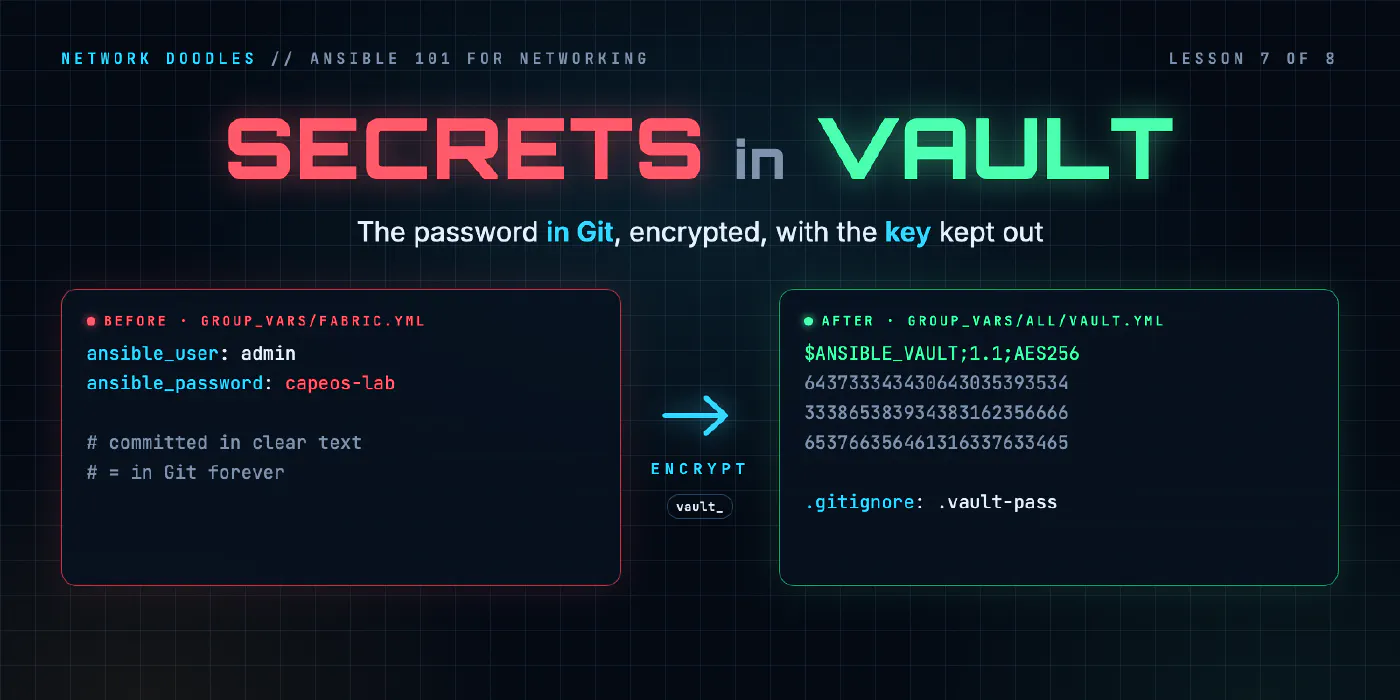
Right now inventory/group_vars/fabric.yml contains:
ansible_user: admin
ansible_password: capeos-lab
Commit that and the password is in Git forever. Not until you delete the line: forever. It’s in the history, in every clone, in every fork, in the CI cache. Rotating the password is the only real fix, and on a network that’s every device.
We want three things:
- The password is in Git, so the repo is still the complete description of the network.
- It’s unreadable to anyone without the key.
- The key is not in Git.
How ansible-vault works
ansible-vault encrypts files (or single values) with AES-256 using a password you choose, the vault password. Ansible decrypts them in memory when it runs; they never touch disk in clear text. An encrypted file looks like this, and it’s safe to commit:
$ANSIBLE_VAULT;1.1;AES256
32653236363634656263313066396265613937616133336430353330393338626165333766383163
3836373465373031333334333465393337376132646438390a616132313762633532636561363561
...
The setup has a handful of moving parts, and each has one job:
| Piece | What it’s for |
|---|---|
.vault-pass | A file holding the vault password: the key. It stays on your machine, readable only by you (chmod 600), and never in Git. |
.gitignore entry for .vault-pass | Makes sure the key can’t be committed by accident. Add it before the file exists. |
vault_password_file = .vault-pass in ansible.cfg | Tells Ansible where the key is, so every run decrypts without asking. |
ansible-vault create | Makes a new encrypted file and opens it in your editor. |
ansible-vault view / edit | Reads or changes an encrypted file without ever writing the clear text to disk. |
ansible-vault rekey | Re-encrypts a file with a new vault password, for when the key itself has to change. |
ansible-vault encrypt_string | Encrypts one value, for pasting into an otherwise plain YAML file. |
That .gitignore line is the most important line in this post. Everything else is recoverable; a committed
key isn’t.
A whole file, or one value
There are two ways to encrypt, and they suit different secrets.
A whole file (ansible-vault create) is the simple one. view, edit and rekey all work on it, and
you can keep several secrets in it. The cost is that everything in the file is hidden, from reviewers as much
as from attackers.
One value (ansible-vault encrypt_string) encrypts a single string and prints a block you paste into a
normal file:
snmp_community: !vault |
          $ANSIBLE_VAULT;1.1;AES256
          66383430653433353434623339646165323662353563666433656536636265656363663036313434
          ...
The rest of the file stays readable, and the variable name stays visible, so a diff shows that the
community changed even though nobody can see what to. The cost: each value is encrypted on its own, so you
can’t view or edit it in place; changing it means encrypting a new value and pasting it over the old one.
Rule of thumb: inline for the odd value that lives naturally in a plain settings file, a vault file once you have more than a couple of secrets, or any you’ll change often.
The vault_ pattern
Here’s the mistake almost everyone makes first: encrypting group_vars/fabric.yml whole. It works, and now
nobody can see any of the fabric’s settings without the key, not the connection type, not the NTP servers,
nothing. Code review on that file becomes “trust me”.
The pattern that fixes it is small:
# inventory/group_vars/all/vault.yml   (encrypted)
vault_ansible_password: capeos-lab
# inventory/group_vars/fabric.yml     (plain text)
ansible_user: admin
ansible_password: "{{ vault_ansible_password }}"   # from inventory/group_vars/all/vault.yml
- The encrypted file holds only secrets, each named with a
vault_prefix. - The plain file references them, so anyone can read the fabric’s settings, search for where the password is used, and review changes, without the key.
group_vars/all/ is a folder rather than a file: Ansible loads every file inside a group’s folder, which lets
you keep vault.yml separate from the plain settings for the same group.
The playbooks don’t change at all. Ansible finds the key through ansible.cfg, decrypts in memory, and the
switches never know anything changed.
Checking you actually fixed it
Encrypting the file you were looking at isn’t the same as getting the password out of the repo. Search every
tracked file for the old password, not just the one you edited, because it tends to turn up in a README,
a test script or an example inventory somebody copied. git grep does exactly that: it searches what Git
would commit, and nothing else.
Expect some hits you meant. A lab’s README that documents the login on purpose is fine. Anything you’d copy into production isn’t.
And if the password was ever committed in clear text, assume it’s compromised and rotate it. Removing it from the latest commit doesn’t remove it from history.
Where vault stops being enough
ansible-vault is the right first step, and for a lab or a small team it might be all you need. It has limits worth knowing before you outgrow it:
- One key unlocks everything. Everyone who can run the playbooks can read every secret. Vault IDs (separate keys per environment) help a little.
- Rotation is manual. Change a device password and someone has to edit, re-encrypt and commit.
- The key still has to live somewhere. On a laptop it’s a file; in CI it’s a masked variable. Either way, it’s a long-lived secret protecting other secrets.
The next step is a secrets manager: HashiCorp Vault, CyberArk, AWS Secrets Manager, Azure Key Vault. Ansible fetches secrets at runtime through a lookup plugin, nothing sensitive is stored in Git at all, and access is per person or per pipeline, audited and revocable. If you run Ansible Automation Platform, its credential store does the same job and keeps secrets out of the playbook’s reach entirely.
The playbooks don’t change much when you move: ansible_password just gets its value from a lookup instead
of a vault_ variable. That’s another reason the vault_ pattern pays off. The plain files never cared where
the value came from.
Where people get it wrong
1. Committing the key next to the lock
.vault-pass in the repo, or the vault password in the README, or echo in a committed script. All three
undo the encryption. The key lives outside Git, always.
2. Encrypting everything
A fully encrypted group_vars file can’t be reviewed, diffed or searched. Encrypt secrets only, with the
vault_ pattern.
3. Printing secrets
debug: var=ansible_password prints it decrypted, straight into your CI log. Any task that handles a secret
should have no_log: true, and nothing should ever debug one.
4. “It’s only the lab password”
Lab passwords get reused, lab repos get made public, and lab inventories get copied into production. Build the habit where it’s cheap.
Try it
Chapter 7 of the lab moves the switch password into a vault file with the
vault_ pattern, keeps the key out of Git, and encrypts the SNMP community inline with encrypt_string.
Next, in lesson 8, the finale: running all of this the way production does, in an execution environment, lint-clean, from a pipeline.
Related doodles
Ansible Handlers, Tags and block/rescue on Network Devices (Ansible 101 for Networking, Lesson 5)
Save the config only when something actually changed with handlers, run just part of a playbook with tags, and recover when a change fails halfway …
Ansible Inventory and Ad-Hoc Commands for Network Switches (Ansible 101 for Networking, Lesson 1)
Ansible for people who run networks, not servers. What Ansible actually does when the target is a switch, how an inventory works, how to point it at a …
Ansible Loops, when and Jinja2 Templates for Network Config (Ansible 101 for Networking, Lesson 4)
Configure every port on every switch from a list of data with loop, treat uplinks differently with when, and render a report of the whole fabric with …