Ansible Roles and Collections for Network Automation (Ansible 101 for Networking, Lesson 6)
Turn a folder of playbooks into roles: tasks, defaults and handlers in a reusable unit, the precedence rule that makes role defaults useful, why role variables need a prefix, and where collections fit. Lesson 6 of Ansible 101 for networking, with a hands-on lab.
lesson 6 of 8 · course Ansible 101 for networking
- 1Hello, Ansible
- 2Your first playbook
- 3Variables and facts
- 4Loops, conditionals, templates
- 5Handlers, tags, errors
- 6Roles and collections
- 7Secrets
- 8Run it like production
Five lessons in, the lab has a playbook for banners, one for base config, one for interfaces, one for facts and one for a report. Each works. Together they’re the start of a problem every team hits: which playbook do I run, in what order, and why is the save handler defined twice?
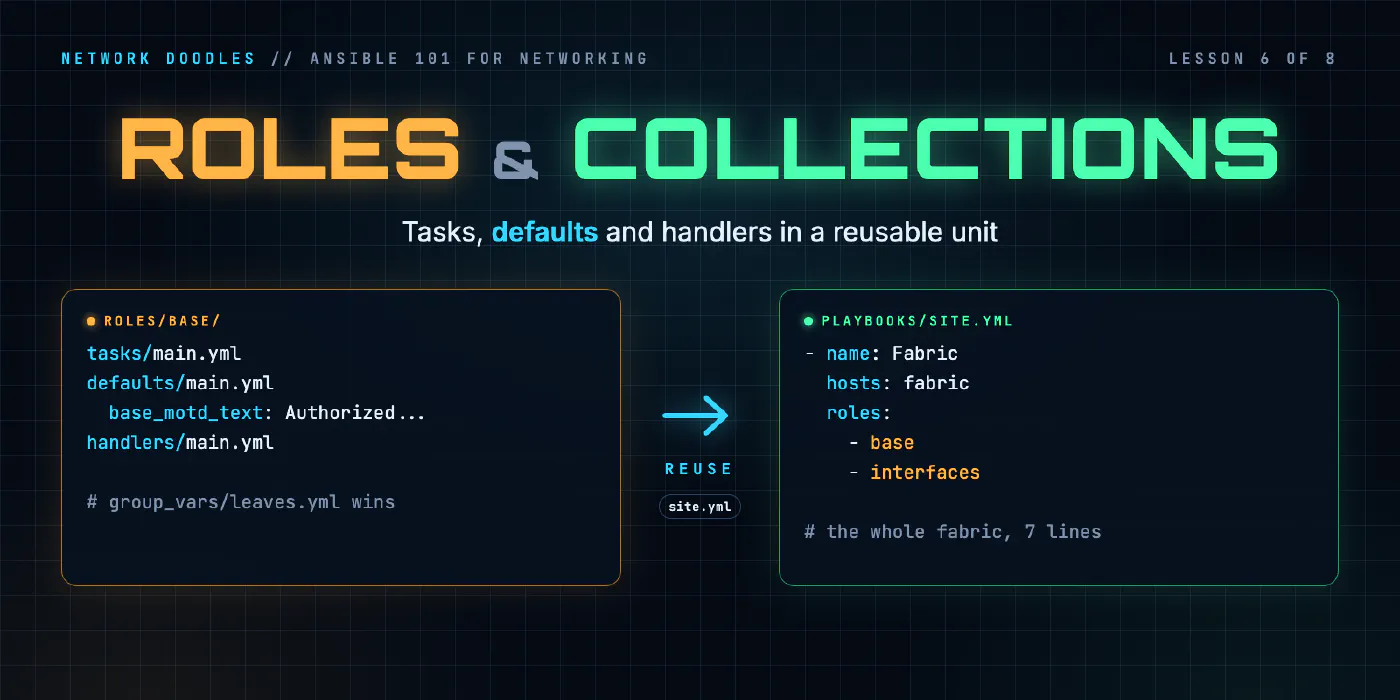
Roles are Ansible’s answer. A role packages tasks, their defaults, their handlers and their templates into
one folder you can run, reuse and share. This lesson turns the lab’s playbooks into two roles and one
site.yml, and explains the one precedence rule that makes roles click.
What a role is
A role is a folder with a fixed layout. Ansible knows where to look for each piece:
roles/base/
├── tasks/main.yml       ← what the role does (required)
├── defaults/main.yml    ← its variables, at the lowest precedence there is
├── handlers/main.yml    ← its handlers (the save from lesson 5)
├── templates/           ← its Jinja2 templates, found by name
└── meta/main.yml        ← who wrote it, what it needs
You don’t create that by hand: ansible-galaxy role init scaffolds it, with a stub main.yml in every
folder. Delete the ones you don’t use; an empty vars/ folder is noise.
The lab ends up with two roles:
base: banners, contact, domain, location, LLDP, NTP, and the save handler.interfaces: the two port loops from lesson 4.
And one playbook that runs them:
# playbooks/site.yml
- name: Fabric
  hosts: fabric
  gather_facts: false
  roles:
    - base
    - interfaces
That’s the whole fabric in seven lines. The playbook no longer says what it does, only which roles apply
to which hosts. As the network grows, site.yml becomes the map: spines get these roles, leaves get these,
the border gets these.
Moving tasks into a role
The tasks move over almost unchanged. Here’s the start of the role’s tasks/main.yml, with the banner and
config-line tasks from lessons 2 and 3:
# roles/base/tasks/main.yml
- name: Login banner
  cisco.ios.ios_banner:
    banner: login
    text: "{{ base_banner_text }}"
    state: present
  notify: Save the running config

- name: Message of the day
  cisco.ios.ios_banner:
    banner: motd
    text: "{{ base_motd_text }}"
    state: present
  notify: Save the running config

- name: Contact, domain, location and LLDP
  cisco.ios.ios_config:
    lines:
      - "snmp-server contact {{ base_contact }}"
      - "ip domain name {{ base_domain_name }}"
      - "snmp-server location {{ location }}"
      - lldp run
  notify: Save the running config
The NTP task follows, as it was in lesson 3, and every task notifies the save handler, which now lives in
handlers/main.yml.
Three things changed:
- No play wrapper. A role’s tasks file is just a list of tasks. The play lives in
site.yml. - The hard-coded strings became variables, and those variables got defaults.
- Four single-line tasks became one.
lines:is a list, andios_configchecks each line on its own, so the contact, domain, location and LLDP lines can share a task.
Defaults: the values nobody had to set
# roles/base/defaults/main.yml
base_banner_text: "Managed by Ansible - Network Doodles lab"
base_motd_text: "Authorized access only. Changes go through Git."
base_contact: netops@networkdoodles.com
base_domain_name: lab.networkdoodles.com
Role defaults are the lowest-precedence variables in Ansible. Everything beats them: group_vars,
host_vars, play vars, -e. That sounds like a weakness. It’s the point.
A role with good defaults works out of the box, and anyone using it can override exactly the values they care about without touching the role. The leaves want a different message of the day? One line, in the place you’d expect:
# inventory/group_vars/leaves.yml
base_motd_text: "Leaf switch. Hosts plug in here; uplinks go to spine1."
Run site.yml and the leaves show the new message while spine1 keeps the role’s default. Nobody edited the
role. That’s the precedence chain from lesson 3 doing its job: host beats group, specific group beats general
group, and everything beats role defaults.
There’s also a vars/main.yml in a role, and it’s the opposite: high precedence, hard to override. Use it
for values the role needs fixed (a path, an API version), and almost never for anything a user might
reasonably want to change.
Why the base_ prefix
My first version of the role had banner_text and contact. It worked. Then ansible-lint (lesson 8) flagged
every one of them, and it was right. Variables are global in Ansible: if two roles both define contact, they
silently share it, and whichever wins precedence wins for both. Prefixing every role variable with the role’s
name (base_contact) makes collisions impossible and tells the reader exactly where a value comes from.
Inventory-level facts that describe the switch itself, like location or interfaces, stay unprefixed.
They’re not the role’s; they belong to the host, and any role can read them.
Collections: roles’ bigger sibling
You’ve been using a collection since lesson 1: cisco.ios. A collection is the distribution format for
Ansible content. It can hold modules, plugins, roles and playbooks, and it’s versioned and installed as a unit.
The lab’s requirements.yml pins exactly which ones it uses:
collections:
  - name: cisco.ios
    version: 11.6.0
  - name: ansible.netcommon
    version: 8.7.1
  - name: ansible.utils
    version: 6.1.1
ansible-galaxy collection install -r requirements.yml installs exactly those versions, on your laptop, in CI,
or into an execution environment (lesson 8).
How I think about the three levels:
| Holds | Use it for | |
|---|---|---|
| Playbook | Plays: which hosts get which roles | Your site, your inventory |
| Role | Tasks, defaults, handlers, templates | One job, done well, reusable |
| Collection | Modules, plugins, and roles | Sharing across teams or publishing |
Start with roles inside your repo, like the lab does. Package them into a collection when a second team wants
them. And always pin versions in requirements.yml: a collection upgrade that changes a module’s behavior
should be a reviewed change in Git, not a surprise on a Tuesday.
Where people get it wrong
1. One role per playbook
A role called site that contains everything isn’t a role, it’s a renamed playbook. Split by job: base
config, interfaces, routing, security. Each role should be explainable in one sentence.
2. Configuration in vars/main.yml
Putting user-facing values in vars/ means nobody can override them without editing the role. If you find
yourself copying a role to change one value, that value belonged in defaults/.
3. Roles that reach into other roles
A role that reads another role’s variables, or notifies another role’s handler, is two roles pretending to be
independent. Pass what you need through variables, or declare a dependency in meta/main.yml.
4. Unpinned collections
ansible-galaxy collection install cisco.ios installs whatever is newest today. Your pipeline will install
something different next month. Pin everything.
Try it
Chapter 6 of the lab turns the playbooks into the base and interfaces
roles run from site.yml, then gives the leaves, and leaf2 alone, their own message of the day without
touching the role.
Next, in lesson 7, we finally deal with the password that’s been sitting in plain text since lesson 1.
Related doodles
Ansible Handlers, Tags and block/rescue on Network Devices (Ansible 101 for Networking, Lesson 5)
Save the config only when something actually changed with handlers, run just part of a playbook with tags, and recover when a change fails halfway …
Ansible Inventory and Ad-Hoc Commands for Network Switches (Ansible 101 for Networking, Lesson 1)
Ansible for people who run networks, not servers. What Ansible actually does when the target is a switch, how an inventory works, how to point it at a …
Ansible Loops, when and Jinja2 Templates for Network Config (Ansible 101 for Networking, Lesson 4)
Configure every port on every switch from a list of data with loop, treat uplinks differently with when, and render a report of the whole fabric with …