Ansible Handlers, Tags and block/rescue on Network Devices (Ansible 101 for Networking, Lesson 5)
Save the config only when something actually changed with handlers, run just part of a playbook with tags, and recover when a change fails halfway with block, rescue and always. Lesson 5 of Ansible 101 for networking, with a hands-on lab.
lesson 5 of 8 · course Ansible 101 for networking
- 1Hello, Ansible
- 2Your first playbook
- 3Variables and facts
- 4Loops, conditionals, templates
- 5Handlers, tags, errors
- 6Roles and collections
- 7Secrets
- 8Run it like production
By the end of lesson 4 the playbooks configure every port on every switch from data. They’re also missing three things every network engineer cares about the moment the automation touches production:
- The config isn’t saved. Reboot a switch and the changes are gone.
- You can’t run part of a playbook. Fixing one port description means re-running everything.
- Nothing handles a change that fails halfway, which is the one that actually ruins your night.
This lesson fixes all three.
Handlers: do it once, only if something changed
On these switches, as on most classic CLIs, your playbooks change the running-config. Reboot and the switch
loads the startup-config, so anything nobody saved with write memory is gone. Saving the config after
every task is wasteful, and saving it when nothing changed is worse: it rewrites the startup config for no
reason, and on some platforms it’s slow. What you want is “if anything changed, save
once, at the end”. That’s a handler.
- name: Base config
  hosts: fabric
  gather_facts: false

  tasks:
    - name: NTP servers, from group_vars
      cisco.ios.ios_ntp_global:
        config:
          servers: "{{ ntp_servers }}"
      notify: Save the running config

    - name: Where the switch lives, from host_vars
      cisco.ios.ios_config:
        lines:
          - "snmp-server location {{ location }}"
      notify: Save the running config

  handlers:
    - name: Save the running config
      cisco.ios.ios_command:
        commands:
          - write memory
A handler is a task that only runs when another task notifies it, and only if that task reported
changed. Both tasks above notify the same handler, but it runs once, after all the tasks have finished,
as a RUNNING HANDLER [Save the running config] section at the end of the output. If only leaf1’s NTP had
drifted, only leaf1 would change, and only leaf1 would save.
Run it again: both tasks report ok, nothing notifies, and the handler doesn’t run at all. That’s exactly
right. Two details are worth a second look:
- The handler reports
ok, notchanged.ios_commandcan’t know whetherwrite memorychanged anything; it only knows the command ran. (Remember lesson 2:changedis only as honest as the module.) - The handler is matched by name. Typo the name in
notifyand Ansible stops with an error saying the requested handler wasn’t found, which is the behavior you want.
Here’s a trap I walked into building the lab: if your switches already have the config, adding a handler and running the playbook does nothing at all, because nothing changes, so nothing notifies. That’s correct behavior, and it confuses everyone the first time. To see a handler fire, you need a change for it to react to.
(Some modules offer a shortcut: cisco.ios.ios_config has save_when: changed. It’s handy. Handlers are the
general tool; they work for any module, on any platform, and for things other than saving.)
Tags: run part of a playbook
Tag your tasks, and you can run just the ones you need:
    - name: Description and no shutdown, one port at a time
      cisco.ios.ios_interfaces:
        ...
      tags: [descriptions]

    - name: Jumbo MTU on uplinks only
      cisco.ios.ios_interfaces:
        ...
      tags: [mtu]
--tags descriptions on the command line runs only the tasks tagged descriptions; --skip-tags mtu runs
everything except the MTU task. Add --list-tasks and Ansible prints the tasks a run would include and
touches nothing, which is how you check what a tag selects before you trust it:
playbook: playbooks/interfaces.yml

  play #1 (fabric): Interfaces	TAGS: []
    tasks:
      Description and no shutdown, one port at a time	TAGS: [descriptions]
Tags are great for speed and for scoping a change (“only the NTP part tonight”). They’re also easy to abuse.
Tag by what the task configures (ntp, descriptions, mtu), not by when you run it (tuesday,
quick). And remember that a tag filter can skip a task another task depends on; --list-tasks is how you
catch that before it catches you.
When a change fails halfway
This is the one that matters. A change with two steps, where the second one fails, leaves the device in a state
nobody designed: not the old config, not the new one. Ansible’s answer is block, rescue and
always, which work like try, except and finally:
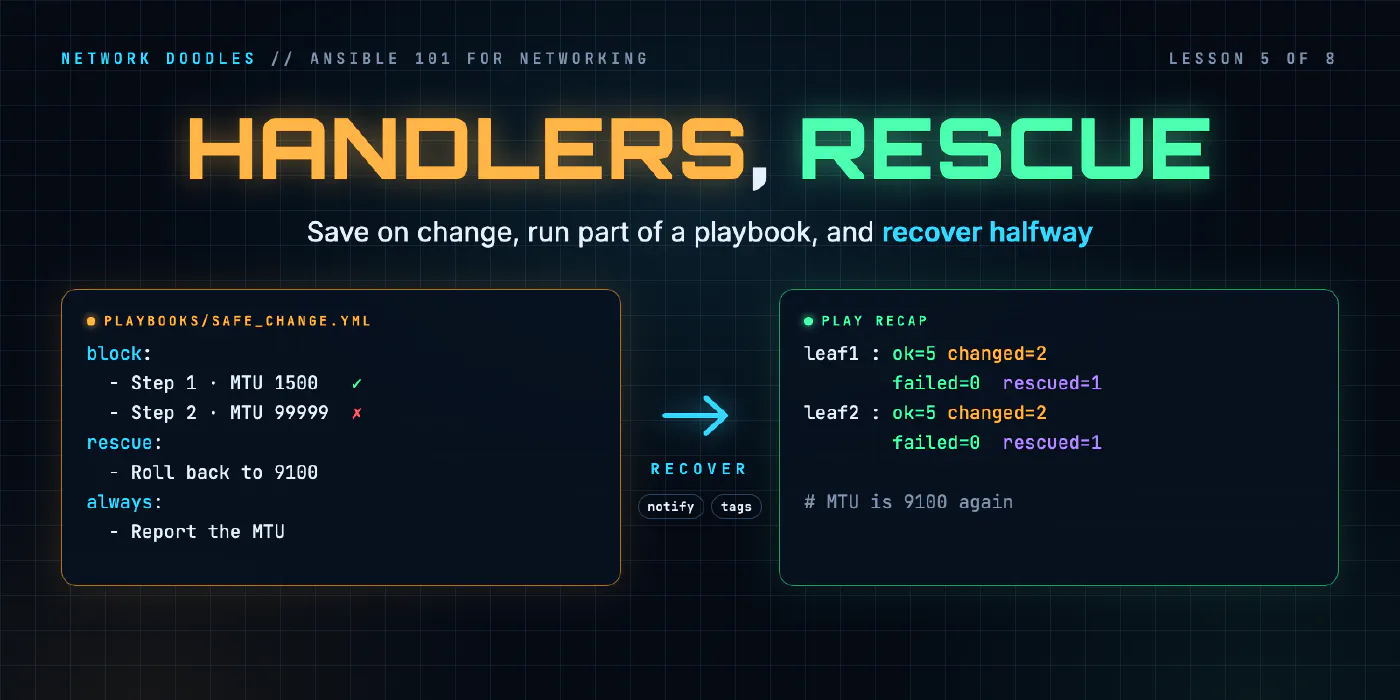
    - name: Change the uplinks, then roll back if anything fails
      block:
        - name: Step 1 · lower the uplink MTU (this works)
          cisco.ios.ios_interfaces:
            config:
              - name: GigabitEthernet1
                mtu: 1500

        - name: Step 2 · an MTU no switch supports (this fails)
          cisco.ios.ios_interfaces:
            config:
              - name: GigabitEthernet1
                mtu: 99999

      rescue:
        - name: Roll back to the known-good MTU
          cisco.ios.ios_interfaces:
            config:
              - name: GigabitEthernet1
                mtu: 9100

      always:
        - name: Read the port's config back
          cisco.ios.ios_command:
            commands:
              - show running-config interface GigabitEthernet1
          register: uplink_config
Step 1 works: the uplink’s MTU drops to 1500. Step 2 fails, because the switch rejects the value with
% Invalid input detected, exactly as it would if you typed it. Without a rescue, that’s where Ansible stops
for that host, and the uplink stays at 1500: not the old config, not the new one.
With the rescue, Ansible runs the rescue tasks for that host instead, which put the MTU back to 9100. The
always tasks run either way and read the port’s config back from the switch, so every run ends with proof
of the state it left behind. (register keeps the show command’s output, as promised in lesson 3.) Inside a
rescue, ansible_failed_task is the task that failed, which makes for an honest log message.
The recap tells the story: failed=0, rescued=1. Something went wrong, and it was handled. That distinction
matters in a pipeline: a rescued play is a success with a story, not a red build.
A classic CLI applies each line the moment it’s accepted. The switch refused step 2’s line, so nothing from step 2 took, but step 1 was already live. That’s why the rescue matters.
Rollback is a design decision, not a keyword
rescue doesn’t magically undo anything. It runs whatever you wrote. In the lab, the rescue re-applies a
known-good value, which is simple and honest. Real options, from simplest to strongest:
- Re-apply the known-good values (this post). Easy; you have to know what “good” was.
- Re-run the whole playbook from Git. If your playbooks describe the full intended state, the last good commit is your rollback.
- Let the device do it. Platforms with a candidate config often support a confirmed commit: apply the change, and if it isn’t confirmed within N seconds, the device reverts on its own. A CLI that applies lines as you type them, like the lab’s, has no commit to confirm, so this one depends on your platform. Where it exists, it’s the one that saves you when the change cuts off your own management access.
Where people get it wrong
1. ignore_errors: true as a lifestyle
It turns every failure into a shrug, and the play carries on as if the change worked. If a failure is
expected and safe, handle it with rescue or failed_when and say why in the task name. If it isn’t, let it
fail.
2. Saving config in every task
A save after every change is slow, noisy in the recap, and leaves you no way to tell “saved because something changed” from “saved because it always does”. Notify a handler.
3. Handlers that never run
A play that fails before the end doesn’t run its handlers by default, so a change that applied before the
failure is never saved. If that matters, use force_handlers: true on the play, or meta: flush_handlers at
the point where you want pending handlers to run.
4. Tags as a substitute for structure
If every run uses --tags, the playbook is really three playbooks. Split it. That’s lesson 6.
Try it
Chapter 5 of the lab adds the save handler to the base playbook, tags the interface tasks, and has you finish the rescue and always sections so a failed change leaves the uplinks the way it found them.
Next, in lesson 6, the playbooks become roles: reusable units with their own defaults, handlers and tasks, and the precedence rule that makes role defaults so useful.
Related doodles
Ansible Inventory and Ad-Hoc Commands for Network Switches (Ansible 101 for Networking, Lesson 1)
Ansible for people who run networks, not servers. What Ansible actually does when the target is a switch, how an inventory works, how to point it at a …
Ansible Loops, when and Jinja2 Templates for Network Config (Ansible 101 for Networking, Lesson 4)
Configure every port on every switch from a list of data with loop, treat uplinks differently with when, and render a report of the whole fabric with …
Ansible Roles and Collections for Network Automation (Ansible 101 for Networking, Lesson 6)
Turn a folder of playbooks into roles: tasks, defaults and handlers in a reusable unit, the precedence rule that makes role defaults useful, why role …